Adalo Security Guide: Payments, User Data, and App Store Compliance
Is an app built on Adalo secure for payments and user data? Yes, but only if you configure its security features correctly. Adalo is a no-code app builder for database-driven web apps and native iOS and Android apps—one version across all three platforms, published to the Apple App Store and Google Play. The platform provides a secure infrastructure, but as an app creator, you must handle authentication, permissions, and privacy settings. Here's what you need to know:
- Payments: Adalo integrates with Stripe for secure payment processing, meeting PCI DSS standards. Payment data never touches Adalo's servers.
- User Data: Data is encrypted both in transit (TLS/HTTPS) and at rest (AES standards). User passwords are hashed with bcrypt for added protection.
- App Store Compliance: Apps undergo Apple and Google security reviews before being published. Privacy policies and data collection disclosures are required.
- Authentication: Token-based system with 20-day expiration limits session risks. Database-level permissions ensure data access control.
- Privacy Laws: Adalo supports GDPR and CCPA compliance by enabling user consent mechanisms, data export, and deletion features.
Bottom line: Adalo’s tools can help you create secure apps, but your app's safety depends on how well you implement these features. Follow best practices, test thoroughly, and stay compliant with privacy laws and app store guidelines.
How to implement OTP in your Adalo app for verifying emails
Adalo's Security Infrastructure
Adalo's security framework begins with a hosted backend that handles data storage, authentication, and API requests. This setup removes the need for developers to manage separate servers. Built on a modular infrastructure that supports over 1 million monthly active users, the platform prioritizes performance while keeping your app's data isolated, reducing the risk of cross-contamination. With 20 million+ daily requests and 99%+ uptime, this architecture provides enterprise-grade reliability for apps of any size.
Hosted Backend Security
When you create an app on Adalo, it connects directly to Adalo's servers for storing and accessing data. This hosted system eliminates the hassle of managing your own database but requires developers to disclose data collection practices when you prepare your app store listing. As outlined by Adalo, developers must report the collection of User IDs, Product Interaction data, and Diagnostic Data because these are processed through Adalo's backend.
Adalo strictly processes "Customer Content"—the data generated by your users—based on your instructions. This relationship is governed by Data Processing Agreements, which clearly define Adalo as a data processor rather than a data controller. To enhance security, authentication tokens automatically expire every 20 days, requiring users to log in again. This feature limits the risk of session hijacking if a token is ever compromised.
The Adalo 3.0 infrastructure overhaul, launched in late 2025, introduced significant backend improvements. The modular architecture now handles scaling automatically, so your security measures remain consistent whether you have 100 users or 1 million. This eliminates the common problem of security configurations breaking as apps grow.
App Store Security Reviews
Adalo also benefits from external security validations for native apps. When you publish iOS and Android apps through Adalo, they undergo security reviews by Apple and Google before becoming available to users. These reviews ensure that Adalo's backend and internal security measures align with platform-specific standards, privacy guidelines, and data handling protocols. This adds an extra layer of protection that you don't get with web-only platforms.
Unlike competitors that only offer Progressive Web Apps (PWAs), Adalo compiles to true native iOS and Android code. This means your apps benefit from device-level security features like Secure Enclave on iOS and Strongbox on Android. PWAs, by contrast, run in browser sandboxes and cannot access these hardware security modules.
Apple has moved away from SMS-based two-factor authentication for developer accounts, now prioritizing trusted devices and security keys for enhanced account protection. Adalo's publishing workflow accommodates these requirements, guiding you through the security configurations needed for successful app store submission.
Data Encryption Standards
Adalo's secure backend, combined with rigorous app store reviews, ensures your app remains well-guarded against unauthorized access. A key layer in this protection is data encryption, which secures information both in transit and at rest. As Jeremy from Adalo explains, "We currently use industry leading encryption for data in-transit and at-rest, and we have added layers of security for some extra-sensitive pieces of data like credit cards (Stripe) and passwords (bcrypt)". Here's a closer look at how these encryption measures work.
TLS and HTTPS Encryption
Every connection to your app uses HTTPS with TLS encryption. This means data traveling between a user's device and the backend is encrypted, making it nearly impossible for unauthorized parties to intercept sensitive information. Adalo takes care of SSL certificate provisioning and management for custom domains, so there's no need for manual setup. Certificates are included with all paid plans starting at $36/month, and HTTPS is enforced by default across the platform.
It's critical for developers to never disable SSL certificate validation in their apps, as doing so can expose vulnerabilities. For native apps built using Adalo's native compilation, you can also leverage device-native security features like Secure Enclave and Strongbox to add extra layers of protection for sensitive data stored locally.
This native compilation approach sets Adalo apart from platforms like Glide or Softr, which only produce web apps or PWAs. Native apps can store encryption keys in hardware-protected enclaves, while web apps must rely on browser-based storage that's more vulnerable to JavaScript-based attacks.
Stored Data Encryption and Backups
Data stored in Adalo's database is encrypted using AES standards, providing robust protection for information at rest. User passwords are hashed with the bcrypt algorithm, which makes them extremely difficult to reverse-engineer, even in the event of unauthorized access. Additionally, payment information is never processed or stored on Adalo's servers—Stripe handles all credit card data in compliance with PCI DSS standards.
With Adalo's $36/month plan, you get unlimited database storage with no record caps. This means you can store as much encrypted data as your app needs without worrying about hitting limits or paying overage fees. Competitors like Bubble charge $69/month and still impose Workload Units that can spike your costs unpredictably when database operations increase.
The Adalo 3.0 infrastructure maintains these encryption protocols while supporting apps that scale to handle millions of monthly active users. Your app's security grows alongside its user base without requiring configuration changes or security audits at each growth milestone.
User Authentication and Access Control
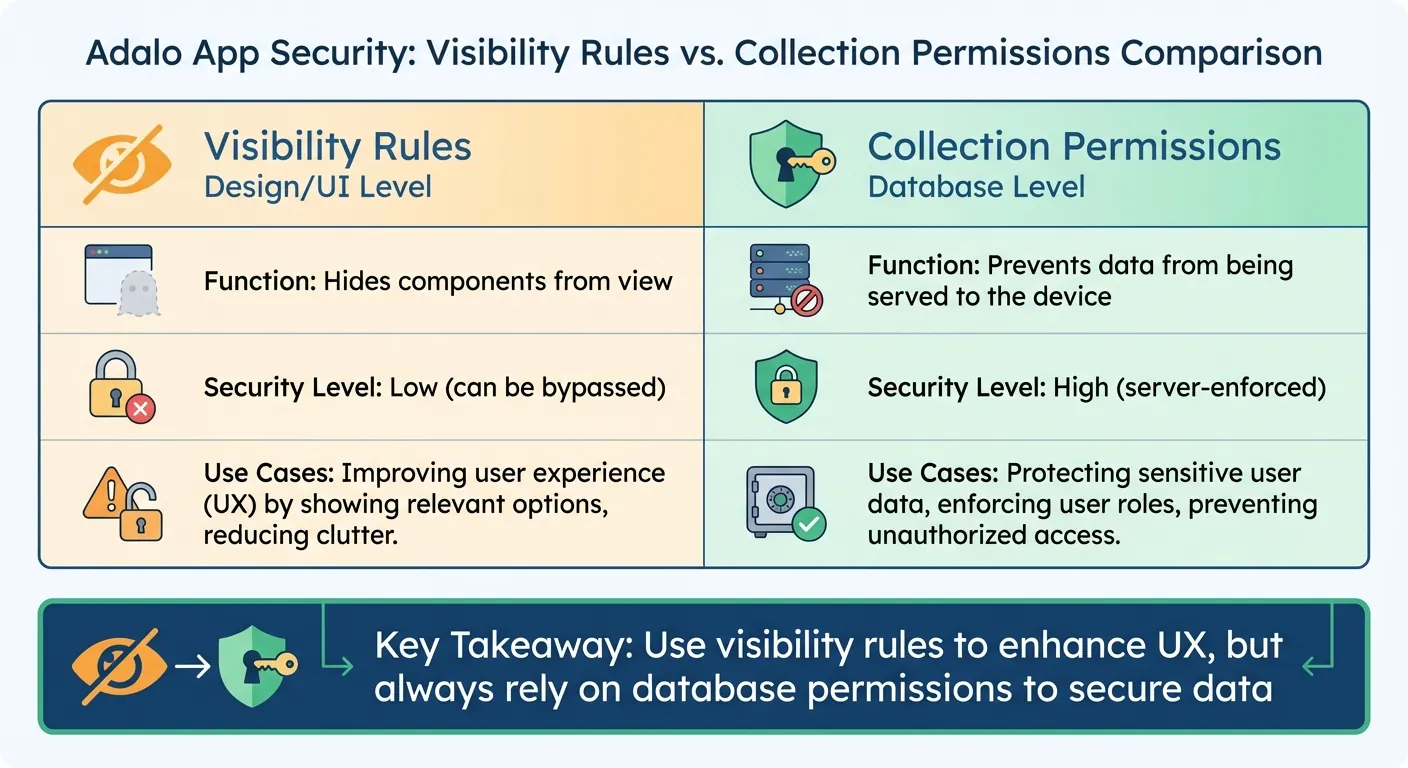
Visibility Rules vs Collection Permissions in Adalo Security
Adalo uses a secure token-based system for user authentication, striking a balance between ease of use and strong security. This system works hand-in-hand with Adalo's encryption protocols and backend protections to safeguard your app. Tokens automatically expire after 20 days, minimizing the risk of session hijacking. Additionally, users are logged out if they sign in on another device or clear their browser cache and cookies. These measures form the backbone of Adalo's authentication approach, detailed further below.
Authentication Methods
Adalo offers built-in user authentication with secure password management. Passwords stored in the Users collection are completely inaccessible—even to the app builder. Session handling is automated across all app types, ensuring a seamless experience for users whether they're on web, iOS, or Android.
Ada, Adalo's AI builder, lets you describe what you want and generates your app. Magic Start creates complete app foundations from a description, while Magic Add adds features through natural language.
The AI Builder can help you set up authentication flows quickly. Using Magic Add, you can describe the authentication experience you want—"add a login screen with email verification"—and the AI generates the necessary screens, database fields, and logic. This accelerates development while maintaining security best practices, since the generated code follows Adalo's established authentication patterns.
For apps requiring additional security, you can implement OTP (one-time password) verification for email confirmation, as shown in the video tutorial above. This adds a second factor to your authentication flow without requiring complex custom code.
Setting Up User Roles and Permissions
Authentication goes beyond verifying users—it also involves controlling access to sensitive data, such as when you build a client portal. Adalo implements database-level permissions, which provide stronger security than visibility rules at the UI level. While visibility rules can hide elements from the user interface, they don't stop the data from being sent to the device. To truly secure your app's data, you must configure Collection Permissions using the "Shield and Key" icon in the database editor.
For the Users collection, Adalo defaults permissions for Email, Password, and Full Name to "Only the Record Creator". You can also fine-tune access at the property level, deciding who can view or edit specific fields. For other collections, permissions are set at the collection level for actions like Create, View, Update, and Delete. To limit access to "Some Logged In Users", you'll need to establish a relationship between that collection and the Users collection (up to two relationship levels deep).
| Feature | Visibility Rules | Collection Permissions |
|---|---|---|
| Level | Design/UI level | Database level |
| Function | Hides components from view | Prevents data from being served to the device |
| Security Level | Low (can be bypassed) | High (server-enforced) |
It's important to align visibility rules with database permissions. Use visibility rules to enhance the user experience, but always depend on database permissions to secure your data. Any changes to permissions take effect immediately, so there's no need to republish your app after updates.
This immediate permission propagation is particularly valuable for security incidents. If you discover unauthorized access, you can revoke permissions instantly across all platforms—web, iOS, and Android—from a single dashboard. Competitors that require separate codebases for each platform make emergency security responses significantly more complex.
Stripe Payment Security
Adalo's integration with Stripe uses a tokenization model to protect sensitive payment data. When users input their card details through Adalo's Stripe component, this information is sent directly to Stripe's servers, bypassing your app's backend entirely. This setup not only reduces the security risks associated with storing raw card numbers but also lightens your compliance responsibilities. Combined with Adalo's encryption and strict access controls, this approach ensures a secure payment process.
To validate transactions, Adalo requires users to log in, linking every payment to a verified account. This creates a clear audit trail for added transparency and security. Connecting your Stripe account to Adalo is simple and secure, using an OAuth-style "Connect with Stripe" flow that protects sensitive credentials, such as API keys.
Adalo also enforces strict separation between Test and Live Modes by requiring different Secret and Publishable keys for each environment. During development, you can use Stripe's test card numbers to simulate payment workflows. When you're ready to go live, switching to real transactions is seamless. Additionally, Adalo ensures compliance with App Store policies by restricting Stripe to payments for physical goods or services on native iOS and Android apps. For digital products, you must use the In-App Purchase components to meet platform guidelines.
How Stripe Handles Payment Data
Stripe takes payment security to the next level with its industry-leading practices. As a PCI Level 1 Service Provider—the highest certification in the payments industry—Stripe ensures that card data is protected using AES-256 encryption. Decryption keys are stored on separate machines, adding an extra layer of security. By using Adalo's Stripe Kit components, you can tap into this infrastructure without needing to build custom payment fields yourself.
In your Adalo database, only non-sensitive payment details—such as card type, the last four digits, and expiration date—are stored. These details fall outside PCI compliance requirements, making them safe to keep. Stripe also sends a "Receipt Email" for every transaction, serving as the main customer identifier in your Stripe Dashboard and providing users with automated payment confirmations.
With Adalo's unlimited database storage, you can maintain complete transaction histories without worrying about hitting record limits. This is crucial for payment apps that need to store receipts, invoices, and transaction logs for compliance and customer service purposes. Platforms with record caps force you to either delete historical data or pay premium prices for additional storage.
PCI DSS Compliance Requirements
"PCI compliance is a shared responsibility and applies to both Stripe and your business." - Stripe
While Stripe covers the bulk of PCI compliance, you still have specific responsibilities as an app builder. For instance, all payment pages must use TLS 1.2 or higher to secure data transmission. Stripe's systems automatically block requests from older versions to maintain security.
Additionally, you are required to complete an annual Self-Assessment Questionnaire (SAQ) through the Stripe Dashboard. Thanks to tokenization, your app qualifies for a low-risk SAQ. If you're using webhooks for payment confirmations, ensure your endpoints are secured with TLS to prevent data interception.
Here's a quick summary of key PCI DSS compliance requirements:
| Requirement | Who Handles It | Implementation |
|---|---|---|
| PCI Level 1 Certification | Stripe | Managed entirely by Stripe |
| Data Tokenization | Stripe + Adalo | Handled via Stripe's tokenization model |
| TLS 1.2+ Encryption | Developer/Platform | Enforced by Adalo and Stripe |
| Annual Attestation (SAQ) | Developer | Completed in the Stripe Dashboard |
| User Authentication | Developer | Requires login flow through Adalo |
The $36/month Adalo plan includes everything you need for PCI-compliant payment processing—SSL certificates, Stripe integration, and secure user authentication. Competitors often require higher-tier plans for payment features or charge additional fees for SSL certificates on custom domains.
App Store Compliance and Privacy Requirements
Publishing your Adalo app means meeting strict privacy and compliance standards. Following these guidelines is essential to avoid having your app rejected during the submission process. Adalo's single-codebase approach simplifies compliance since you only need to configure privacy settings once for both iOS and Android.
Apple and Google Privacy Guidelines
Both Apple and Google require apps to include a privacy policy URL. This document must clearly explain what data your app collects, how it's used, and who it's shared with.
Apple's Privacy Nutrition Labels go a step further. You'll need to disclose all data collection practices directly in App Store Connect. This includes data collected by Adalo and any third-party services you've integrated. For Adalo apps, this might involve details like User ID, Product Interaction, and Diagnostic Data used for app functionality and analytics. Be sure to review the documentation for any third-party tools you're using to ensure your disclosures are accurate.
For apps targeting iOS 14.5 or later, Apple's App Tracking Transparency (ATT) framework requires you to obtain explicit user permission before tracking them or accessing their device's advertising identifier (IDFA). Apple also bans fingerprinting—methods that identify users based on device characteristics.
If your app is being published in the Kids Category, additional measures are required. Parental gates must be enabled for external links and in-app purchases, and third-party analytics or ads should be avoided entirely.
- Privacy Policy: Both Apple and Google mandate a privacy policy URL.
- Tracking Consent: Apple enforces ATT for tracking, while Google relies on standard permissions.
Adalo handles the complex app store submission process, guiding you through these requirements. This is often the hardest part of launching a mobile app—navigating certificates, provisioning profiles, and store guidelines. Platforms that only produce web apps or PWAs avoid this complexity but also miss out on the distribution advantages of being in the App Store and Play Store.
GDPR and CCPA Compliance
If your app is accessible to users in the European Union or California, compliance with the General Data Protection Regulation (GDPR) and the California Consumer Privacy Act (CCPA) is non-negotiable. These laws give users control over their personal data, including the right to access, delete, or export it.
Adalo's privacy policy already acknowledges specific rights for California residents, such as the ability to request details about data shared for marketing purposes. To meet these standards, ensure your app includes clear user consent mechanisms to obtain permission before collecting personal data.
Adalo's user roles and permissions can help you manage data access. For example:
- Setting permissions to Only the Record Creator ensures that only the data's owner can access it on the server.
- Using the Nobody permission level restricts access entirely to the Builder UI.
When users request access to their data, Adalo's data export features make it easy to fulfill these requests. Your privacy policy should explain how users can exercise their rights, and you must respond within the required timeframes—30 days for GDPR and 45 days for CCPA.
With no caps on database records, you can maintain the detailed audit logs that GDPR requires without worrying about storage limits. Compliance often requires keeping records of consent, data access requests, and deletion confirmations—all of which consume database space that platforms with record limits would charge extra for.
API Security and Third-Party Integrations
When connecting external services to your Adalo app—whether for payments, analytics, or data management—security is critical. These integrations create access points that need to be safeguarded, building on the encryption and user authentication measures already in place.
API Keys and Token Security
Think of API keys as digital passwords for your integrations. You can generate, delete, or regenerate these keys directly in your app settings, giving you complete access control. When using API keys with external services, always include them in Authorization headers as Bearer tokens. Avoid putting them in URLs or query parameters, where they could be exposed.
API tokens follow a 20-day expiration policy. Additionally, the platform enforces a rate limit of 5 requests per second—exceeding this will result in a 429 status code, helping to prevent overloading and abuse. This rate limiting protects both your app and Adalo's infrastructure from denial-of-service attacks.
For External Collections, you'll need to configure authorization headers manually. For instance, when connecting to Airtable as an external collection, set the header name as Authorization and the value as Bearer [Your_API_Key]. Keep in mind that Adalo only supports External Collection IDs in number format—IDs with text, UUIDs, or special characters are not compatible.
The AI Builder can help you set up API integrations faster. Using Magic Add, describe the integration you need—"connect to my Airtable base for inventory management"—and the AI generates the External Collection configuration with proper authentication headers. You'll still need to add your actual API key, but the structural setup is handled automatically.
Securing Webhooks and Data Exchange
Webhooks, which allow real-time updates from external services to your app, also require robust security measures. Always use TLS 1.2 or higher for webhook endpoints and verify signatures (commonly HMAC SHA256) to confirm the authenticity of incoming requests.
To prevent duplicate actions—such as charging a customer twice—implement idempotency by storing and verifying unique event IDs before processing. Webhook endpoints should respond with a 200 OK status immediately while handling the payload in the background to avoid timeouts.
For Stripe integrations, ensure that https://checkout.stripe.com and https://*.stripe.com are whitelisted in your Content Security Policy. Additionally, design your app to handle API downtime gracefully by displaying clear error messages instead of failing silently.
Adalo's infrastructure processes 20 million+ daily requests with 99%+ uptime, so your webhook endpoints benefit from a reliable foundation. However, you should still implement retry logic for critical integrations, since external services may experience their own downtime.
Testing Your App's Security
Before you release your app, you need to ensure your security measures hold up under scrutiny. This isn't just a suggestion—it's the difference between catching vulnerabilities during testing and discovering them after your users have already downloaded the app.
Testing Authentication and Permissions
Once you've implemented token expiration and encryption, it's time to put these features to the test. Create test accounts for every user role in your app—basic users, admins, and any other roles you've set up. Then, check if permissions are functioning as they should. For instance, log in as a basic user and try accessing admin-only features, viewing another user's private data, or editing records you shouldn't be able to touch. If you can bypass these restrictions during testing, your users (or bad actors) likely can too.
Don't forget to test password recovery. Verify that reset tokens expire after use and can't be exploited multiple times. Additionally, ensure that all transaction flows run smoothly under test conditions, with no room for errors or security lapses.
Adalo's X-Ray feature can help identify potential security issues by highlighting performance problems that might indicate misconfigured permissions or inefficient data queries. While X-Ray focuses on performance, security and performance often intersect—a query that returns too much data might indicate overly permissive access controls.
Validating Payment Workflows
Securing access controls is just one piece of the puzzle—you also need to lock down your payment processes. Never use live funds for testing. Instead, switch to "Test Mode" in the Stripe Dashboard to generate test credentials (Publishable and Secret keys). Add these keys to your Adalo component settings, allowing you to simulate transactions with Stripe's test card numbers without processing real payments.
"PCI compliance is a shared responsibility and applies to both Stripe and your business." - Stripe
Run through every scenario in your payment flow using Stripe test cards: successful transactions, declined cards, and expired cards. Make sure successful payments are processed without a hitch and errors are handled clearly. Confirm that your database only stores non-sensitive card details like the card type, last four digits, and expiration date—never full card numbers. Finally, use the Qualys SSL Labs "SSL Server Test" to ensure your payment pages are secured with TLS 1.2 or higher.
Test your payment flows on all three platforms—web, iOS, and Android—since Adalo publishes from a single codebase. A bug that appears only on one platform could create security vulnerabilities for a subset of your users. The unified codebase makes this testing more manageable than platforms requiring separate builds for each platform.
Conclusion
Adalo provides a solid framework for building apps that securely handle user data and payments. With features like automatic SSL certificates, database-level encryption, and role-based access controls, the platform ensures compliance with privacy laws such as GDPR and CCPA while meeting app store security requirements. When you publish iOS and Android apps through Adalo, they also undergo Apple and Google's security reviews, adding an extra layer of scrutiny before users can access them.
That said, security isn't solely Adalo's responsibility—it requires your active participation. This includes enforcing proper data handling practices, implementing multi-factor authentication for sensitive apps, and correctly integrating payment systems like Stripe or building a PayPal clone. As Sonia Rebecca Menezes from Adalo highlights:
Data protection is a shared responsibility by everyone involved in app development
By following best practices—like setting clear permissions, conducting thorough testing, and being transparent with privacy policies—you can help safeguard user data and maintain compliance. Adalo further demonstrates its commitment to security by pledging to notify customers of any data breaches within 24-48 hours.
Each layer of Adalo's security measures works together to create a dependable system. Thanks to its single-codebase architecture, security updates are applied uniformly across web, iOS, and Android platforms. This eliminates the need for managing separate configurations and ensures consistency as your app scales.
By leveraging AI-powered mobile app creation with features like Magic Start and Magic Add, you can build secure apps faster while maintaining best practices. With Adalo's scalable infrastructure supporting millions of monthly active users, you can focus on building and growing your app while maintaining a secure environment.
Related Blog Posts
- How to Create a Property Leasing App
- GDPR and Data Sync in No-Code Apps
- How to Build GDPR-Compliant Apps Without Code
- Building Domain-Specific SaaS Apps with Adalo
FAQ
Why choose Adalo over other app building solutions?
Adalo is an AI-powered app builder that creates true native iOS and Android apps from a single codebase. Unlike web wrappers or PWA-only platforms, Adalo compiles to native code and publishes directly to both the Apple App Store and Google Play Store. At $36/month with unlimited database records and no usage-based charges, it offers predictable pricing that competitors like Bubble ($69/month with Workload Units) can't match.
What's the fastest way to build and publish an app to the App Store?
Adalo's AI Builder with Magic Start generates complete app foundations from text descriptions—database structure, screens, and user flows created in minutes instead of days. Combined with the drag-and-drop interface and Adalo's handling of the complex App Store submission process, you can go from idea to published app in days rather than months.
How does Adalo protect user passwords and sensitive data?
Adalo encrypts data both in transit using TLS/HTTPS and at rest using AES standards. User passwords are hashed with the bcrypt algorithm, making them extremely difficult to reverse-engineer even if unauthorized access occurs. Passwords stored in the Users collection are completely inaccessible—even to the app builder.
Do Adalo apps comply with GDPR and CCPA privacy regulations?
Yes, Adalo supports GDPR and CCPA compliance by enabling user consent mechanisms, data export capabilities, and deletion features. The platform's user roles and permissions system helps you manage data access appropriately, and you can configure settings so only record creators can access their own data on the server.
What's the difference between visibility rules and collection permissions in Adalo?
Visibility rules operate at the UI level and only hide components from view—data can still be sent to the device. Collection permissions work at the database level and actually prevent data from being served to unauthorized users. For true security, always configure collection permissions rather than relying solely on visibility rules.
Does Adalo handle app store security reviews automatically?
When you publish iOS and Android apps through Adalo, they undergo Apple and Google's security reviews before becoming available to users. These reviews ensure your app meets platform-specific standards, privacy guidelines, and data handling protocols. Adalo guides you through the submission process, handling certificates and provisioning profiles.
How much does it cost to build a secure payment app with Adalo?
Adalo's $36/month plan includes everything needed for PCI-compliant payment processing—SSL certificates, Stripe integration, secure user authentication, and unlimited database storage for transaction records. Unlike competitors that charge extra for SSL certificates or payment features, Adalo's pricing is all-inclusive with no usage-based surprises.
Can I build a secure payment app without coding experience?
Yes, Adalo's drag-and-drop interface and AI-assisted building make it possible to create secure payment apps without writing code. The Stripe integration handles PCI compliance automatically through tokenization, and the AI Builder can generate authentication flows and database structures from simple descriptions.
How does Adalo's security compare to Bubble or FlutterFlow?
Adalo compiles to true native iOS and Android code, allowing access to device-level security features like Secure Enclave and Strongbox. Bubble produces web apps only, while FlutterFlow requires more technical expertise. Adalo also offers simpler pricing at $36/month versus Bubble's $69/month with unpredictable Workload Units or FlutterFlow's $80/month per seat.
What happens if there's a data breach on Adalo?
Adalo pledges to notify customers of any data breaches within 24-48 hours. The platform's Data Processing Agreements clearly define Adalo as a data processor, and the modular infrastructure keeps your app's data isolated from other apps to reduce cross-contamination risks.