Build Apps with AI — No Code Required
Adalo is the no-code app builder that pairs AI-powered generation with a visual multi-screen canvas, so entrepreneurs and business teams can design, build, and publish custom database-driven apps to the Apple App Store, Google Play Store, and web from a single project, with no code and no developers required. Meet Ada, Adalo’s AI builder: describe what you want and get a working app in minutes.
Existing business? Adalo Blue
- Free forever
- Build unlimited apps, AI included
- True native
- iOS IPA and Android AAB builds
- Ada AI builder
- Generate, edit, and publish
- Built-in Postgres database
- No Firebase setup, 500 free records
- Adalo 3.0
- 3–4x faster, scales to 1M+ MAU
Build Any App You Can Describe
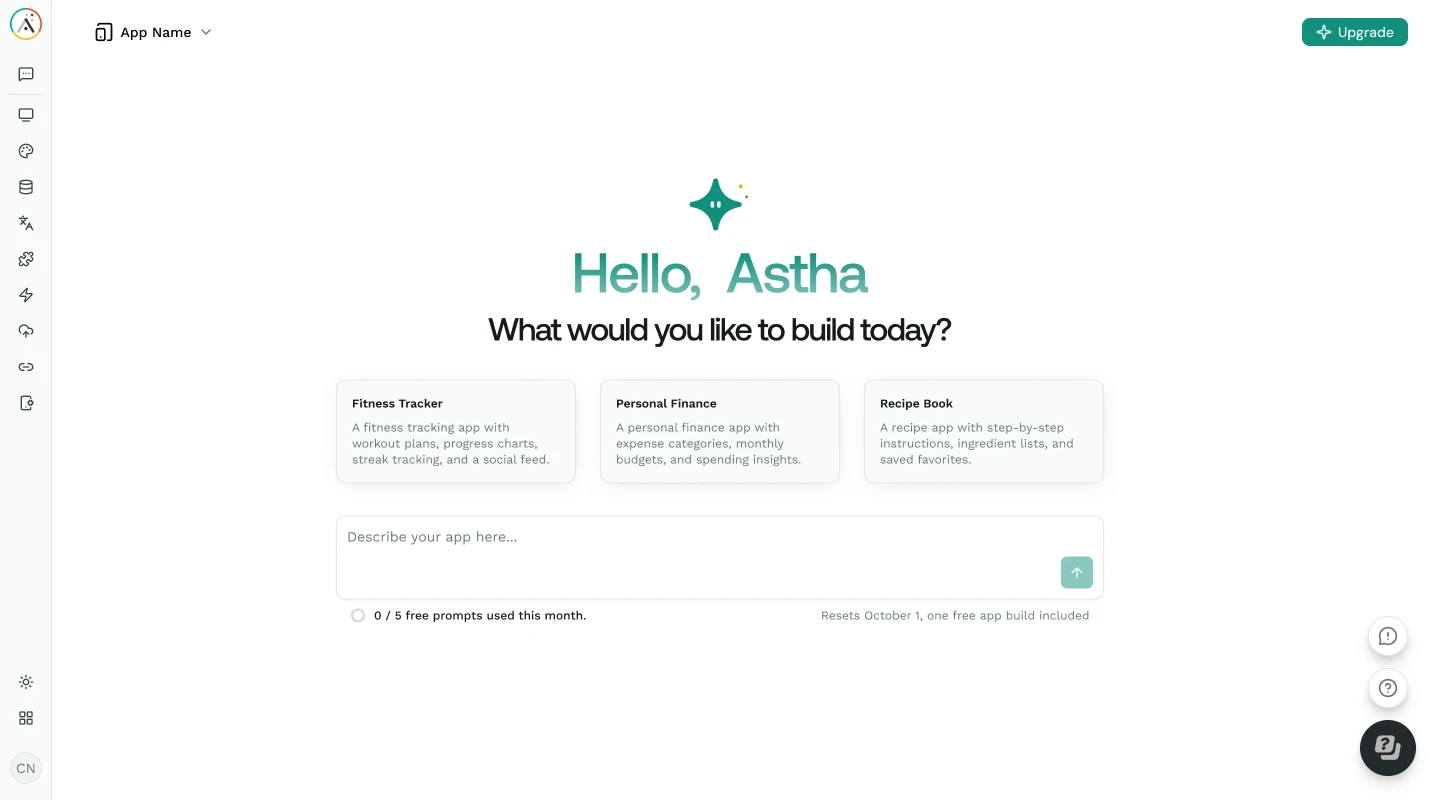
Ada, Adalo’s AI builder, generates working apps from natural language descriptions. Tell Ada what your app needs, and screens, database, logic, and navigation are all created automatically with Magic Start. Publish to the Apple App Store, Google Play, and web from a single project.
From Idea to Working App, Without the Traditional Barriers
Building a custom app has traditionally required hiring developers, learning to code, or spending months figuring out complex tools. Ada, Adalo’s AI builder, removes every barrier between your idea and a published app.
The Traditional App Development Problem
3–6 months- 01Hiring developers costs $50,000–$200,000+ for a custom app, if you can find the right team
- 02Learning to code takes months or years before you can build anything useful
- 03No-code tools without AI still require hours of manual screen-by-screen configuration
- 04Chat-only AI builders (Lovable, Bolt, v0) generate code you then have to maintain and debug
- 05Most platforms require separate builds for iOS, Android, and web, tripling the work
- 06Connecting a database, setting up authentication, and managing user data requires technical expertise
 The Adalo AI Builder Solution
Minutes - 01Ada generates a complete app from your description: screens, database, and navigation in under two minutes
- 02Visual multi-screen canvas lets you see all screens at once and point at elements to direct changes
- 03Magic Add lets you add features with natural language instead of manual configuration
- 04No code to write, no code to maintain: Adalo handles the infrastructure
- 05One build deploys to iOS (native), Android (native), and web simultaneously
- 06Built-in relational database with user authentication and role-based permissions included
What Ada Can Do for You
Ada is Adalo’s AI builder: the unified experience for generating, editing, and publishing apps. These capabilities take you from idea to published app without writing a single line of code.
Describe your app in plain language and Ada generates a complete working prototype: multiple screens, a relational database, navigation flow, and sample data. Typically under two minutes from prompt to preview. Start with a sentence like “build me a booking app for yoga classes” and get a functional app immediately.
After your app is generated, add new features by describing what you want, like “Add a review system where users can rate products from 1 to 5 stars” or “add a notifications screen for new messages.” Ada adds the screens, database collections, and logic automatically.
Point at any element on the canvas and instruct Ada to change it: “Make this button teal,” “move this list above the header,” “change this card layout to a grid.” Unlike chat-only builders where you describe everything in text, you see what you are pointing at and direct the AI visually.
Ada’s X-Ray feature scans your entire app for performance issues, broken links, missing data connections, and design inconsistencies. It identifies problems before you publish and suggests specific fixes, so your users never encounter issues you could have caught in advance.
See every screen of your app simultaneously on one canvas. Unlike page-by-page editors or chat-only builders with a preview pane, Adalo’s canvas lets you design spatially: drag, resize, and connect screens. You always see the full picture of your app.
Every app you build with Ada deploys to iOS (native IPA), Android (native AAB), and web from a single project. Same database, same screens, same logic. No separate codebases, no platform-specific bugs, no tripled development effort. Publish to the Apple App Store and Google Play.
From Description to Published App in Five Steps
Adalo 3.0’s infrastructure (launched late 2025) is 3–4x faster and scales to 1M+ monthly active users. Here is how Ada takes you from an idea to a live app on the App Store and Google Play.
-
Describe Your App to Ada
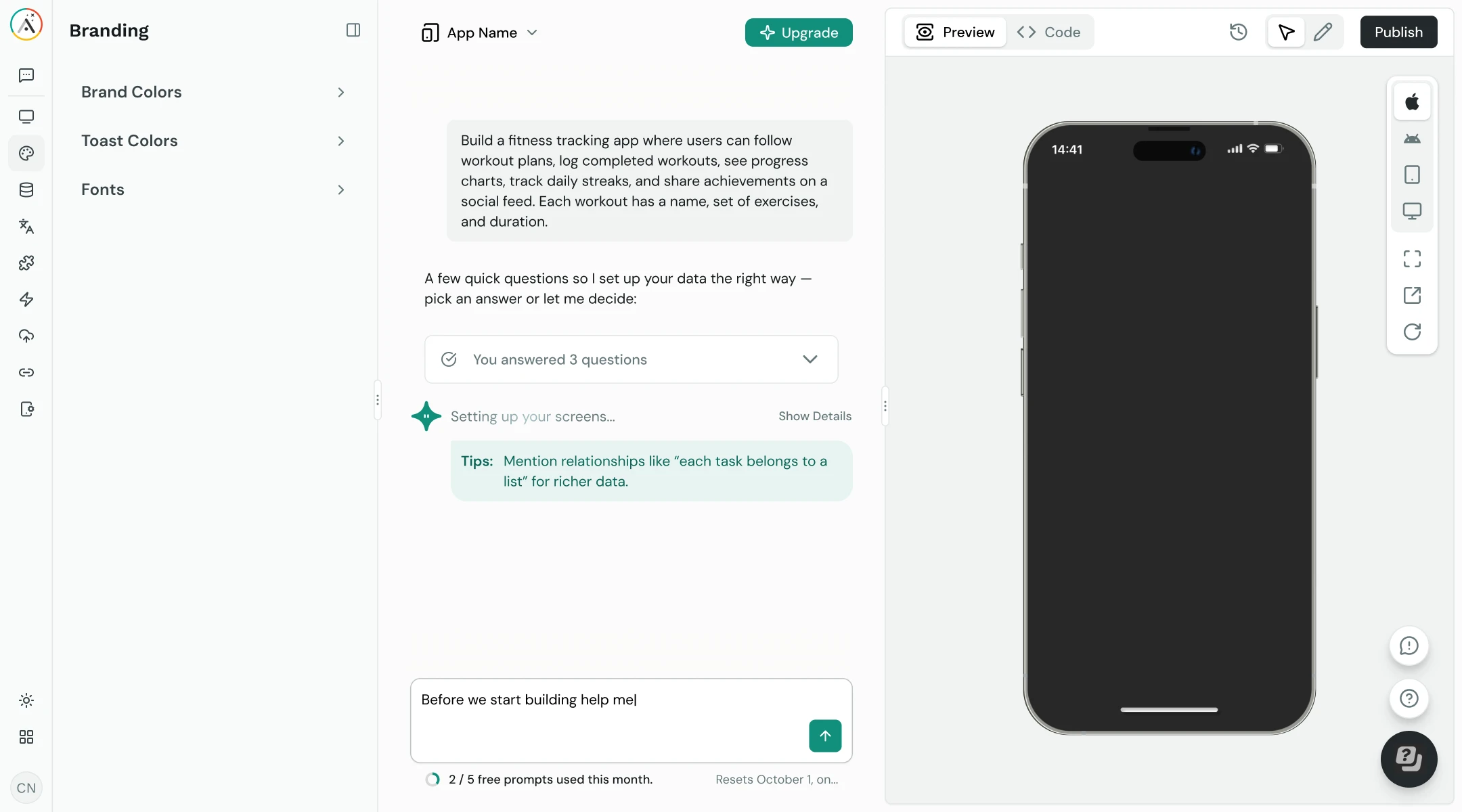
Tell Ada what your app needs in plain language, as specific or as general as you like: “Build me a marketplace app where users can list items for sale, browse by category, and message sellers.” Ada generates screens, database structure, and navigation from your description.
-
Generate Your App with Magic Start
Ada analyzes your description and generates a complete working prototype: screens and layouts, a relational database with the right collections and relationships, navigation flow, user authentication, and sample data. You see the full app on the visual canvas immediately, typically in under two minutes.
-
Refine with Visual AI Direction & Magic Add
See every screen on the canvas and point at elements to direct changes. Use Magic Add to add features by describing what you want, like “add a favorites list” or “add a search bar to the home screen.” Drag and resize, edit the database, or connect Google Sheets via SheetBridge. X-Ray identifies issues before you publish.
-
Preview on Any Device
Preview your app on any device form factor directly from the canvas. Test the complete user flow (login, browsing, creating content, notifications) on iPhone, Android, tablet, and desktop screen sizes. See exactly how your app looks and behaves before publishing.
-
Publish to App Store, Google Play & Web
Adalo compiles your app into native iOS (IPA) and Android (AAB) builds and guides you through app store submission. Your same project also deploys as a responsive web app. One build, three platforms, all from a single Adalo project with unlimited usage.
The Fastest Path from Idea to Published App
Ada combines AI generation with a visual canvas, so you get the speed of AI with the control of a visual editor. No other platform gives you both.
Minutes, Not Months
Go from a description to a working prototype in under two minutes with Magic Start. Traditional development takes 3–6 months, and other no-code tools take days of manual configuration. Ada generates screens, database, and navigation from a single prompt.
No Technical Skills Required
No coding, no widget trees, no property panels, no command line. Describe what you want in plain English, point at elements to make changes, and publish. If you can describe your app, you can build it.
Unlimited Everything
Publish to the Apple App Store and Google Play with unlimited usage: no caps on actions, users, records, or storage. Compare to FlutterFlow at $80/mo per seat or hiring developers at $50,000+.
Visual + AI Combined
Chat-only builders like Lovable and Bolt give you a prompt and a preview pane. Adalo gives you AI generation plus a visual multi-screen canvas where you can see every screen, point at elements, and direct changes spatially.
True Native Apps
Ada builds apps that compile to native iOS and Android, not web wrappers. Your users get native performance, push notifications, and a real App Store listing alongside established apps.
X-Ray Quality Checking
Before publishing, X-Ray scans your entire app for broken data connections, missing navigation, and performance issues. It catches what manual testing misses, preventing app store rejections and bad reviews.
How Adalo’s AI Builder Compares
See how building with Ada compares to prompt-led web app builders and traditional development approaches.
| Feature | Adalo | Lovable | Bolt | Traditional Dev |
|---|---|---|---|---|
| AI app generation | Included: Full app from prompt | Included: Web app from prompt | Included: Web app from prompt | Not included: None |
| Visual editing | Included: Multi-screen canvas | Not included: Chat + preview only | Not included: Chat + preview only | Partial: Code editor |
| Native iOS & Android | Included: IPA + AAB builds | Not included: Web only | Not included: Web only | Included: Platform-specific |
| Code maintenance | Included: None, no code generated | Partial: Code export, you maintain | Partial: Code export, you maintain | Not included: Full codebase to maintain |
| Built-in database | Included: Relational DB included | Not included: Requires Supabase/Firebase | Not included: Requires external DB | Not included: Setup manually |
| App Store publishing | Included: One-click, free tier available | Not included: Web deploy only | Not included: Web deploy only | Partial: Manual submission |
| Visual AI direction | Included: Point at elements | Not included: Text prompts only | Not included: Text prompts only | Not included: None |
| Performance scanning | Included: X-Ray | Not included: None | Not included: None | Partial: Manual testing |
Tips for Getting the Best Results from Ada
Follow these patterns to get the most out of AI-powered app building.
Use Visual Direction Over Chat
When refining your app, point at the specific element you want changed instead of describing its location in text. “Make this button bigger” while pointing at it is faster and more precise than “make the submit button on the checkout screen bigger.”
Be Specific in Your Prompts
The more detail you give Ada, the better your initial app. Instead of “build me a fitness app,” try “build me a fitness app with workout logging, progress charts, a meal planner, and user profiles with goal tracking.” Specific prompts need less refinement.
Preview on Real Devices
Use Adalo’s device preview to test your app on iPhone and Android before publishing. Real-device testing catches layout issues, touch target problems, and navigation flow gaps that desktop previews miss.
Run X-Ray Before Publishing
Always run X-Ray before submitting to the App Store or Google Play. It catches broken data connections, missing navigation links, and performance issues users would encounter, preventing negative reviews and rejections.
Build Iteratively
Start with Magic Start to get your core app, then add features one at a time with Magic Add. Test each addition in device preview before moving on. Iterative building produces better results than describing everything in a single prompt.
Start with Your Data Model
Your data structure determines what your app can do. Let Ada generate the initial database from your prompt, then review the collections and relationships before adding screens. A solid data model makes everything else easier.
Requirements for Building with Ada
See Pricing and Plans- 1
A Web Browser
Adalo runs entirely in your browser. No downloads, no IDE, no special hardware. Works on Mac, Windows, Linux, and Chromebook. Design, build, and publish from anywhere.
- 2
An App Idea
Ada works best when you can describe what your app does. You don’t need wireframes, specifications, or technical knowledge, just an idea of the problem your app solves and who will use it.
- 3
Adalo Account (Free to Start)
Build and preview for free with 500 database records. When you are ready to publish to the App Store or Google Play, plans start with unlimited usage: no caps on actions, users, records, or storage.
- 4
Developer Accounts (for App Stores)
Publishing to the Apple App Store requires an Apple Developer Account ($99/year). Google Play requires a one-time $25 developer registration. Both are optional: you can deploy as a web app without either.
Learn How to Build Apps with Ada
Step-by-step guides, documentation, and tutorials to help you get the most out of AI-powered app building.
AI Builder Guide: Magic Start & Magic Add
Complete walkthrough of Ada’s AI generation features. Learn how to write effective prompts and get the best results from Magic Start and Magic Add.
View docs DocumentationRelational Database Basics
Understand collections, relationships, and record linking, the foundation Ada creates automatically when generating your app.
View docs DocumentationPublishing to App Store & Google Play
How to take your Ada-generated app from preview to published. Covers iOS, Android, and web deployment from a single project.
View docs Getting StartedGetting Started with Adalo
New to Adalo? Start here. Learn the basics of the visual canvas, database, components, and how to build your first app.
Get startedCommon Questions About AI App Building
What is Ada and how does it work?
Ada is Adalo’s AI builder: the unified experience for generating, editing, and publishing apps without code. Describe what you want in plain language and Ada generates a complete app with screens, database, and navigation using Magic Start. Then use Magic Add to add features, Visual AI Direction to point at elements and make changes, and X-Ray to scan for issues before publishing.
How is Adalo different from Lovable, Bolt, v0, or Base44?
Lovable, Bolt, v0, and Base44 are prompt-led web app builders: they generate code from prompts and give you a preview pane. You get web-only output and have to maintain the generated code. Adalo pairs AI generation with a visual multi-screen canvas, produces native iOS (IPA) and Android (AAB) builds in addition to web, includes a built-in relational database, and requires no code maintenance. You describe, then visually refine on the canvas.
Can Ada build a mobile app for the App Store?
Yes. Ada generates apps that compile into true native iOS (IPA) and Android (AAB) builds. You can publish to the Apple App Store and Google Play directly from Adalo with unlimited usage. These are native builds, not web wrappers or PWAs.
Do I need any technical skills to use Ada?
No. Ada is designed for people without technical backgrounds. If you can describe what your app should do, Ada can build it. The visual multi-screen canvas lets you see and adjust everything visually: no coding, no widget trees, no command line. Adalo users routinely build and publish complete apps to the App Store and Google Play without developer assistance.
What is Magic Start and how does it differ from Magic Add?
Magic Start generates a complete app from scratch based on your description: all the screens, database collections, relationships, navigation, and sample data. Magic Add works on an existing app and adds new features based on your natural language instructions. Use Magic Start to create your initial app, then Magic Add to expand it incrementally.
Does Ada include a database or do I need to set one up separately?
Adalo includes a built-in relational database, with no Firebase, Supabase, or external setup required. When Ada generates your app, it creates the database structure automatically: collections, relationships, field types, and sample records. You can also connect external data through SheetBridge (Google Sheets as a relational database) or External Collections for third-party APIs.
How much does it cost to build and publish an app with Ada?
Building and previewing your app is free with 500 database records. Publishing to the Apple App Store and Google Play starts with unlimited usage: no caps on actions, users, records, or storage. For comparison, Lovable and Bolt charge monthly fees for web-only hosting, FlutterFlow starts at $80/mo per seat, and hiring developers typically costs $50,000–$200,000+.
Can I use Ada to build an app if my data lives in Google Sheets?
Yes. SheetBridge lets you connect Google Sheets as a relational database for your Adalo app. This is useful for teams migrating from spreadsheet-based workflows: your existing data becomes the backend for a native mobile app without any data migration or restructuring.
What can’t Ada build?
Ada handles most business and consumer app use cases, but there are limitations. Apps requiring real-time video calling, advanced GPU rendering, deep HealthKit or HomeKit integration, or complex custom animations may need native code components. Games with physics engines, full offline-first architectures, and direct Bluetooth hardware control are also outside Ada’s current scope. For 90% of database-driven business and consumer apps, Ada’s capabilities are sufficient.
What is Adalo?
Adalo is the no-code app builder that pairs AI-powered generation with a visual multi-screen canvas, so entrepreneurs and business teams can design, build, and publish custom database-driven apps to the Apple App Store, Google Play Store, and web from a single project, with no code and no developers required. Ada is Adalo’s AI builder, and Adalo 3.0 (launched late 2025) is 3–4x faster and scales to 1M+ monthly active users.
Build for every platform: iPhone App Builder, Android App Builder, Web App Builder. Explore solutions: CRM Apps, Marketplace Apps, Fitness Apps, and Booking Apps. Learn more about Adalo’s no-code app builder.
Ready to Build Your App with AI?
Start free with 500 database records. Describe your app to Ada, customize it on the visual multi-screen canvas, and publish to the Apple App Store, Google Play, and web with unlimited usage.