8 Best AI App Builders in 2026
You've got an app idea. Maybe it's a marketplace connecting local service providers, a fitness tracker that actually motivates users, or an internal tool to finally fix that broken workflow at your company. The vision is clear in your head, but then you start building and reality hits. The platform you chose shows you one screen at a time, so you're constantly clicking back and forth trying to remember how everything connects. You get something working with 10 test users, then at 100 users the performance tanks and your monthly bill quadruples. Worst of all, after months of work, you discover your "app builder" can't actually get you into the App Store — it only makes web apps or requires a $10,000 developer account upgrade.
Start building with Adalo's AI app builder.
Explore Adalo's AI app builder to start building.
In this article, we compare the 8 best AI app builders in 2026, from visual AI direction to prompt-based code generation. We'll cover pricing, features, and give you an honest take on the trade-offs of each platform.
Key Points
- Adalo is the only platform under $40/month offering true native iOS and Android compilation with unlimited usage (no caps on users, actions, or database records)
- Prompt-led builders (Lovable, Bolt, v0) generate impressive demos quickly but produce web code only, with no native mobile apps and ongoing code maintenance required
- FlutterFlow offers the most code control but requires Flutter knowledge and charges $80/month per seat, making team costs prohibitive
- Bubble's visual development platform handles complex web logic but App Builder Guides' 2026 research documented 5-10 second page loads even on enterprise plans
- Visual AI direction (pointing at elements to instruct changes) produces more precise results than chat-only prompts for production apps
- Most "AI app builders" either lack databases entirely or charge based on usage. Only Adalo and Bubble include unlimited database operations
Solutions Covered
- Adalo — no-code app builder for database-driven web apps and native iOS and Android apps. One version across all three platforms: see every screen on one canvas, preview on any device, and visually direct the AI to refine your app before publishing to the Apple App Store and Google Play.
- Bubble — Visual web development platform best suited to niche use cases working hand-in-hand with Bubble Experts. Web primary, separate mobile builder.
- FlutterFlow — Flutter-based builder for developer-adjacent teams wanting visual tools with full code export.
- Appy Pie — Template-driven app builder for small businesses in supported verticals like restaurants and fitness.
- Bolt — Prompt-led web app builder that generates full-stack React/Node.js code from natural language descriptions.
- Lovable — Prompt-led web builder best for rapid prototyping of web apps only. No native mobile output.
- v0 — Vercel's AI component generator for individual React/TypeScript UI elements. Developer tool, not a full app builder.
- Replit — Cloud IDE with AI coding assistance. Requires programming knowledge but supports any language or framework.
How We Evaluated
We focused on platforms where AI drives the building experience, not legacy drag-and-drop builders with ChatGPT bolted on. Our evaluation criteria: how the AI accepts instructions (visual pointing vs text prompts vs code completion), what it produces (native apps vs Progressive Web Apps vs raw code), whether the output handles production load, and the true cost at 1,000+ monthly active users.
Every platform was tested with the same app concept: a two-sided marketplace with user authentication, real-time messaging, payment processing, and push notifications. This stressed each platform's database capabilities, revealed scaling bottlenecks, and exposed which features were actually "coming soon" versus ready today. We tracked development time, monthly costs, performance metrics, and, most critically, whether we could actually get the app into the Apple App Store and Google Play.
1. Adalo — Best no-code app builder for Native Mobile
Price: Free plan available for building and previewing; $36/mo for app store publishing with unlimited usage Platforms: Web, iOS (native), and Android (native) — one app version across all three AI Features: Magic Start, Magic Add, X-Ray performance analysis, visual AI direction
Adalo's no-code app builder lets you see every screen on one canvas, preview on any device form factor, and visually direct the AI to make changes, then publish native iOS and Android apps to the Apple App Store and Google Play from a single codebase.
The platform's standout feature is visual AI direction. After Ada, Adalo's AI builder (Magic Start) generates your initial app from a text description, you don't have to describe changes in words. Point at a button, tell the AI "make this primary color and add an icon," and watch it update. Point at a list, say "add filtering by category," and the AI implements the database query and UI simultaneously. This spatial interaction eliminates the back-and-forth clarification that plagues chat-only builders.
Adalo includes a relational database with no record limits, user caps, or action quotas. While Bubble charges based on "Workload Units" that can spike unexpectedly (App Builder Guides documented one scheduling app burning 700,000 WU), Adalo's $36/month plan includes unlimited everything. You can scale to thousands of users without surprise bills.. Free plan includes 500 database records
The native compilation is genuine. Adalo produces IPA files for iOS and APK files for Android, not Progressive Web Apps or React Native bundles. This means proper push notifications, App Store optimization, offline capability, and device-specific features. Your users download from the App Store and Google Play like any other app.
Best for: Non-technical founders building marketplace apps, SaaS products, internal tools, or any database-driven application that needs native mobile and web presence. Particularly strong for two-sided marketplaces given the built-in user roles and permissions.
Not best for: Games, AR/VR apps, or applications requiring custom algorithms. Teams needing full code export should consider FlutterFlow. Enterprises requiring on-premise deployment need different solutions.
{/* internal-link: How Adalo's visual AI builder works */}2. Bubble — Best for Niche Use Cases with Bubble Experts
Price: $69/mo for web and mobile development, plus usage-based Workload Units Platforms: Web (primary), separate mobile builder (disconnected from web app builder) AI Features: AI text generation, limited AI building assistance
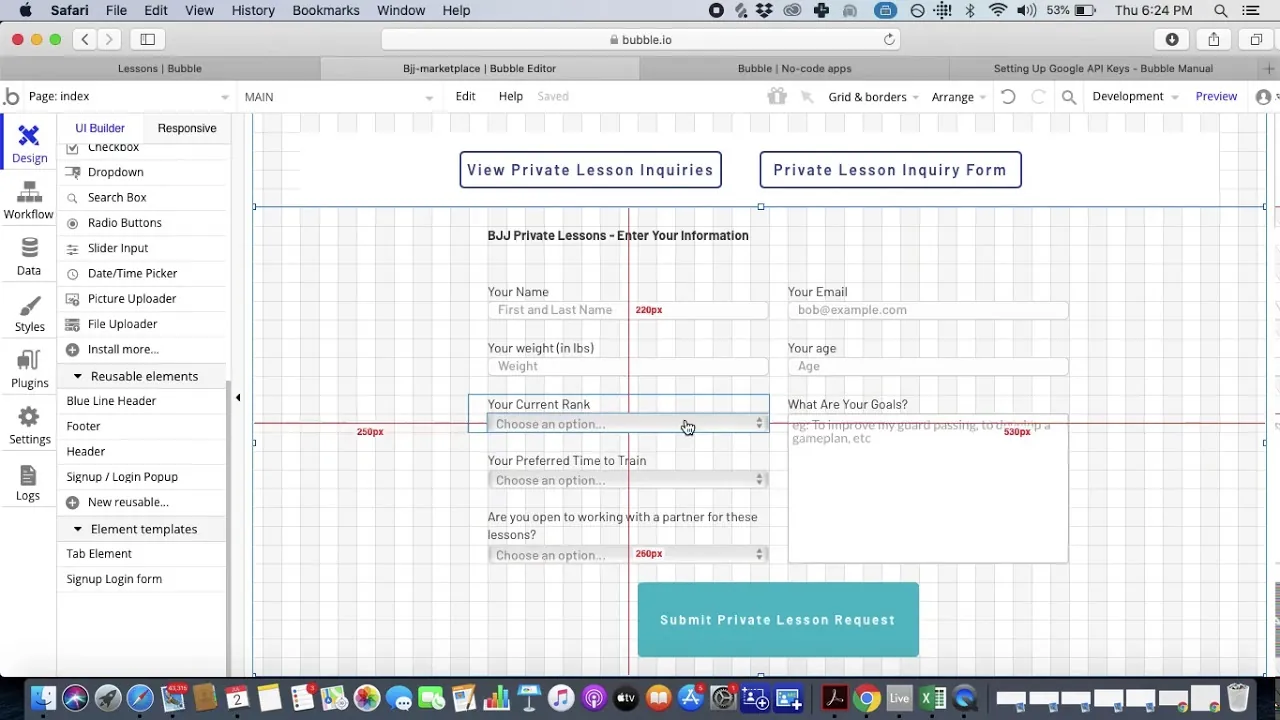
Bubble pioneered visual web development and works best for niche use cases where teams work hand-in-hand with Bubble Experts. The platform uses a property-panel interface where you configure each element through forms and dropdowns, building page by page. While Bubble markets itself as "fully visual," this means visual compared to code, not the spatial canvas approach of platforms like Adalo.
The platform's strength lies in its workflow engine. You can build complex conditional logic, API integrations, and backend processes that rival custom-coded applications. The plugin ecosystem includes over 5,300 options, though independent research found that "most require developer expertise to configure correctly."
Performance remains Bubble's biggest weakness. App Builder Guides' February 2026 State of App Building report, which analyzed 190 Reddit threads and 150+ platform citations with zero platform sponsorships, documented typical page loads of 5-10 seconds on desktop and 8-14 seconds on mobile. One user on a $40,000/year enterprise plan reported "still slow" performance. The report traced this to Bubble's backend architecture making "sequential API calls where parallel would be possible."
Bubble's 1.7/5 Trustpilot rating (123 reviews) is dominated by billing complaints about Workload Unit consumption. The platform's usage-based pricing means costs scale unpredictably. Independent research found apps consuming 400-500 WU per user per day, with poorly optimized apps burning through allocations rapidly.
Best for: Niche web-only use cases where teams work hand-in-hand with Bubble Experts ($40-$125/hour according to marketplace data). Suits complex backend logic and data-heavy web platforms where mobile isn't critical.
Not best for: Mobile-first apps, real-time applications, or teams without technical expertise. The learning curve means most founders end up hiring consultants for anything beyond basic apps.
3. FlutterFlow — Best for Developer-Adjacent Teams
Price: $80/mo per seat for standard features, $360/mo per seat for enterprise Platforms: Web, iOS, Android via Flutter AI Features: AI code generation, AI theme builder, limited visual AI
{/* Image: flutterflow-ui.png — pending CDN upload */}FlutterFlow bridges visual development and traditional coding by generating Flutter code you can export and modify. The platform offers impressive control: custom functions, API integration, state management, and animations. If you know Flutter, you can extend anything the visual builder creates.
The editor uses a widget tree structure where you build by nesting components, similar to how Flutter code is structured. This makes sense for developers but feels alien to non-technical builders. The AI features mainly assist with code generation rather than visual design, assuming you understand Flutter concepts like widgets, state, and streams.
FlutterFlow's 2.6/5 Trustpilot rating (19 reviews) cites platform instability and support issues. App Builder Guides found that "the editor takes 2-40 seconds per click when working with larger apps." The report also noted that FlutterFlow doubled prices in mid-2025, catching existing users off-guard.
The per-seat pricing becomes prohibitive for teams. A five-person startup pays $400/month just for FlutterFlow access, before any hosting or database costs. Unlike Adalo's unlimited user model, every team member who touches the app needs a paid seat.
Best for: Development teams wanting visual tools without giving up code control. Agencies building client apps who need source code handoff. Technical founders comfortable with Flutter concepts.
Not best for: Non-technical builders, budget-conscious startups, or teams wanting fast iteration without code knowledge. The Flutter learning curve defeats the purpose of visual development for most users.
4. Appy Pie — Best for Template-Based Apps
Price: $18/mo for basic web app, $60/mo for iOS development alone Platforms: Web, iOS, Android AI Features: AI app generator, voice-to-app commands
{/* Image: appypie-ui.webp — pending CDN upload */}Appy Pie takes a template-first approach. Choose from hundreds of pre-built app templates for restaurants, fitness, e-commerce, or events, then customize colors, copy, and basic functionality. The AI features primarily help select and customize templates rather than building from scratch.
The platform works well in specific verticals where templates match common needs exactly. A restaurant wanting online ordering, table booking, and loyalty programs can launch in hours. The trade-off is flexibility: venturing beyond template boundaries hits hard limits quickly.
The pricing structure deserves scrutiny. iOS development alone costs $60/month, and publishing to both iOS and Android requires separate subscriptions. That puts the real cost of cross-platform mobile publishing well above the $18/month starting price. Compare that to platforms offering both iOS and Android from a single plan.
The database capabilities are basic. You can store records and create simple relationships, but complex queries, calculated fields, or custom data operations require workarounds or aren't possible. The platform is designed for information display and simple transactions, not data-driven applications.
Native app compilation works, but with caveats. Apps tend to be larger than necessary due to template framework overhead. Performance varies by template. Some users report App Store rejections for "minimum functionality" when their customization is too light.
Best for: Small businesses in supported verticals wanting to launch quickly with minimal customization. Restaurants, gyms, salons, and event organizers with standard needs.
Not best for: Unique app concepts, data-driven applications, or anything requiring capabilities beyond the template structure. Startups wanting to iterate and scale beyond initial launch.
5. Bolt — Best for AI-Generated Web Prototypes
Price: $20/mo for basic, usage-based pricing for deployment Platforms: Web only AI Features: Full-stack code generation from prompts
{/* Image: bolt-ui.webp — pending CDN upload */}Bolt represents the new wave of prompt-led web app builders. Describe your app in natural language, and Bolt generates a complete full-stack web application with React frontend and Node.js backend. The AI understands context impressively well, maintaining consistency across multiple prompts.
The generated code quality surpasses typical AI code generators. Bolt produces production-ready React components, implements proper state management, and creates RESTful APIs that actually work. For developers, this accelerates development significantly. For non-developers, you get working code but no way to maintain it.
The fundamental limitation is that Bolt generates code, not a visual app. Once generated, you need development knowledge to modify, debug, or deploy the application. The AI can make changes based on prompts, but you're still maintaining a codebase. When the AI makes mistakes or you need specific modifications, you're editing React and Node.js directly.
Mobile support doesn't exist beyond responsive web design. Bolt generates web applications only. Getting these into app stores requires wrapping in Capacitor or similar tools, losing native capabilities and performance.
Best for: Developers wanting to quickly prototype web applications. Technical founders comfortable maintaining React/Node.js code. Rapid MVP validation where you'll rebuild if successful.
Not best for: Non-technical builders, mobile-first applications, or production apps requiring long-term maintenance without a development team.
6. Lovable — Best for Rapid Prototyping (Web Only)
Price: $20/mo for generation, additional for hosting Platforms: Web only AI Features: Conversational full-stack development
{/* Image: lovable-ui.jpg — pending CDN upload */}Lovable (formerly BaseAI) pioneered the chat-to-app interface. Have a conversation with the AI about what you want to build, and watch it generate a complete web application in real-time. The natural language understanding exceeds other prompt-led builders. You can describe complex features conversationally and get surprisingly accurate implementations.
The platform maintains context across long conversations better than competitors. You can build iteratively through discussion, refining features and fixing issues through chat. The AI explains what it's building and why, making it educational for those learning web development.
Like Bolt, Lovable produces code that eventually requires developer maintenance. The AI handles initial development well, but production issues, performance optimization, and custom features need human intervention. The generated code is high quality, but it's still code you're responsible for.
Database implementation remains weak. While Lovable can generate database schemas and basic CRUD operations, complex queries, migrations, and data relationships often require manual intervention. Most production apps need external database services, adding complexity and cost.
Best for: Rapid prototyping of web apps only. Good for proof-of-concept validation and developers wanting AI assistance before committing to full development.
Not best for: Non-technical teams wanting to maintain apps long-term, mobile applications, or data-heavy applications requiring sophisticated database operations.
7. v0 — Best for AI Component Generation
Price: $20/mo for credits Platforms: Web only AI Features: React component generation from prompts
{/* Image: v0-ui.jpg — pending CDN upload */}v0 (by Vercel) takes a focused approach: generate individual React components from natural language descriptions. Rather than building entire applications, v0 excels at creating specific UI elements like dashboards, forms, charts, and landing page sections.
The component quality is exceptional. v0 generates modern React with TypeScript, uses Tailwind CSS for styling, and follows React best practices. Components are production-ready and integrate cleanly into existing Next.js or React applications. For development teams, this accelerates UI development significantly.
The limitation is scope. v0 doesn't build full applications, handle backend logic, or manage databases. It's a tool for developers building web applications who want AI assistance with frontend components. Each generated component requires integration into a broader application architecture.
Mobile support is non-existent beyond responsive web design. v0 generates React components for web applications. Native mobile development requires entirely different approaches and platforms.
Best for: Frontend developers building web applications with Next.js or React. Design teams wanting to quickly prototype UI components. Agencies needing rapid component generation.
Not best for: Non-developers, full-stack applications, mobile apps, or anyone needing complete application generation rather than individual components.
8. Replit — Best for Learning and Experimentation
Price: $25/mo for AI features and deployment Platforms: Web (can deploy various frameworks) AI Features: Code completion, debugging assistance, natural language to code
{/* Image: replit-ui.jpg — pending CDN upload */}Replit combines a cloud IDE with AI assistance, creating a unique middle ground between traditional development and AI builders. The AI helps write code, debug issues, and explain concepts, but you're still fundamentally programming.
The platform's strength is its integrated environment. Everything runs in the browser: write code, test immediately, deploy instantly. The AI assistance is contextual, understanding your project structure and suggesting relevant code. For learners, this combination of AI help and real coding provides excellent education.
Replit supports multiple languages and frameworks, so you're not locked into specific tech stacks. Build with Python, JavaScript, Go, or dozens of other languages. Deploy web apps, APIs, or Discord bots. This flexibility means you can build almost anything, assuming you can code it.
The requirement for coding knowledge limits accessibility. While the AI helps significantly, you still need to understand programming concepts, debug errors, and architect applications properly. Non-technical users will struggle despite AI assistance.
Best for: People learning to code, developers wanting cloud-based development with AI assistance, hackathon projects, and experimental applications.
Not best for: Non-technical builders, production applications requiring serious infrastructure, native mobile apps, or teams wanting visual development without code.
Quick Comparison Table
| Platform | Price | Native Mobile | AI Features | Database | Best For |
|---|---|---|---|---|---|
| Adalo | Free; $36/mo for publishing | Web, iOS (native), Android (native) | Visual AI direction, Magic Start/Add | Built-in, unlimited | Native mobile apps |
| Bubble | $69/mo + usage | Web + separate mobile builder | Limited AI assistance | Built-in with WU limits | Niche use cases w/ experts |
| FlutterFlow | $80/mo per seat | iOS + Android via Flutter | AI code generation | External required | Developer teams |
| Appy Pie | $60/mo per platform | iOS + Android | Template customization | Basic built-in | Template-based apps |
| Bolt | $20/mo + hosting | Web only | Full-stack generation | Generated code | Web prototypes |
| Lovable | $20/mo + hosting | Web only | Conversational dev | Generated code | Rapid prototyping |
| v0 | $20/mo | Web only | Component generation | None | UI components |
| Replit | $25/mo | Web only | Code completion | External required | Learning/experiments |
How to Choose the Right AI App Builder
Selecting the right platform requires honest assessment of four factors that determine success or failure:
1. Native Mobile Requirements If your app needs App Store or Google Play distribution, eliminate web-only platforms immediately. Adalo, FlutterFlow, and Appy Pie compile native apps. Bubble has a separate mobile builder, but it's disconnected from the web app builder, so you're essentially maintaining two products. Prompt-led builders produce web code only. This single decision eliminates half the options.
2. Technical Capability Adalo and Appy Pie require zero coding knowledge. Bubble requires technical thinking even if not traditional coding. FlutterFlow assumes Flutter familiarity. Prompt-led builders produce code requiring developer maintenance. Replit is explicitly for programmers. Match the platform to your actual skills, not aspirational ones.
3. Scaling Economics Calculate costs at 1,000 monthly active users, not starting prices. Adalo charges $36/month regardless of users. Bubble's Workload Units can reach hundreds or thousands monthly. FlutterFlow's per-seat pricing multiplies with team growth. Prompt-led builders require hosting and maintenance costs. A "cheap" start can become expensive quickly.
4. Production Readiness Some platforms excel at prototypes but break in production. App Builder Guides documented Bubble's 5-10 second page loads. FlutterFlow's editor slows to 2-40 seconds per click at scale. Prompt-led builders require ongoing code maintenance. Adalo and established platforms handle production load, while newer entrants remain unproven.
Beyond these core factors, consider your specific use case. Marketplaces need user roles and permissions. SaaS products require subscription billing. Internal tools need enterprise authentication. Match platform strengths to your specific requirements rather than choosing based on general capability claims.
{/* internal-link: Compare all app builders side by side */}Common Mistakes When Choosing an AI App Builder
Believing "no-code" means "no learning" Every platform requires learning its logic, constraints, and best practices. Bubble's learning curve rivals traditional programming. Even Adalo's visual interface takes time to master. Budget weeks for proficiency, not hours.
Ignoring total cost of ownership Starting price tells you nothing. Factor in usage-based charges, per-seat costs, consultant fees, hosting, and maintenance. That $20/month prompt-led builder becomes expensive when you're paying developers to maintain generated code.
Choosing based on demos, not production apps Platform demos look amazing. Check real apps in app stores. Read performance complaints. Understand scaling limitations. Beautiful demos don't equal production success.
Underestimating mobile complexity "Mobile support" varies wildly. Native compilation, React Native output, PWAs, and web wrappers deliver completely different user experiences. If mobile matters, verify exact technical implementation, not marketing claims.
FAQ
What is the best AI app builder for beginners? Adalo is designed for non-technical builders. Magic Start generates a full app from a description, and the visual canvas lets you see and modify every screen without writing code. The free plan lets you build and test completely before committing to paid publishing.
Which AI app builder is cheapest? Adalo offers a free plan for building and previewing apps, with paid plans starting at $36/month for app store publishing with unlimited usage. That includes native iOS and Android compilation, built-in database, and AI features. But "cheapest" depends on scale: Bubble starts at $69/month but adds usage charges that can reach thousands. FlutterFlow costs $80/month per person, so team costs multiply quickly.
Can I build native mobile apps with these platforms? Only some. Adalo compiles true native iOS (IPA) and Android (APK) apps. FlutterFlow generates Flutter apps that compile to native. Appy Pie offers native compilation with template limitations. Bubble has a separate mobile builder, but it's disconnected from the web app builder, so you're managing two separate products. Prompt-led builders like Lovable, Bolt, and v0 produce web code exclusively.
Do I need to know how to code? Adalo, Appy Pie, and Bubble (despite its learning curve) don't require traditional coding. FlutterFlow works best with Flutter knowledge. Bolt, Lovable, and v0 generate code you'll eventually need to maintain. Replit explicitly requires programming knowledge despite AI assistance.
What's the difference between visual AI building and prompt-led building? Visual AI builders like Adalo provide a spatial canvas where you see all screens and point at elements to direct changes. You work with the actual app interface. Prompt-led builders like Lovable and Bolt use chat interfaces where you describe changes in text and receive generated code. Visual building offers more precise control and immediate visual feedback. Prompt-led building produces faster initial results but requires describing everything in words and maintaining code output.
Can I switch platforms later if I need to? Migration between platforms is essentially rebuilding from scratch. No AI app builder exports to another's format. You can export data (usually as CSV), but the app logic, design, and structure must be recreated. FlutterFlow's code export provides an escape route to traditional development. Choose your platform assuming you'll stay there or rebuild entirely.
Which platform is best for marketplace apps? Adalo's built-in user roles, permissions system, and relational database make it particularly strong for two-sided marketplaces. You can create buyer/seller distinctions, implement ratings, handle payments, and manage inventory without external services. Bubble can build complex marketplace logic but only for web. FlutterFlow requires more configuration but offers full customization.
What about enterprise requirements? Most AI app builders aren't enterprise-ready. Bubble offers some enterprise features but struggles with performance at scale. FlutterFlow's code export allows eventual migration to custom infrastructure. Adalo handles thousands of users but lacks enterprise features like SSO and audit logs. For true enterprise needs, these platforms work better for prototyping before custom development.
Conclusion
The "best" AI app builder depends entirely on what you're building and who's building it. For non-technical founders wanting native mobile apps with predictable costs, Adalo provides the clearest path from idea to app store. For niche web-only use cases, Bubble can deliver results when working with experienced Bubble Experts, though performance challenges persist. Developers seeking AI acceleration should evaluate prompt-led builders based on their maintenance comfort. The key is matching platform capabilities to your actual needs — not marketing promises or feature lists.