How to Create a Tradesperson Quoting Web and Mobile App
Tradespeople juggle demanding schedules, traveling between job sites while trying to keep up with quotes, invoices, and client communications. Building a custom quoting app that works on both web and mobile devices seems like the obvious solution, but traditional development requires significant technical expertise, substantial budgets, and months of waiting—resources most independent contractors and small trade businesses simply don't have.
No-code platforms have changed this equation entirely, putting powerful app development within reach of non-technical builders. Adalo is a no-code app builder for database-driven web apps and native iOS and Android apps—one version across all three platforms. AI-assisted building and streamlined publishing enable launch to the Apple App Store and Google Play in days rather than months.
Why Adalo Works for Building a Tradesperson Quoting App
Adalo is a no-code app builder for database-driven web apps and native iOS and Android apps—one version across all three platforms, published to the Apple App Store and Google Play. This makes it the perfect solution for tradespeople who need a professional quoting system that works seamlessly whether they're measuring a job site on their phone or finalizing estimates at their desk—all without writing a single line of code or hiring expensive developers.
For contractors constantly moving between job sites, having your quoting app available on both app stores means you can send push notifications when quotes are approved, alert team members about new job requests, and respond to potential clients instantly. In an industry where speed wins work, this kind of real-time accessibility gives you a competitive edge that manual quoting simply can't match.
Tradespeople spend countless hours each week creating quotes manually—time that could be spent on billable work. Building a custom quoting app that works seamlessly across web and mobile devices typically requires expensive developers and months of development, putting this solution out of reach for most independent contractors and small trade businesses.
Adalo, an AI-powered app builder, makes this ambitious project achievable for anyone, regardless of technical background. The platform creates database-driven web apps and native iOS and Android apps from a single codebase—one version across all three platforms. AI-assisted building and streamlined publishing enable launch to the Apple App Store and Google Play in days rather than months.
Why Adalo Works for Building a Tradesperson Quoting App
Adalo creates true native iOS and Android apps alongside web apps from a single build—not web wrappers that compromise performance. This makes it the ideal solution for tradespeople who need a quoting app that works seamlessly whether they're at a job site on their phone or back at the office on their computer, without the expense of hiring developers to build separate versions.
Having your quoting app available on the Apple App Store and Google Play means you can send push notifications to remind clients about pending quotes, alert your team when new jobs come in, and keep everyone connected in real time. For tradespeople constantly on the move, this instant accessibility can be the difference between winning a job and losing it to a competitor who responded faster.
Creating quotes manually can waste hours each week for plumbers, electricians, and carpenters. A quoting app can save time, reduce errors, and improve response rates. Businesses that send quotes within an hour see 160% higher conversion rates, and digital tools can save up to 7 hours weekly. Adalo simplifies app creation with its visual builder, allowing you to build a single app for web, iOS, and Android without rebuilding for each platform. Here's how you can design an app to streamline quoting, manage clients, and improve accuracy.
Key Steps:
- Plan Features: Include customizable templates, calculators, and client databases.
- Set Up a Database: Organize collections for clients, quotes, and materials.
- Design the Interface: Use Adalo's drag-and-drop tools to create user-friendly screens.
- Add Logic: Build pricing calculators and integrate real-time data sources.
- Test and Publish: Ensure functionality across devices and publish to app stores.
Switching to a quoting app not only saves time but also helps you secure jobs faster. Start with Adalo's free plan to build your app and upgrade as your business grows.
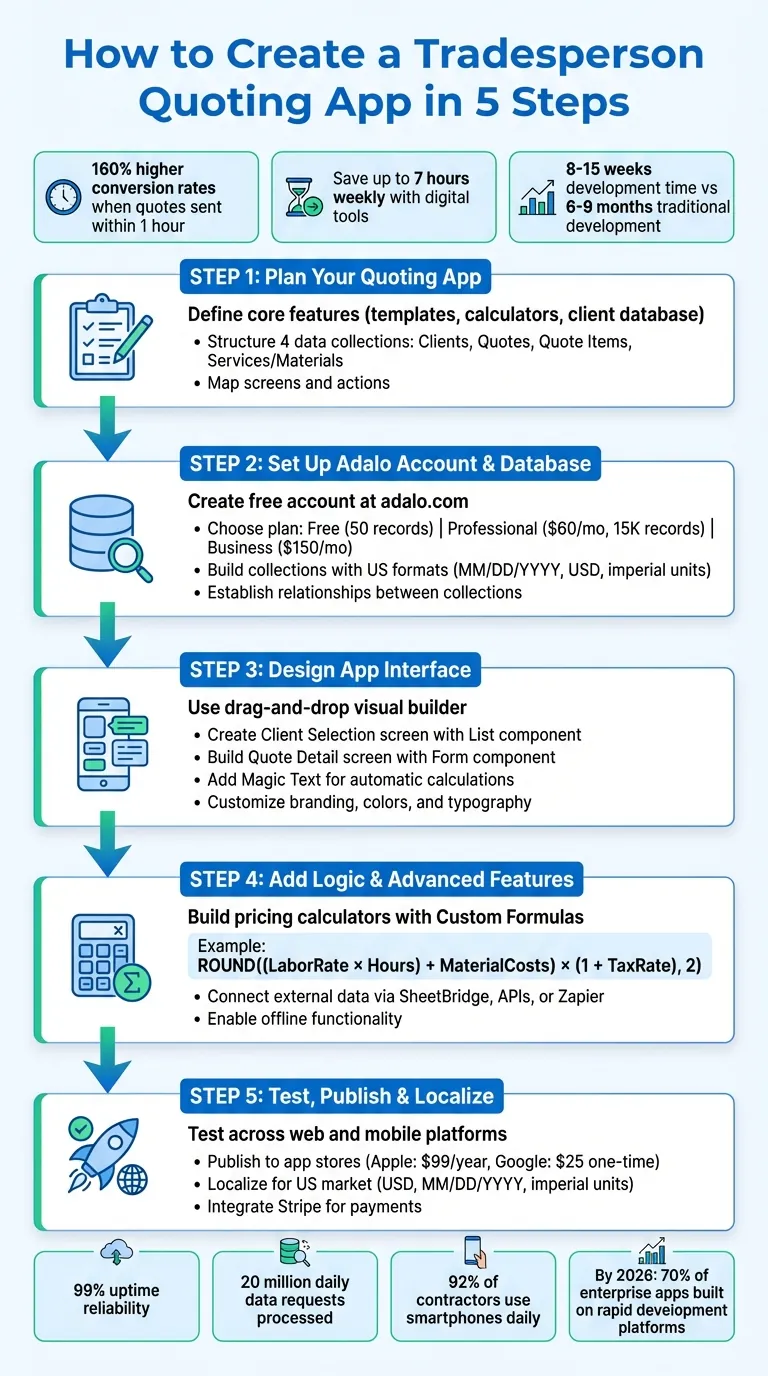
5-Step Process to Build a Tradesperson Quoting App with Adalo
Step 1: Plan Your Quoting App
Start with a clear plan to avoid unnecessary features. Map out the screens, actions, and data your app will need before touching the builder.
Define Core Features
Focus on essential tools like customizable quote templates for creating polished estimates quickly. Include calculators for material and labor costs to ensure real-time accuracy. Add a client database and user authentication to securely manage contacts and quote histories.
Ada, Adalo's AI builder, lets you describe what you want and generates your app. Magic Start creates complete app foundations from a description, while Magic Add adds features through natural language.
Consider mobile-friendly features like camera access for uploading images and geolocation for on-site quoting. You can also integrate payment processing for direct transactions and a ratings system to help build customer trust. Magic Add, Adalo's AI feature, lets you describe these capabilities in plain language—"add a feature to photograph job sites and attach images to quotes"—and the platform generates the necessary components.
Structure Your Data Collections
Once features are outlined, organize them with structured data collections. Adalo's built-in database uses collections, similar to spreadsheet tables that interact with each other. For a quoting app, you'll need at least four primary collections: Clients, Quotes, Quote Items, and Services/Materials.
- Clients: Store details like name, email, phone, US-formatted address (e.g., 123 Main St, Anytown, CA 90210), and creation date (MM/DD/YYYY).
- Quotes: Include fields for quote ID, status (e.g., Draft, Sent, Accepted), total amount in USD (e.g., $1,234.56), and creation date. Link each quote to a client.
- Quote Items: Use this collection for line items, including fields for item name, quantity, unit (e.g., feet, square feet), unit price (e.g., $3.50/ft), and subtotal.
- Services/Materials: This acts as a master price list, storing standard labor rates ($/hr) and material costs for consistent pricing.
Ensure all pricing fields are set as number properties so you can create custom formulas for calculations. Establish one-to-many relationships: one Client can have multiple Quotes, and one Quote can include multiple Quote Items. This setup minimizes duplicate entries and keeps your data organized. With paid plans offering no database record limits, your quoting app can scale alongside your business without hitting storage constraints.
Step 2: Set Up Your Adalo Account and Database
After laying out your initial plan, it's time to turn that vision into reality. Here's how to get your Adalo account up and running, along with the database that will serve as the backbone of your quoting app.
Create Your Adalo Account
Head over to adalo.com and click the "Get Started for Free" button. Sign up by entering your email, password, and full name. Once you've registered, check your email for a verification link and confirm your account. During the setup process, you'll also select your role (like builder or individual) and answer a brief quiz about your app idea.
Adalo offers several pricing tiers:
- Free Plan: Ideal for prototyping and testing your app concept.
- Starter Plan: $36/month for app store publishing, unlimited database records, and unlimited usage.
- Professional Plan: $52/month for advanced integrations and additional features.
- Business Plan: Higher tiers available for enterprise needs with priority support.
Unlike platforms that charge based on usage or limit database records, Adalo's paid plans include unlimited usage with no bill shock—a significant advantage for growing trade businesses. Opting for annual billing provides additional savings.
Model Your Data Collections
Once your account is set up, navigate to the Database tab in your Adalo dashboard. This is where you'll create the core collections for your app: Clients, Quotes, Quote Items, and Services/Materials. Use US-standard formats throughout, such as MM/DD/YYYY for dates, US dollars for currency, and imperial units (like sq ft, ft, or lbs).
Here's how to set up each collection:
- Clients: Ensure the Email field is marked as unique. This will allow clients to log in later.
- Quotes: Add a formula for the Total field: Subtotal × (1 + Tax/100), and format it as currency.
- Quote Items: Configure a formula for Line Total: (Quantity × Unit Price) + Labor Hours + Material Cost × (1 + Markup/100). Use imperial units and US dollar formatting for all calculations.
- Services/Materials: Create a master price list with fields for Description, Standard Rate (e.g., $/hr or $/unit), and Category.
Next, establish the relationships between collections. Add a Client property to the Quotes collection so each client can have multiple quotes. Similarly, add a Quote property to the Quote Items collection, allowing each quote to include multiple line items. This setup ensures that one client can manage multiple quotes, and each quote can break down into detailed items.
Finally, test your setup by manually adding a few sample records. For example, create a sample client, assign them a quote, and include a couple of line items in that quote. This will help confirm that your relationships and formulas are working as intended.
Step 3: Design Your App's Interface
Once your database is ready, it's time to design the interface that turns your data into practical tools for tradespeople. With Adalo's visual builder—described by users as "as easy as PowerPoint"—you can drag and drop components onto a canvas without writing code. You'll see your app design update in real time, making it easy to make quick decisions and adjustments. The builder can display up to 400 screens at once on a single canvas, giving you complete visibility into your app's structure.
Build Quote Creation Screens
Start by designing a Client Selection screen. Use the List component from the Add Panel and link it to your Clients collection. Each list item should show key details like the client's name, phone number, and the date of their last quote. To streamline the process, allow users to tap on a client to navigate directly to the Quote Detail screen.
Next, create the Quote Detail screen using a Form component. Organize the form into sections for clarity:
- Basic Information: Include fields for the quote number and date (MM/DD/YYYY format).
- Line Items: Add fields for descriptions, quantities, and unit prices in U.S. dollars.
- Totals: Use Magic Text to calculate subtotals, taxes, and the final total automatically. For instance, if a tradesperson enters 3 hours of labor at $85/hour, the total will instantly update to $255.00.
To keep things user-friendly, consider a multi-step form. Start with client and job details, move to line items, and finish with pricing and a signature pad. This step-by-step approach reduces errors and makes it easier for tradespeople working on-site or in fast-paced environments.
Finally, fine-tune the design to ensure smooth navigation and usability across all devices.
Customize the User Experience
In the Branding tab, define your app's colors and typography for a polished, consistent look. For example, use blue to convey reliability and green for action-oriented elements.
Make sure important buttons are easy to reach with one hand—place them within a 44-pixel touch zone for thumb-friendly navigation. Adalo's responsive tools allow you to design once and deploy across mobile, tablet, and web platforms seamlessly. Since Adalo 3.0's infrastructure overhaul, apps run 3-4x faster than before, ensuring your quoting app feels snappy even when loading large client lists or complex calculations.
Leverage Conditional Visibility to simplify screens. For instance, hide the "Submit Quote" button until all required fields are completed. Similarly, advanced options like markup percentage adjustments can remain hidden unless the user taps "Show Advanced Settings." This keeps the interface clean and intuitive, while still offering flexibility for more detailed tasks. Research shows users take just 500 milliseconds to decide whether to stay on a screen, so clarity is essential.
Lastly, add a Dashboard screen to give tradespeople a quick overview of their business. Use Adalo's Stats component to display summaries like "15 Active Quotes" or "$12,450 in Pending Work." This allows users to check key metrics at a glance without searching through individual records.
Step 4: Add Logic and Advanced Features
This is where your app starts to come alive. By adding logic, you turn static screens into a dynamic tool that calculates prices, applies discounts, and pulls real-time data from external sources.
Build Pricing Calculators
With Adalo's Custom Formula feature, you can create all the pricing logic your app needs. Access this tool through the Magic Text menu when setting up text fields or forms. The formula builder supports basic arithmetic—like addition, subtraction, multiplication, and division—as well as advanced functions such as ROUND for currency formatting.
For example, if you're creating a quote and estimate app from Google Sheets, you might combine labor rates, material costs, and tax percentages. Store these as Number properties in your database (e.g., Labor Rate, Hours, Material Costs, and Tax Rate). Then, use a formula like ROUND(((LaborRate * Hours) + MaterialCosts) * (1 + TaxRate), 2) to calculate and format the total price as currency—for instance, $1,245.50 instead of a raw number.
This logic ensures that your pricing is accurate and consistent.
- Dynamic Calculations: Use Magic Numbers to pull values from your database or user input. For instance, if a plumber enters 4 hours at $95/hour, $180 for parts, and a 7% tax rate, the app calculates the total as $599.20:
((95 * 4) + 180) * 1.07 = $599.20 - Client Discounts: Add a
Client Discountfield to your database to handle customer-specific discounts. Update the formula to reflect this:
ROUND(((LaborRate * Hours) + MaterialCosts) * (1 - ClientDiscount), 2) - Error Prevention: Use Conditional Visibility to hide the total price until all required fields are filled. This avoids "NaN" errors when data is missing. Test your formulas against edge cases—like zero values, decimals, or blank fields—to ensure they work smoothly in all situations.
Once your pricing logic is solid, you can take it to the next level by integrating real-time data from external systems.
Connect External Data Sources
To make your pricing even more accurate, Adalo offers three ways to integrate external data: External Collections (via REST APIs), SheetBridge (for Google Sheets), and Zapier (for workflow automation). These options allow you to pull in up-to-date information seamlessly.
- Google Sheets with SheetBridge: If you track material prices in a Google Sheet, SheetBridge enables a quick, two-way sync. Any updates in your spreadsheet instantly reflect in your app. Before connecting, ensure the first row of your sheet contains headers without spaces (e.g.,
Material_Costinstead of "Material Cost") and remove merged cells. This feature turns your existing spreadsheet into an actual database for the easiest control without database-related learning curves—far more convenient than alternatives that require separate database setup and management. - Enterprise Databases: For businesses using MySQL, PostgreSQL, or similar databases, DreamFactory can generate REST APIs to connect your data to Adalo as an External Collection. This provides real-time access to enterprise pricing systems. When setting up, match the Results Key to your API's JSON structure (e.g., 'resource' for DreamFactory) and add authentication headers like
X-DreamFactory-API-Keyin Adalo's settings to secure the connection.
Once connected, you can use Magic Text to dynamically display external pricing data in your app components. For offline functionality, consider designing your pricing logic to work with cached reference data. This way, field workers can still generate accurate quotes even without an internet connection.
Step 5: Test, Publish, and Localize Your App
With your app's design and functionality ready, the final steps involve testing, publishing, and tailoring it for a US audience. You're almost there!
Test Across Web and Mobile Platforms
Use the "View App" button in the Adalo builder to preview your app in a web browser. Go through every screen—create quotes, add materials, calculate pricing—to ensure all features work as expected. Check how your app performs on different devices using the device preview options, making sure buttons, text fields, and other elements are properly sized and functional.
X-Ray, Adalo's AI-powered performance tool, identifies potential issues before they affect users. It highlights bottlenecks in your database queries, slow-loading screens, or inefficient logic flows—problems that could frustrate tradespeople trying to generate quotes quickly on job sites.
Share your app with a few trusted tradespeople via a shareable link or QR code. Their feedback can uncover issues like unclear navigation or confusing pricing displays. For more in-depth testing, use tools like TestFlight for iOS or Google Play Console's testing modes. Save versions of your app as you make changes, so you can quickly revert if something doesn't work as intended.
Once you're confident your app runs smoothly, it's time to publish.
Publish Your App to App Stores
To publish your app, you'll need a paid Adalo plan starting at $36/month, along with platform-specific fees—$99 per year for the Apple Developer Program and a one-time $25 fee for the Google Play Console. For iOS, you'll need to set up Two-Factor Authentication, create an Apple Bundle ID, and generate a Certificate Signing Request. Prepare assets like your app icon, 4–5 screenshots for each device type, a 30-character app title, and a privacy policy URL before submission.
Apple's review process usually takes about 48 hours, but rejections can happen if you don't clearly justify permissions like camera or location access. To minimize risk, consider using the Phased Release option on the App Store, which lets you roll out your app gradually over seven days. This gives you time to address any critical bugs before the app reaches your full audience.
A key advantage of Adalo's approach: one build automatically updates web, iOS, and Android versions. Unlike platforms that use web wrappers for mobile—requiring separate management of each version—changes you make in Adalo propagate across all platforms. Paid plans include unlimited app updates once published, so you can iterate based on user feedback without additional charges.
Localize for the US Market
Adjust your app to meet US standards for formatting and integrations. US users expect pricing in dollars, dates in MM/DD/YYYY format, and measurements in feet and inches. Double-check that your pricing formulas and data formats align with these standards. For example, currency should appear as $1,234.56, with commas for thousands and periods for decimals. Input fields for materials should use units like square feet or yards, and date pickers need to follow the MM/DD/YYYY format.
Integrate the Stripe component in Adalo to securely process payments in USD. Use Google Maps and Geolocation plugins to simplify address inputs with US zip codes and state-based navigation. When submitting your app to the US App Store or Google Play, optimize its discoverability by conducting keyword research in American English. For example, phrases like "contractor estimate app" may resonate better with a US audience. These adjustments ensure your app feels familiar and user-friendly to your target market.
How Adalo Compares to Alternatives
When evaluating app builders for a tradesperson quoting app, understanding the differences between platforms helps you make the right choice for your specific needs.
Bubble offers extensive customization for web applications, but its mobile solution uses a web wrapper rather than compiling to native code. This can introduce performance challenges at scale, and means updates don't automatically propagate across web and mobile versions. Bubble's pricing starts at $59/month with usage-based charges (Workload Units) that can be difficult to predict, plus limits on records and app re-publishing. For tradespeople who need reliable mobile performance on job sites, the wrapper approach may create friction.
FlutterFlow targets technical users with a low-code approach. Users need to set up and manage their own external database—a significant learning curve that can create scalability problems if not configured optimally. The ecosystem includes many experts precisely because users frequently need help, often spending significant sums chasing scalability. Pricing starts at $70/month per user for app store publishing, but that still doesn't include database costs. The builder also limits how many screens you can view simultaneously, slowing down development.
Glide excels at spreadsheet-based apps with fast deployment, but restricts users to set templates that create generic, simplistic apps with limited creative freedom. Pricing starts at $60/month for custom domain capability, but still limits app updates and data rows—additional charges apply for exceeding limits. Critically, Glide doesn't support Apple App Store or Google Play Store publishing, limiting distribution options for tradespeople who want their app on customers' phones.
Softr focuses on web apps built from spreadsheets, with pricing starting at $167/month for Progressive Web App publishing. Like Glide, Softr doesn't support native iOS and Android app creation or app store publishing, and restricts records per app and per datasource.
| Platform | Starting Price | Native Mobile Apps | Database Included | Usage Limits |
|---|---|---|---|---|
| Adalo | $36/month | Yes (iOS & Android) | Yes, unlimited records | None on paid plans |
| Bubble | $59/month | Web wrapper only | Yes, with record limits | Workload Units |
| FlutterFlow | $70/month/user | Yes | No (external required) | Varies by database |
| Glide | $60/month | No | Yes, with row limits | Updates & rows |
| Softr | $167/month | No | Yes, with limits | Records per app |
For tradespeople specifically, Adalo's combination of native mobile apps, included database with no record caps, and predictable pricing without usage charges makes it the most practical choice. The ability to publish to both app stores from a single codebase—with unlimited updates—means you can iterate based on field feedback without worrying about additional costs or managing multiple app versions.
Conclusion
Now you know how to plan, design, and launch a tradesperson quoting app that simplifies every step—from organizing your database and creating screens to adding pricing calculators, testing on devices, and publishing to app stores. This process lays the groundwork for a dependable and modern solution. With Adalo's AI-assisted builder, you can deliver a professional app in just 8 to 15 weeks, compared to the 6 to 9 months traditional development typically requires.
Here's something to consider: research predicts that by 2026, rapid app development platforms will be behind 70% of all new enterprise apps. And with 92% of contractors using smartphones daily on the job, there's no denying that clients expect digital solutions. A custom quoting app not only keeps your business top of mind but also establishes you as a forward-thinking professional who can respond to opportunities in real time.
Adalo makes it easy to get started. Begin with their free plan to build and test your app, then upgrade to publish it to app stores. The platform processes over 20 million daily data requests with 99%+ uptime, and its modular infrastructure scales to serve apps with over 1 million monthly active users. Plus, you can integrate tools like Stripe for secure payments, QuickBooks for accounting, or Zapier to automate workflows—all without writing a single line of code.
The best time to start building your app? Today. Focus on core features like quote creation and client management first, then refine based on user feedback. Waiting only gives competitors a head start. With your app, you can generate quotes, secure jobs, and grow your business faster than ever.
Related Blog Posts
- How to Launch Your First Mobile App Without Coding
- Build a No-Code Ticketing System in 3 Days
- How to Create an Invoice App
- How to Create a Barber Booking App
FAQ
Why choose Adalo over other app building solutions?
Adalo is an AI-powered app builder that creates true native iOS and Android apps—not web wrappers. It compiles to native code and publishes directly to both the Apple App Store and Google Play Store from a single codebase. Paid plans include unlimited database records and no usage-based charges, so you won't face surprise bills as your business grows.
What's the fastest way to build and publish an app to the App Store?
Adalo's drag-and-drop interface and AI-assisted building let you go from idea to published app in days rather than months. The platform handles the complex App Store submission process—certificates, provisioning profiles, and store guidelines—so you can focus on your app's features and user experience.
Can I easily build a quoting app for my tradesperson business?
Yes. With Adalo's visual builder, you can create customizable quote templates, pricing calculators, and client databases using drag-and-drop tools—no coding required. The platform also supports features like camera access for uploading job site photos and geolocation for on-site quoting.
How do I set up pricing calculators in my quoting app?
Adalo's Custom Formula feature allows you to build pricing calculators using the Magic Text menu. Combine labor rates, material costs, and tax percentages using formulas like ROUND(((LaborRate * Hours) + MaterialCosts) * (1 + TaxRate), 2) to automatically calculate totals that update in real-time as users enter data.
Can I integrate my quoting app with external data sources like Google Sheets?
Yes. SheetBridge enables two-way sync with Google Sheets, so any price updates in your spreadsheet instantly reflect in your app. You can also connect via REST APIs for external collections and Zapier for workflow automation, plus integrate tools like Stripe for payments and QuickBooks for accounting.
How long does it take to build a quoting app with Adalo?
With Adalo, you can build and launch a professional tradesperson quoting app in 8 to 15 weeks, compared to the 6 to 9 months traditional development typically requires. Start with the free plan to prototype and test, then upgrade to a paid plan starting at $36/month to publish to app stores.
What database structure do I need for a quoting app?
You'll need at least four primary collections: Clients (storing contact details), Quotes (including status and totals), Quote Items (for line items with quantities and prices), and Services/Materials (your master price list). Establish one-to-many relationships so one client can have multiple quotes, and each quote can include multiple line items.
Which is more affordable, Adalo or Bubble?
Adalo starts at $36/month with unlimited usage and no record limits on paid plans. Bubble starts at $59/month with usage-based Workload Unit charges that can be difficult to predict, plus limits on records and app re-publishing. For predictable costs, Adalo offers better value.
Is Adalo better than Glide for mobile apps?
For native mobile apps, yes. Adalo creates true native iOS and Android apps that publish to the App Store and Play Store. Glide doesn't support app store publishing at all—it only creates web apps. If you need your quoting app on customers' phones, Adalo is the clear choice.
Do I need coding experience to build a quoting app?
No. Adalo's visual builder is described by users as "as easy as PowerPoint." You drag and drop components, set up database relationships visually, and create logic through menus rather than code. The platform handles the technical complexity of native app compilation and app store submission.