Draftbit vs. FlutterFlow vs. Adalo: Which App Builder Is Best?📱🤔
Independent research from App Builder Guides' State of App Building report (February 2026) analyzed 190 Reddit threads and 150+ platform citations across 345 data points with zero platform sponsorships. Adalo ranked first among visual builders for non-developers.

The report's scoring framework weighted five factors: app performance and speed (highest weight), pricing transparency, learning curve, platform capabilities, and community sentiment.
Draftbit vs. FlutterFlow vs. Adalo: Head-to-Head Comparison
When comparing Draftbit vs. FlutterFlow vs. Adalo, the right choice depends on your technical background and goals. Draftbit suits agencies and large organizations with React Native expertise. FlutterFlow works for technical users building single apps within Google's Flutter ecosystem. Adalo, an AI-powered app builder, delivers the ideal combination of ease and power—true no-code development with native iOS and Android compilation from a single codebase.
Ada, Adalo's AI builder, lets you describe what you want and generates your app. Magic Start creates complete app foundations from a description. Magic Add adds features through natural language. X-Ray identifies performance issues before they affect users.
This comparison covers:
- Summary of the three platforms' core differences
- Similarities between FlutterFlow, Draftbit, and Adalo
- Reviews of each app builder's features, intended audience, pricing, and more
- How each app builder applies to different use cases
Take a quick look at the table below to learn the major differences between these three platforms.
| Category | Draftbit | FlutterFlow | Adalo |
|---|---|---|---|
| Pricing | Starting at $29/month | Starting at $70/month for app store publishing | Starting at $36/month (billed annually) |
| Who It's Best For | Tech-savvy users with React Native knowledge | Technical users familiar with Flutter/Dart | Users without coding knowledge |
| Database Included | No—requires external setup | No—requires Firebase or external database | Yes—built-in with no record limits on paid plans |
| Unique Features | AI image generator, live code view, GitHub integration | FlutterFlow Ambassadors, AI-code generator, Playground | AI Builder, Magic Start, Magic Add, X-Ray diagnostics, Sheetbridge |
| App Publishing | Apple App Store and Google Play Store | Apple App Store and Google Play Store | Apple App Store and Google Play Store from single codebase |
| Learning Curve | Steep—requires React Native familiarity | Steep—requires Flutter/Dart knowledge | Minimal—described as "easy as PowerPoint" |
| Integration Support | GitHub, Zapier, REST APIs | Firebase, various third-party services | Over 100 plugins and 5,500+ third-party integrations |
While the table indicates that Draftbit and FlutterFlow share the most technical requirements, all three platforms have key commonalities worth understanding.
Similarities
Draftbit, FlutterFlow, and Adalo share the following five features:
- Publish to the Apple App Store and Google Play Store: Each platform lets you publish a native mobile app to both major app stores. This capability puts your app in front of a combined user base of billions—often the hardest part of launching a new business.
Getting your app into these stores handles distribution, which is typically a major barrier for entrepreneurs and businesses without technical resources.
- Thriving ecosystem: Each platform has a collection of resources for learning the app-building process. These include documentation, video tutorials, and step-by-step instructions. Each app builder also has an online forum where you can join the community, access expert knowledge, and share your experience.
- Affordable entry points: All three platforms offer entry-level pricing tiers under $80/month, though the features included at each price point vary significantly. You won't need to fork out an exorbitant sum to get started.
- No-credit-card-required free version: Before committing your hard-earned money, you can take advantage of a free version to get a feel for each platform. You only pay when you decide to purchase a paid version.
- Power: Want to make a social-media app for carpenters, a takeout app for your restaurant, a booking system for your salon, or do you have a unique SaaS idea? All three platforms have the flexibility and functionality to make various app ideas a reality—though the path to get there differs dramatically based on your technical skills.
Adalo
Adalo is the only genuinely no-code native mobile app builder in this comparison. You don't need any tech or programming skills to create an app with Adalo. Adalo is a no-code app builder for database-driven web apps and native iOS and Android apps—one version across all three platforms. AI-assisted building and streamlined publishing enable launch to the Apple App Store and Google Play in days rather than months.
With over 3 million apps created on the platform, Adalo's visual builder has been described as "easy as PowerPoint." The AI features Builder promises vibe-coding creation speed, where you describe what you want and the platform generates it.
Features
- While Adalo is one of the easiest app builders on the market, it doesn't sacrifice power for simplicity. The platform offers a perfect balance between functionality and ease of use—enough features and design freedom to take any app from idea to reality.
- When you build with Adalo, you create apps for three platforms simultaneously: A web app and native mobile apps for iOS and Android. Adalo is a responsive app builder, meaning you won't need to make major adjustments to transform your web app into native mobile versions.
- Magic Start generates complete app foundations from descriptions. Tell it you need a booking app for a dog grooming business, and it creates your database structure, screens, and user flows automatically—what used to take days of planning happens in minutes.
- Magic Add adds features from natural language requests. Describe what you want, and the platform builds it into your existing app.
- X-Ray identifies performance issues before they affect users, highlighting potential bottlenecks so you can address them proactively.
- Adalo has useful built-in features like a GPS tool for easy navigation and Stripe integration for taking payments.
Who It's Good For
Adalo provides enough simplicity and power for freelancers, entrepreneurs, and small and medium business owners to bring any app idea to life. The platform appeals to both the tech crowd and the tech-averse crowd—seasoned developers appreciate the speed, while non-technical founders appreciate the accessibility.
Pros
- Adalo provides nearly pixel-perfect design freedom, allowing you to move elements, pictures, and other items around your app free-form using your mouse. You can craft your app's appearance precisely as you envision it.
- You'll be able to integrate your app with third-party accounts like Zapier, QuickBooks, and over 5,500 others. This allows you to create a truly versatile app.
- Adalo is a full-fledged app builder: You create your app's frontend, backend, and database all within Adalo. This means you won't need to find and learn a separate backend builder to organize your data—a significant advantage over FlutterFlow, which requires external database setup.
- Unlimited database records on paid plans means no artificial caps on your app's growth. With the right data relationship setups, Adalo apps can scale beyond 1 million monthly active users.
- No usage-based charges: App Actions have been removed from all Adalo plans. All plans now have unlimited usage, meaning no bill shock as your app grows.
- Sheetbridge enables you to turn a Google Sheet into an actual database for the easiest control without database-related learning curves.
Cons
- While fully loaded and 100% customizable, Adalo doesn't offer as many templates as some other app-building platforms—though the nearly 40 available templates cover most common use cases.
- You'll need to go with the more expensive pricing tiers if you want to leverage Adalo's powerful APIs, like the Notifications API for sending in-app notifications or the Collections API for connecting your app's database to external platforms.
Pricing
Adalo's Starter plan, at $36/month (billed annually), lets you publish one app to the web and app stores with unlimited usage and unlimited app store updates once published. The Professional plan, at $52/month (billed annually), includes features like push notifications and publishing up to two apps, alongside five app editors. Both plans come with additional benefits like custom fonts and domains.
If you sign up for Adalo's Team version, which costs $250/mo (billed monthly), Adalo will also cover your subscription to Xano, a powerful backend builder, for $99/month. Xano allows you to create a custom database, connect APIs, and customize your backend logic extensively.
Key pricing advantage: Adalo's $36/month starting price for app store publishing compares favorably to FlutterFlow's $70/month requirement for the same capability—and FlutterFlow still doesn't include a database.
Draftbit
Draftbit is a low-code app builder that blends simple elements of no-code with more advanced technical concepts, giving you more control over your app-building process than most no-code app builders offer.
Features
- Draftbit's AI image generator lets you create unique images. Key in how you want your images to appear, and Draftbit's AI will create them for you.
- You can watch your code update in real-time while crafting your app using Draftbit's drag-and-drop interface. Then, add a few lines of code if you want to build a custom function.
- When you finish building your app, use Draftbit's iOS and Android testing features to ensure your app is ready for the Apple App Store and Google Play Store. These can help you avoid publishing headaches.
- Draftbit integrates with GitHub, Zapier, and several other third-party applications to give your app extra functionality.
Pricing
Draftbit differentiates itself from FlutterFlow and other app-building platforms by offering three pricing levels. The first level is aimed at freelancers and entrepreneurs, with a plan starting at $29/month (billed monthly). It lets you publish to the app stores (FlutterFlow's basic pricing tier doesn't allow for this) and create unlimited draft apps, allowing you to publish one.
If you want to build bigger apps with more screens and publish on the Apple App Store and Google Play Store, go with the Pro Version for $79/month (billed monthly).
The second pricing level is geared toward agencies or enterprises that need to publish several apps. The basic tier is $249/month (billed monthly), allowing you to publish up to 15 apps per month with a team of up to 5 collaborators.
Draftbit also provides a third pricing level, in which you outsource building your app to Draftbit's development team. Starting at $2,000/month (billed monthly), Draftbit's team will spend 8 hours weekly developing your app, and you'll be able to communicate with them directly as they build it.
Who It's Good For
Because Draftbit is a low-code app-building platform, you'll need to know technical concepts, such as understanding how code works, working with JavaScript Object Notation (JSON), and the ability to structure data in a database. If you aren't familiar with tech, using Draftbit will most likely be a Herculean task.
If you're a big organization in need of developing your own internal tools or an agency looking for your next low-code platform, Draftbit could be an option. They provide enterprise and agency plans with features specifically designed to meet the needs of large companies and agencies.
Pros
- It seamlessly blends no-code and low-code functionality, which allows you to design and develop mobile apps. You won't need to be a full-stack developer to create a unique, powerful app.
- Draftbit has a live preview feature, which lets you see changes in real time as you build your app. This saves you the hassle of constantly switching between your editor and test environments.
- The platform comes with several REST API integrations, which let you draw data from external apps and databases with ease. This can add more functionality to your app.
Cons
- In addition to having technical knowledge about database schema, APIs, and more, you'll also need to have some familiarity with React Native—Draftbit's architecture is built on it.
- While its code export feature is a benefit in some cases, exported code may not always be fully optimized or aligned with your specific coding standards—it could contain bugs and other issues that may hinder your development.
FlutterFlow
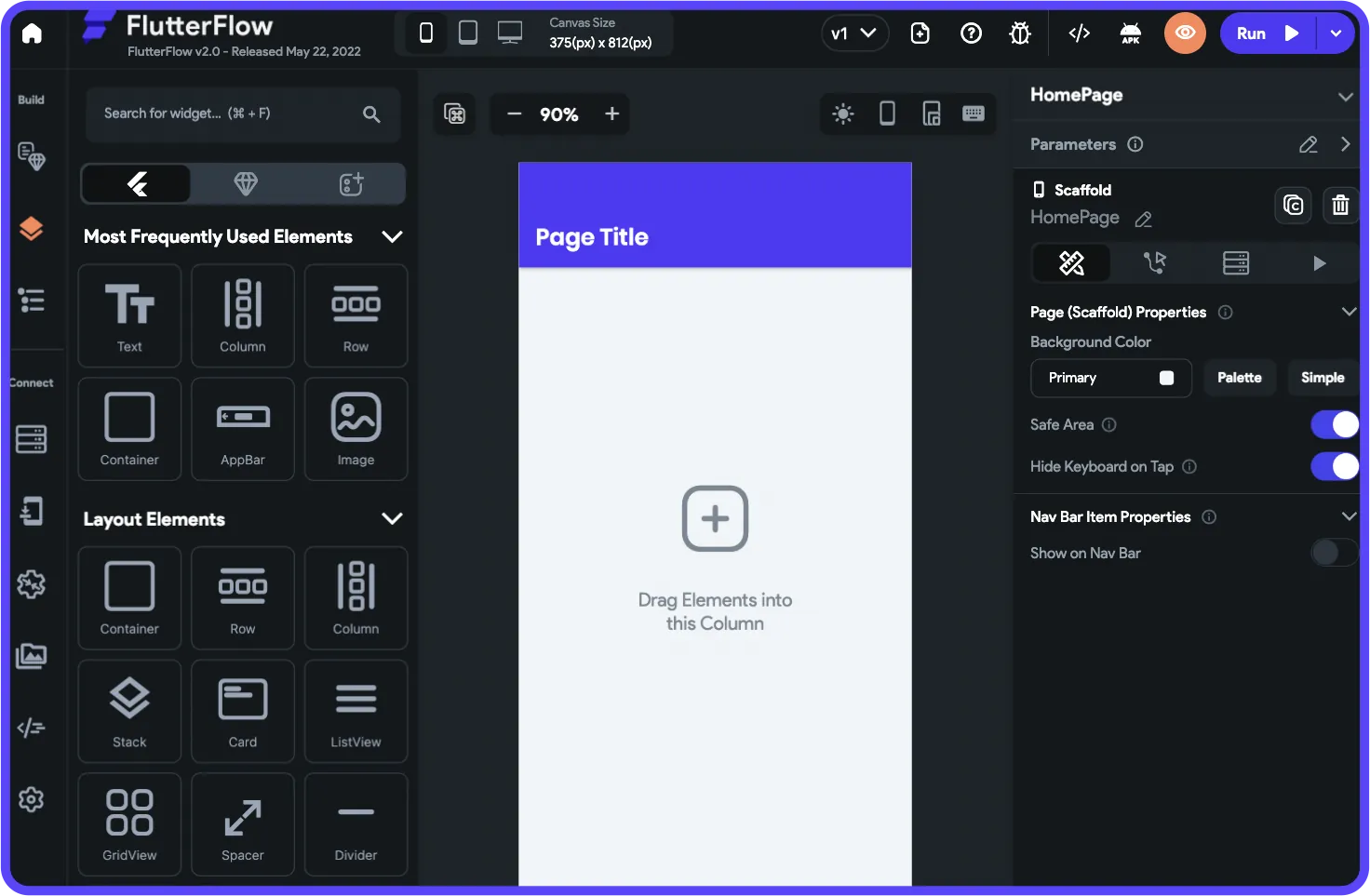
Like Draftbit, FlutterFlow is a low-code web and native mobile app builder. It leverages a drag-and-drop interface similar to photo-editing software, providing design flexibility and control—but requires significant technical knowledge to use effectively.
Features
- FlutterFlow provides abundant resources for learning the building interface. One particularly unique learning feature is the FlutterFlow Ambassadors, experts who create YouTube videos about learning FlutterFlow and share tips and tricks.
- You can try FlutterFlow without signing up. Visit the FlutterFlow Playground and tinker with its building interface to see how it feels—no signup information required.
- Want to create a few lines of code but don't want to write them out? Look no further than FlutterFlow's AI-code generator, which produces lines of code after you enter a prompt.
Pricing
FlutterFlow's pricing structure requires careful consideration. While you can start using FlutterFlow for $30/month (billed monthly) to download your source code, you'll need the $70/month tier (billed monthly) for simple publishing to the Apple App Store and Google Play Store and the ability to integrate with GitHub.
Critical consideration: FlutterFlow's pricing still doesn't include a database. Users need to source, setup, and pay for their own database separately—typically Firebase or another external service. This adds both cost and significant learning complexity, especially when looking for scale, as anything less than optimal setup can create performance problems.
If you're a big company looking to develop an app at scale, try FlutterFlow's Enterprise option. It comes with enterprise-level security and hands-on support. Contact FlutterFlow for pricing info.
Who It's Good For
FlutterFlow is a low-code app-building platform requiring a skill set similar to Draftbit. There's significant overlap between the two platforms. FlutterFlow also has a pricing plan for teams, which allows multiple members to build apps in real time.
The platform has developed an ecosystem rich with experts because so many users need help—and end up spending significant sums chasing scalability. If you're comfortable managing external databases and have Flutter/Dart experience, FlutterFlow can be powerful. If not, expect a steep learning curve.
Pros
- FlutterFlow is built on Google's Flutter framework and powered by Dart (a programming language), enabling you to create visually appealing mobile apps that perform on iOS, Android, and the web. This can also make publishing to the app stores less of a chore for those familiar with the framework.
- You can seamlessly connect your app with various APIs, Firebase, and third-party services. This capability streamlines your app-building while providing the option to add more power to your app.
- The platform is packed with pre-built components and templates, which you can add to your app, accelerating the development process without sacrificing design quality.
Cons
- You'll need to be familiar with the Flutter framework and their proprietary code in order to publish your app with FlutterFlow, meaning you'll need to bring significant technical skills.
- FlutterFlow relies heavily on the Flutter framework. While this is great if you're developing an app for the Flutter ecosystem, it's not ideal if you're creating an app to work primarily with other frameworks.
- While you can type in your own code, the only code FlutterFlow allows is Dart, which is not as widespread as Python or JavaScript. Even if you use the AI generator to create Dart commands, you'll still need to understand how the Dart language works.
- Limited canvas view: FlutterFlow's builder is limited in view, making it slow to see more than 2 screens at once. By comparison, Adalo can display up to 400 screens at a time on one canvas if needed.
- No included database: Users must source, setup, and pay for their own database separately, adding complexity and cost that isn't reflected in the advertised pricing.
Use Cases: When to Choose Draftbit, FlutterFlow, or Adalo
Knowing which app builder is best suited for you requires understanding how each platform executes your desired tasks. Here are four separate use cases and how each tool applies:
1. Building Customizable Mobile Apps with React Native Compatibility
React Native, an open-source framework, allows you to build mobile applications for iOS and Android compatibility. You can create mobile apps with high levels of customization and access to native devices. It's particularly suitable if you want to publish on the Apple App Store or Google Play Store.
Here's what to consider:
- Choose Draftbit: Because Draftbit is built on React Native, it's a robust choice. You'll get significant control and flexibility over your app's performance, allowing you to fine-tune, modify, and polish your source code. Yet, you'll need to be very familiar with React Native to leverage these powerful features.
- Choose FlutterFlow: Although FlutterFlow isn't built on React Native, it can deliver high-performance cross-platform apps. FlutterFlow excels if you have projects requiring scalable design and integration with Google's ecosystem. However, if you require React Native compatibility to integrate with an existing React Native project, FlutterFlow might not be the right choice.
- Choose Adalo: If you're looking to create an advanced app on React Native but want to build a simple MVP (minimum viable product) or startup app first, go with Adalo. The platform is easy enough (even more so for techies) to build your startup app fast and test it on Android and iOS ecosystems by publishing to the Apple App Store and Google Play Store. Then, you can create the next stage of your app using a platform compatible with React.
2. Building a Firebase-Integrated App with a Stellar UI/UX
Firebase is a cloud platform built in the Google ecosystem that provides tools for authentication, real-time database, cloud functions, and storage. To construct a Firebase-integrated app with a jaw-dropping UI/UX, you'll need a development platform combining backend power and design flexibility.
Here's what to look for:
- Choose Draftbit: Draftbit has loads of prebuilt components and tools combined with a powerful drag-and-drop interface to build a stunning user interface. You can also code in your features using Python or JavaScript to build unique frontend components. You can connect to Firebase via REST API, giving you nearly full access to the platform. If you're a techie, Draftbit is a solid choice.
- Choose FlutterFlow: Because FlutterFlow is built around Google's Flutter framework, it's exceptionally well-suited for Firebase services like authentication, Firestore, and cloud functions. This, coupled with its out-of-the-box Firebase integration, allows for a seamless connection to the platform. Combined with its powerful drag-and-drop interface and capability to create custom code commands using Dart, FlutterFlow provides flexibility and security for Firebase-centric projects.
- Choose Adalo: If you don't have any coding experience but still want to create a beautiful app integrated with Firebase, you can do so on Adalo. Adalo has an API integration with Firebase, allowing you to connect easily, and you'll also be able to customize your app without using any code. Plus, Adalo's built-in database means you can start building immediately without Firebase if you prefer a simpler setup.
3. Building Prototypes, MVPs, or Apps Quickly Without Code
If you don't have any programming experience and want to build an app to test an idea or validate a concept, or maybe you're a seasoned developer who wants to release a startup app without any fuss, read on to learn which tool best suits these use cases.
Here's how to decide:
- Choose Draftbit: Although it features a simple user interface, loads of templates, and several premade components, Draftbit is a viable tool for prototyping and creating smaller web apps. However, it's geared towards the tech crowd, so if you don't understand technical concepts like the logic behind programming, you'll struggle.
- Choose FlutterFlow: If you're looking to create a small MVP for publishing in the Apple App Store or Google Play Store, FlutterFlow can serve as a viable option as the Flutter framework makes it compatible with Android and iOS. And, just like Draftbit, you'll have access to a drag-and-drop interface for quick app construction. Yet, you'll need tech experience to use the platform, as it's low-code.
- Choose Adalo: Compared with Draftbit and FlutterFlow, Adalo is the best choice for prototyping and building a startup app. That's because Adalo is 100% no-code, and you won't need any tech or programming skills to use the platform. Magic Start generates complete app foundations from descriptions—tell it what you need, and it creates your database structure, screens, and user flows automatically. You can publish your MVP to the web, Apple App Store, and Google Play Store from a single codebase.
4. Scaling and Maintaining Long-Term Code Ownership
Want to scale your new app to reach an audience in the hundreds of thousands or more? Perhaps you want to keep your app's source code so you won't have to worry about losing your app if the platform goes out of business, or you want to further develop your app with your own coding skills?
Consider the following:
- Choose Draftbit: Draftbit allows you to export your app's source code for compatibility with the React Native framework and scales well on that framework, making it an ideal choice for scaling web apps where code ownership is paramount.
- Choose FlutterFlow: FlutterFlow allows you to download your Dart source code. Because it's based on Flutter, FlutterFlow is ideal for scaling native mobile apps for iOS and Android systems—provided you have the technical expertise to manage the exported code and external database.
- Choose Adalo: Adalo's modular infrastructure scales to serve apps with millions of monthly active users, with no upper ceiling. Unlike app wrappers that hit speed constraints under load, Adalo's purpose-built architecture maintains performance at scale. With no record limits on paid plans and no usage-based charges, your costs remain predictable as you grow. While Adalo doesn't allow source code export, the platform's stability (processing 20 million+ data requests daily with 99%+ uptime) means you're building on proven infrastructure.
Which Platform Should You Choose?
When debating Draftbit vs. FlutterFlow vs. Adalo, consider the following points:
- How much coding knowledge do you have?
- Do you want to manage your own database?
- How much can you spend?
- How many apps do you want to build?
Folks in the tech crowd who want to patch in their code and then keep their source code after publishing their app might want to consider Draftbit or FlutterFlow.
For those who want to release their app in the Apple App Store and Google Play Store, Draftbit has the edge in a FlutterFlow vs. Draftbit face-off. Draftbit allows you to publish on the app stores for $29/month, while with FlutterFlow, it costs $70/month—and FlutterFlow still requires you to set up and pay for an external database.
However, Adalo appeals to both the tech crowd and the tech-averse crowd. Adalo lets you publish your app to the app stores for $36/month (billed annually), with a built-in database included at no extra cost.
Adalo also offers more pricing value—its second tier is only $52/month (billed annually), which is significantly cheaper than FlutterFlow and Draftbit's second tiers at $70/month and $79/month, respectively. And Adalo's pricing includes unlimited database records and unlimited usage, while competitors often have caps or usage-based charges.
Next Steps: Build the App of Your Dreams with Adalo
Are you not part of the tech crowd and don't know a thing about coding? Or maybe you're a seasoned programmer who wants a user-friendly app-building experience. No matter how tech-savvy you are (or aren't), Adalo is the AI-powered app builder that can make your app a reality.
When comparing Draftbit vs. FlutterFlow vs. Adalo for ease of use, Adalo takes the cake by a mile. It has an extremely easy learning curve—described as "easy as PowerPoint"—but it packs enough punch and design freedom for you to make an uber-professional, eye-catching app.
Choose from almost 40 different templates to get started. Then, select from over 100 plugins and 5,500 integrations to supercharge your app. With Magic Start generating complete app foundations from descriptions and Magic Add building features from natural language requests, you can go from idea to published app faster than ever.
Sign up with Adalo for free right now!
FAQ
Why choose Adalo over other app building solutions?
Adalo is an AI-powered app builder that creates true native iOS and Android apps. Unlike web wrappers, it compiles to native code and publishes directly to both the Apple App Store and Google Play Store from a single codebase—the hardest part of launching an app handled automatically. With unlimited database records on paid plans and no usage-based charges, your costs stay predictable as you scale.
What's the fastest way to build and publish an app to the App Store?
Adalo's drag-and-drop interface and AI-assisted building let you go from idea to published app in days rather than months. Magic Start generates complete app foundations from descriptions, and Adalo handles the complex App Store submission process so you can focus on your app's features instead of wrestling with certificates and provisioning profiles.
Which is more affordable, Adalo or FlutterFlow?
Adalo starts at $36/month (billed annually) for app store publishing with an included database and unlimited usage. FlutterFlow requires $70/month for app store publishing and still doesn't include a database—you'll need to source, setup, and pay for that separately, adding both cost and complexity.
Which is faster to build with, Adalo or FlutterFlow?
Adalo is significantly faster for most users because it's truly no-code with an included database. FlutterFlow requires technical knowledge of Flutter/Dart and external database setup. Adalo's Magic Start can generate complete app foundations from descriptions in minutes, while FlutterFlow requires manual configuration of both the app and database.
Which is easier for beginners, Adalo or Draftbit?
Adalo is dramatically easier for beginners. Draftbit is a low-code platform requiring familiarity with React Native, JSON, and database structuring. Adalo's visual builder has been described as "easy as PowerPoint" and requires no technical knowledge whatsoever.
Is Adalo better than FlutterFlow for mobile apps?
For most users, yes. Adalo creates native iOS and Android apps from a single codebase with an included database, unlimited records on paid plans, and no usage charges. FlutterFlow requires external database management, technical Flutter/Dart knowledge, and has a steeper learning curve. FlutterFlow may suit developers already experienced with Flutter who need code export.
Can I migrate from Draftbit to Adalo?
While there's no direct migration tool, you can rebuild your app in Adalo quickly using Magic Start to generate your app foundation from a description. Adalo's no-code approach means you won't need the React Native knowledge Draftbit requires, and you'll gain an included database with no record limits.
Do I need coding experience to use Adalo?
No. Adalo is a truly no-code platform—you don't need any programming or technical skills. The visual builder works through drag-and-drop, and AI features like Magic Start and Magic Add let you describe what you want in plain language. This contrasts with Draftbit and FlutterFlow, which both require technical knowledge.
How does Adalo handle scalability compared to competitors?
Adalo's modular infrastructure scales to serve apps with millions of monthly active users, with no upper ceiling. Paid plans have no database record limits and no usage-based charges. The platform processes 20 million+ data requests daily with 99%+ uptime. Note that most third-party comparisons predate Adalo 3.0's infrastructure overhaul in late 2025, which made the platform 3-4x faster.
What integrations does Adalo support?
Adalo offers over 100 plugins and 5,500+ third-party integrations, including Zapier, Stripe, QuickBooks, and Firebase. You can also use Sheetbridge to turn a Google Sheet into an actual database for the easiest data management without database-related learning curves.