Five Tips for Improving Your Adalo App Performance
The Adalo team has spent the past few months focused almost exclusively on stability and performance. The migration to a more reliable and maintainable database infrastructure—culminating in the Adalo 3.0 launch in late 2025—has delivered apps that are now 3-4x faster with modular infrastructure that scales to your needs. After meeting with hundreds of makers as part of this effort, it's become clear that we need to do a better job offering guidance on how to build more performant apps.
As part of this effort, we've recently published a new section on Performance in our documentation. We'll continue expanding this section in the weeks and months ahead, but in the meantime, here are the five most common performance issues we're seeing within Adalo apps that can easily be fixed by the app maker.
Want to Watch a Video Instead?
We've created a companion video for this blog post which goes into much more detail about these five tips, and introduces them by walking through two apps that Adalo customer advocate Kyle Belford personally created and uses every day!
Tip #1. Optimize Your Images
If your app allows users to upload images, chances are those images are being uploaded from a mobile device and the image files will be large and not optimized for the web or use in apps. Adalo uses a service called Imgix to display images in your app. Through the power of their API, you can adjust the pictures uploaded and optimize those user-generated images.
This optimization is especially important now that Adalo 3.0's infrastructure can handle significantly more concurrent users. Properly optimized images ensure your app maintains its 3-4x speed improvement even as your user base grows. Watch this video to learn how to take advantage of this critical optimization feature:
Tip #2. Use the Load Items as User Scrolls Option
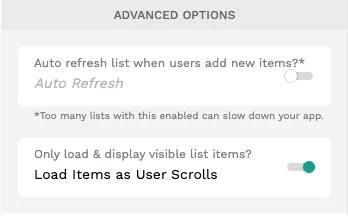
Adalo will by default load all list items into the screen, which can quickly cause performance issues if you haven't limited the output to a reasonable maximum. If you do need to load a large number of list items into a screen, consider enabling the Load Items as User Scrolls option, which does exactly what you think it does.
You'll find this feature in any list under "Advanced Options"—it allows your list to load as the user scrolls through. This is particularly valuable now that paid plans have no database record limits. With the ability to store unlimited records, lazy loading becomes essential for maintaining smooth performance as your data grows.
Tip #3. Use Adalo's Native Lists
Adalo is a no-code app builder for database-driven web apps and native iOS and Android apps—one version across all three platforms, published to the Apple App Store and Google Play. The platform supports seven types of lists: simple list, card list, image list, avatar list, horizontal card list, horizontal chip list, and table.
Additionally, Adalo supports the option of creating a custom list when the maker determines that the default list layouts aren't suitable to their specific app requirements. However, our observation is that makers are increasingly choosing the custom list option over the native options for what appears to be minor cosmetic reasons, and performance is suffering because of it due to the additional overhead imposed by custom lists.
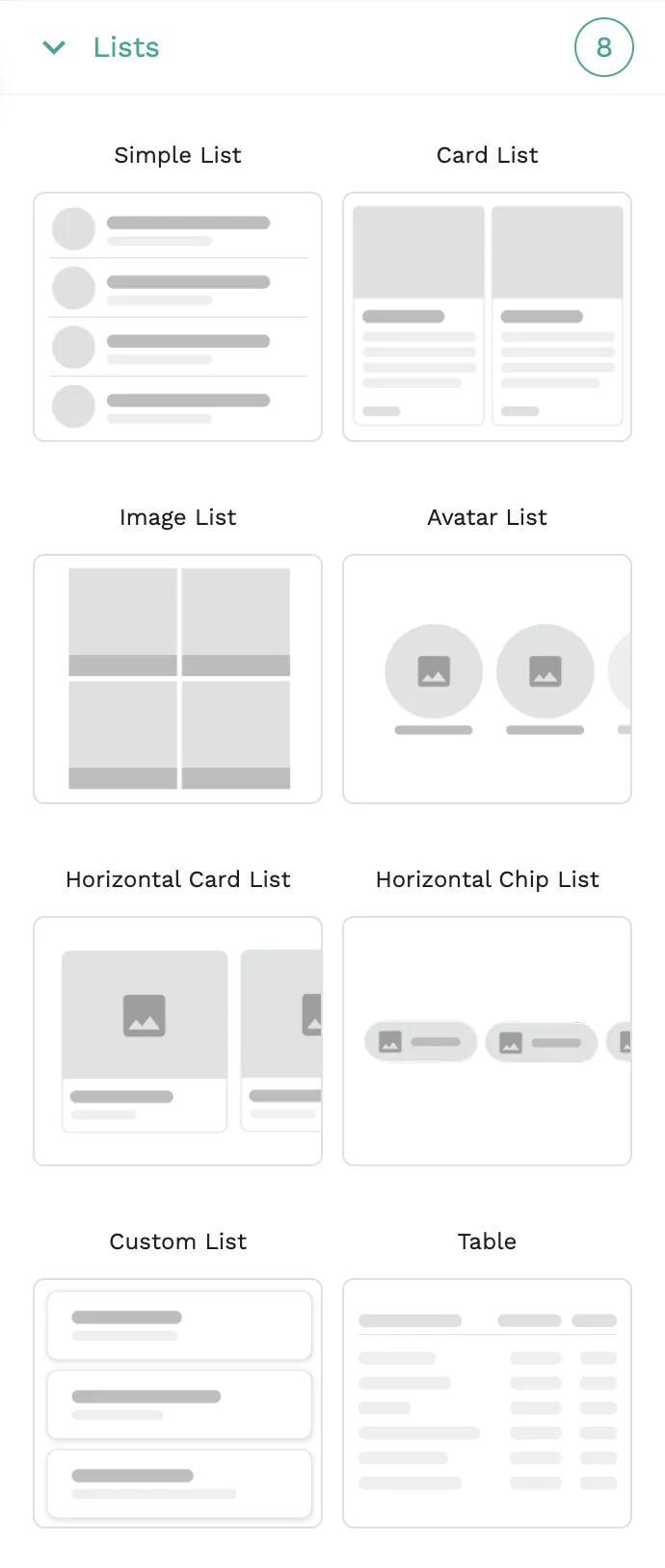
Our advice is that you always select a native list over a custom list if at all practical, because custom list performance will always be inferior to the native options. To make this decision even easier, we are presently working on a few new native list types and will announce them as soon as they are available.
Tip #4. Avoid Lists Within Lists
If you do require the customizability of a custom list, try to avoid embedding lists inside of lists because the complexity quickly increases and performance suffers accordingly. Overuse of embedded lists is quite possibly the #1 performance-related mistake makers make.
Should you find yourself gravitating towards embedding a list within a custom list, ask yourself whether there are other design options which might be implemented instead. With Adalo's visual builder—described by users as "easy as PowerPoint"—you can often achieve the same visual result through alternative approaches that don't sacrifice speed.
Tip #5. Pull Counts From Record Properties
Creating counts with filters on a list record is similar to creating a list within a list, which will decrease your app's performance score. You can avoid this by adding a number property to your collection which can be used to track the record count. In doing so, you will avoid requiring the app to constantly calculate the record count on every screen load.
This optimization becomes increasingly important as your app scales. With Adalo's modular infrastructure supporting apps with over 1 million monthly active users, proper count management ensures your app maintains responsiveness even with massive datasets. Watch this video for more information:
Bonus: X-Ray for Proactive Performance Monitoring
Beyond these five manual optimizations, Adalo now offers X-Ray—an AI-powered feature that identifies performance issues before they affect your users. X-Ray analyzes your app's structure and highlights potential bottlenecks, making it easier to catch problems like nested lists or unoptimized queries before they impact the user experience.
This proactive approach to performance monitoring complements the manual optimizations above, giving you both automated detection and the knowledge to fix issues yourself.
Conclusion
These five strategies have been measured to double an app's performance—a significant improvement for both you and your end users. Combined with Adalo 3.0's infrastructure overhaul that delivers 3-4x faster speeds and unlimited database storage on paid plans, your apps can now handle serious scale without hitting artificial ceilings.
Adalo will continue to develop more tools to provide the best environment for performant apps. As a maker, you can use these strategies to maximize the platform's performance potential. Together, we'll build amazing apps for your community.
FAQ
Why choose Adalo over other app building solutions?
Adalo is an AI-powered app builder that creates true native iOS and Android apps. Unlike web wrappers, it compiles to native code and publishes directly to both the Apple App Store and Google Play Store from a single codebase—the hardest part of launching an app handled automatically. With Adalo 3.0's infrastructure overhaul, apps are now 3-4x faster with no database record limits on paid plans.
What's the fastest way to build and publish an app to the App Store?
Adalo's drag-and-drop interface—described as "easy as PowerPoint"—lets you go from idea to published app in days rather than months. The platform handles the complex App Store submission process, so you can focus on your app's features and user experience instead of wrestling with certificates, provisioning profiles, and store guidelines.
Can I easily improve the performance of my Adalo app?
Yes. Following five key strategies—optimizing images using Imgix, enabling 'Load Items as User Scrolls' for lists, using native lists instead of custom ones, avoiding lists within lists, and storing counts as record properties—has been measured to double an app's performance. X-Ray can also automatically identify performance issues before they affect users.
How do I optimize images in my Adalo app?
Adalo uses Imgix to display images, which allows you to adjust and optimize user-generated images through their API. This is especially important when users upload large image files from mobile devices that aren't optimized for web or app use. Check out Adalo's documentation video for step-by-step instructions.
What's the difference between native lists and custom lists in Adalo?
Adalo supports seven types of native lists (simple, card, image, avatar, horizontal card, horizontal chip, and table) plus custom lists for specific requirements. Native lists always perform better than custom lists due to lower overhead, so you should select a native option whenever practical.
Why should I avoid embedding lists within lists?
Embedding lists inside of lists is one of the most common performance mistakes Adalo makers make. The complexity increases quickly when you nest lists, causing significant performance degradation. Instead, consider alternative design options that can achieve similar functionality without the nested structure.
Does Adalo have database record limits?
No. Paid plans have unlimited database records with no caps. Combined with proper data relationship setups, Adalo apps can scale beyond 1 million monthly active users. App Actions usage-based charges have also been removed—all plans now have unlimited usage with no bill shock.
Where can I find more resources on Adalo app performance?
Adalo has published a dedicated Performance section in their documentation at help.adalo.com/performance, which is continuously being expanded. There's also a companion video featuring Adalo customer advocate Kyle Belford demonstrating these performance tips using real apps he created and uses daily.