How to Build A Mobile App: No Coding Required
Why Adalo Is the Easiest Way to Build Your Mobile App
Adalo is a no-code app builder for database-driven web apps and native iOS and Android apps—one version across all three platforms, published to the Apple App Store and Google Play. This means you can take your app idea from concept to live product without writing a single line of code—and reach users on any device from one unified project.
Having your app in the official app stores matters more than ever. Users expect to download apps from the Apple App Store and Google Play, where they can read reviews, receive automatic updates, and trust that the app meets platform standards. With Adalo, you get real native apps with push notifications to keep users engaged—not just a mobile website wrapper. Let's explore exactly how to build your app from scratch.
Building a mobile app used to mean hiring developers, managing code repositories, and spending months (or years) before seeing a working product. For entrepreneurs, small businesses, and creators with app ideas, this traditional path was often a dead end—too expensive, too slow, too technical.
Adalo, an AI-powered app builder, changes this equation entirely. With a drag-and-drop interface and AI-assisted features, you can build database-driven web apps and native iOS and Android apps from a single project. One build publishes to the web, Apple App Store, and Google Play Store. No coding required.
This guide walks you through everything: from understanding Adalo's interface to designing screens, setting up databases, adding functionality, and publishing your finished app to the world.
What is Adalo?
Adalo is an AI-powered app builder that doesn't require any technical or coding knowledge. If you can create an email or social media account, you have the skills to build your app. It's that simple.
The platform uses an intuitive drag-and-drop interface where you build your app like you would a PowerPoint presentation. Point and click on the features and functions you want to add, drag images from your desktop to your building canvas, and edit everything directly on the interface. Over 3 million apps have been created on Adalo, with users consistently describing the visual builder as "as easy as PowerPoint."
How Adalo Stands Out
A mind-boggling number of mobile app builders exist today. Yet Adalo leads the pack for several compelling reasons. Here's why I've recommended Adalo more than any other app-building platform:
- Actually no-code and simple: Some app-building platforms claim to be no-code, but when you start, they ask you to name a recursion. Not cool. Others are genuinely no-code but require months learning their complex building interface.
Adalo requires zero code knowledge and has a gentle learning curve. Most people can start building their app without reading help documents or watching tutorials. It's hands down one of the most accessible app-building platforms available.
- Highly customizable flexibility with power: While Adalo is simple, it doesn't sacrifice capability. You can add almost any functionality you need, as Adalo comes packed with third-party plugins and a Zapier integration that connects to over 5,500 external programs.
The platform is highly flexible too. You're not limited to specific app types—leverage Adalo to create restaurant apps, CRM tools, e-commerce apps, social networks, and countless other applications.
- Web apps and native mobile apps from one build: Many app builders only create web apps that users access through phone browsers. Adalo is one of the few platforms that creates both web apps and native mobile apps for publishing on the Apple App Store and Google Play Store—all from a single codebase.
Native mobile apps deliver more punch than web apps: They leverage a device's processor for optimized speed and can access the camera, GPS, and other built-in tools. This native compilation approach outperforms app wrappers that simply package web content.
- Competitively priced with no surprises: Adalo offers a generous free version with useful features like Stripe integration for payments and web publishing. Paid plans start at $36/month with unlimited usage and no record caps—meaning no bill shock from unexpected charges.
If you need more power, the next tier costs only $52/month. Compare this to competitors: Bubble's comparable offering starts at $59/month with usage-based charges and record limits. FlutterFlow starts at $70/month per user but doesn't include a database—you'll need to source, set up, and pay for that separately.
Getting Started with Adalo
The first step to building with Adalo is heading to the homepage and creating your free account.
Once registered, select one of Adalo's pre-made templates to get started. If you prefer starting from scratch, that option exists too. But Adalo's templates simplify the building process significantly, including app screens, preloaded functionalities, a database, and more.
Ada, Adalo's AI builder, lets you describe what you want and generates your app. Magic Start creates complete app foundations from a description, while Magic Add adds features through natural language.
For even faster starts, Magic Start generates complete app foundations from simple descriptions. Tell it you need a booking app for a dog grooming business, and it creates your database structure, screens, and user flows automatically—what used to take days of planning happens in minutes.
Adalo's Building Interface: 101
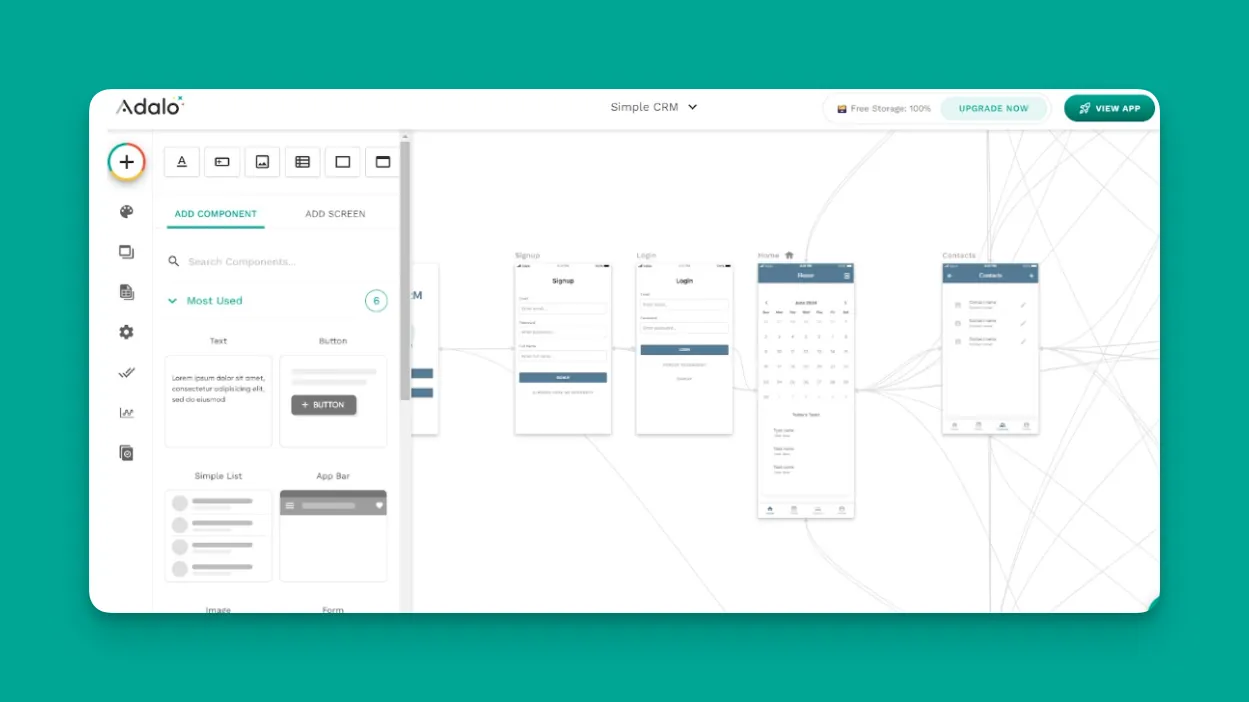
After setting up your account and selecting a template, you'll land on Adalo's app-building interface. It consists of three main parts:
- The top ribbon menu: Located at the very top of your screen, this menu lets you access other apps, preview your app to see how it looks live, and access your account settings.
- The building canvas: This center section is where actual app building happens. You'll see all your app's screens and arrows illustrating navigation paths between them. Adalo can display up to 400 screens at once on a single canvas—a significant advantage over builders that limit you to viewing just two screens at a time.
Click on any screen to edit it; an editing box appears on your left. This box lets you adjust fonts, change colors, and customize any other aspect of the screen.
- The left-hand drop-down dashboard: This serves as Adalo's main editing tool, with functions for adding forms and screens, selecting screens, changing app colors, editing your database, and more.
Start Designing Your Mobile App
Now that you understand Adalo's interface, it's time for the fun stuff: building your app. The prebuilt template you selected includes all the screens needed for a fully functioning app.
But you'll want to customize each screen's color scheme, font, and elements so your app reflects your brand and tastes.
Doing this is straightforward. Go to the left-hand drop-down dashboard. To add new screens, forms, elements, or buttons, press the top icon that looks like a "+" surrounded by a colorful circle.
To change your app's colors, hover over the button that looks like an artist's palette, and the word "Branding" appears. Click this to modify each screen's colors and fonts. For quick access to any screen, press the "Screens" button and select the one you want to edit.
Magic Add accelerates this process further—describe what you want to add in natural language, and Adalo creates it. Need a user profile screen with avatar upload and bio field? Just describe it, and the feature appears ready for customization.
Set Up Your App's Database
As mentioned earlier, the template you choose comes with a pre-made database. Adalo lets you expand and customize this database to meet your specific needs.
Each database has two main components: Collections and properties.
Collections are essentially spreadsheets made up of columns (dropping vertically) and rows (running horizontally). Your template includes premade collections suited to your app type.
For example, if you're building an e-commerce app, you'll find collections for your products. You can customize collection names and add new ones as needed.
Properties are the classifications within a collection, labeled as vertical columns. These columns contain your data—for an e-commerce app, this might include product price, inventory count, images, and more.
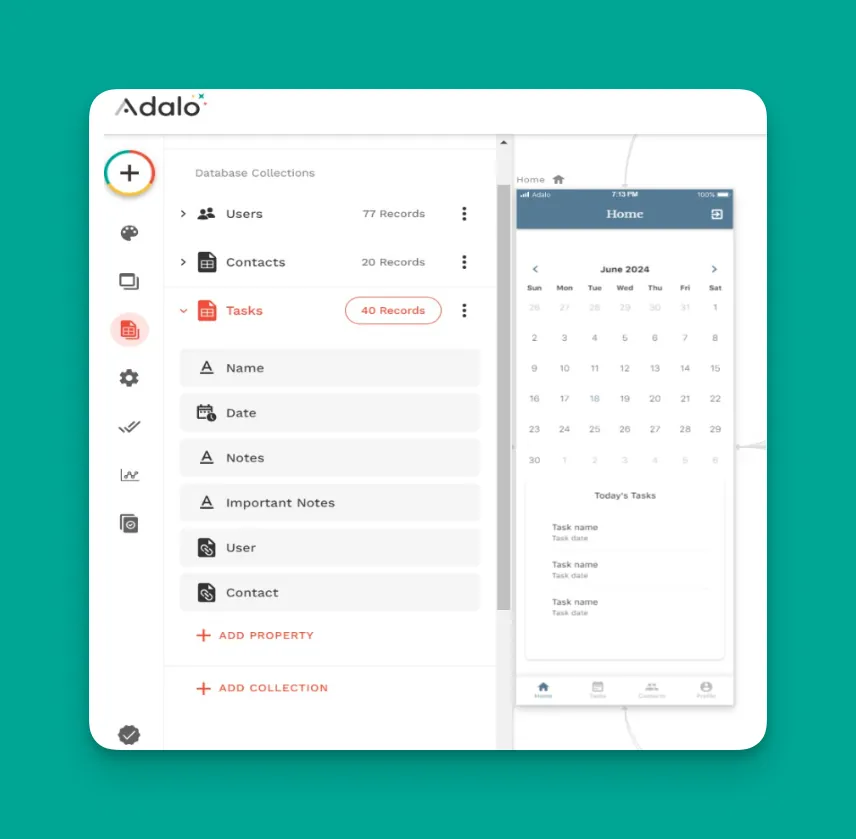
Customizing your database is a breeze. Click on any collection to see its properties. To create new properties or collections, click the "Add Property" and "Add Collection" buttons, and you're off to the races.
A critical advantage: paid Adalo plans have no database record limits. Unlike platforms that cap you at specific record counts or charge extra for data storage, Adalo's infrastructure scales with your needs. With proper data relationship setups, Adalo apps can scale beyond 1 million monthly active users.
If you're coming from spreadsheets, SheetBridge lets you turn a Google Sheet into an actual database—the easiest path to app building without learning database concepts. This approach offers more convenience than competitors like Glide that remain heavily tied to spreadsheet formats with limited creative freedom.
Add Functionality with Actions
Give your app dynamic capabilities by implementing actions. Here are several dynamic actions you can add to your Adalo-made app:
- Link pages: Linking elements like buttons and text to other screens and external web pages is simple. Find the screen you want as your link's origin. Then click "Actions" in the left-hand editing box and push the "Add Another Action" button. Select the destination screen or enter the website URL. Easy peasy!
- Add push notifications: Select the element or button you want to trigger a push notification. Find the "Notifications" button and select "Trigger Notifications." Fill in who receives the notifications, what they say, and when they're sent.
- User authentication: Set up user authentication so people can join your social network, store membership, restaurant VIP program, or any kind of membership. Templates typically come preloaded with sign-in screens, but if not, you can add one in seconds.
Press the "+" button at the top of the left-hand drop-down dashboard, select "Add New Screen," find the screen with a sign-in form, and drag it to your app. Then click the signup form and connect the "Username" and "Password" fields to their corresponding database collections.
- Create and update records: App users add information to your database by filling out forms. To create a new record, go to the form you want to gather data with and select "Which Data Collection" in the left-hand editing box. Then click "Add a New Collection" where data from that form will go. Edit the properties, and you're good to go.
Need to update records? Click on the form and navigate to the collection you want to update. Select the "What do you want your form to do?" option, scroll down to "Update Logged in User," add fields for users to fill out, and you'll have updated records.
Publish Your App
Adalo lets you publish your app as both a web app and native mobile apps without major changes to what you've built. Below, I'll walk you through the general steps for publishing to the web, Apple App Store, and Google Play Store.
How to Publish Your Mobile App to the Web
Before publishing to the web, ensure everything runs smoothly—releasing a sloppy app that crashes won't reflect well on your brand. Here's how to test and publish your web app:
- Navigate to the top ribbon menu and push the big green button labeled "View App." Select the "Staging Preview" button and navigate through each screen and feature to verify everything functions correctly.
- Get feedback from actual users to determine whether your app is truly ready for public release. Adalo lets you share your web app with testers: From the "Staging Preview" button, select "Share Your App." You can send a link via SMS or copy a QR code.
- Share your app with a designated group of people. Ask them to provide feedback about user experience and needed changes.
- After receiving feedback, implement the needed changes and have users test again. If no major problems remain, it's time to publish!
- Select your profile button at the right-hand corner of the top ribbon menu, scroll down to "Settings," and click "Domain." Enter your website address in the box that appears.
Return to the building interface and click the "Publish" button—your app is now live on the web!
How to Publish Your Mobile App to the App Stores: Preparation
Publishing to the Apple App Store and Google Play Store gets your app in front of an even larger audience. Before publishing, prepare by completing the following:
- Make a standout icon: After publishing to app stores, users see your app in search results among many others. Your app needs to grab attention to earn downloads. Create an eye-catching icon.
You don't need to be Andy Warhol to make a gorgeous icon. Services like Looka help you build beautiful icons without graphic design experience.
- Write a concise meta description: Before launching, search for apps in your niche on both app stores. Read the meta descriptions of top-ranking apps and note the keywords used.
When writing your meta description, incorporate these keywords. Ensure your description illustrates all your app's features. Keep the word count below that of top-ranking apps—no one wants to read an overwritten meta description.
- Use professional screenshots: Only include high-quality screenshots that clearly show your app's best features. Failure to illustrate what your app does or providing sloppy images results in very few downloads.
Once you've checked these three boxes, it's time to publish! The Apple App Store and Google Play Store have different publishing requirements, described below.
How to Publish to the Apple App Store
Navigate to the iOS developer web page and create an account. You'll pay an annual fee of $99. Then test your iOS app using TestFlight, Apple's testing program. Like testing your web app, you'll gather user feedback and implement improvements.
Return to your Adalo account and push the "Publish" button on your left-hand drop-down dashboard. Follow the procedures and submit your app for publishing.
Because of iOS's strict standards, expect your app to be live in the Apple App Store in as little as a few weeks and as much as a few months. Adalo handles the complex submission process—certificates, provisioning profiles, and store guidelines—so you can focus on your app's features.
How to Publish to the Google Play Store
Create a developer account at the Google Play Console website. Unlike Apple, you only pay a one-time $25 fee. Follow the publishing instructions and opt-in to let testers try your app.
Return to Adalo, hit the "Publish" button, and provide your information. Google's publishing wait time is short—usually only a few weeks.
A key advantage: Adalo's paid plans include unlimited app store updates. Once published, you can push improvements without additional charges. Compare this to platforms like Glide that limit app updates or don't support app store publishing at all.
Check out our app-marketing strategy guide if you want to supercharge your marketing plan.
Enhance Your App with Integrations
Adalo has integrations that connect to other third-party apps. These integrations let you access more data and give your app more power. While adding integrations may sound intimidating, it's actually simple.
The first way to add integrations is by downloading plugins from Adalo's Component Marketplace. Here you'll find plugins and tools—calendars, progress bars, signature tools, and more—made by Adalo's developer community.
To add these to your app, click the "+" button at the top of your left-hand drop-down dashboard and scroll down to "Explore Marketplace." You'll find over 100 free and paid plugins.
Adalo also integrates with over 5,000 third-party apps, including QuickBooks, MailChimp, Slack, Zapier, and more.
To add integrations, go to the screen you want, find the element, and scroll down to "Add Action." Then find "New Integration" and select your preferred third-party app.
Follow Best Practices for Building with Adalo
Once you've finished building your app and acquired users, you'll need to ensure it stays in tip-top shape. Check your app's analytics daily by pushing the "Analytics" button on your left-hand drop-down dashboard.
X-Ray identifies performance issues before they affect users—highlighting potential bottlenecks so you can address them proactively rather than reactively. This is especially valuable as your user base grows.
Want to see apps that people like you have made using Adalo? Head to Made in Adalo for first-hand examples. Here's a sample of mobile apps built with Adalo:
- Joy Blossom: A meditation app packed with checklists and guided meditations to improve mindfulness. It includes tools to check your emotional health and work toward peace-of-mind improvements daily.
- Stew: Designed to catch, control, and vanquish anger problems. It comes packed with resources and tools that help users manage anger in specific situations, giving them autonomy over emotional triggers.
- Scholarcash: Aimed at soon-to-be college students, this app simplifies the scholarship application process. It gathers information so students can find scholarships matching their personal background and educational aspirations.
These examples demonstrate the range of what's possible—from wellness apps to educational tools to productivity solutions. With Adalo's modular infrastructure scaling to serve apps with millions of monthly active users, your app can grow from MVP to market leader on the same platform.
How Adalo Compares to Alternatives
Understanding where Adalo fits among app-building options helps you make an informed choice. Here's how it stacks up:
| Platform | Starting Price | Native Mobile Apps | Database Included | Record Limits |
|---|---|---|---|---|
| Adalo | $36/month | Yes (iOS & Android) | Yes | Unlimited on paid plans |
| Bubble | $59/month | Wrapper only | Yes | Limited by Workload Units |
| FlutterFlow | $70/month per user | Yes | No (external required) | Depends on external DB |
| Glide | $60/month | No | Spreadsheet-based | Limited, extra charges apply |
| Softr | $167/month | No | Spreadsheet-based | Limited per app and datasource |
Bubble offers more customization options but often results in slower applications that struggle under increased load. Their mobile solution is a wrapper for the web app, introducing potential challenges at scale. Many Bubble users end up hiring experts to achieve scalability—claims of millions of MAU typically require significant professional help and expense.
FlutterFlow is technically "low-code" rather than no-code, designed for technical users. You'll need to source, set up, and pay for your own database separately, which requires significant learning—especially when optimizing for scale. Their builder limits you to viewing two screens at once, slowing development compared to Adalo's 400-screen canvas view.
Glide excels at spreadsheet-based apps with fast building and publishing, but creates generic, simplistic apps with limited creative freedom. It doesn't support Apple App Store or Google Play Store publishing.
Note that most third-party platform ratings and comparisons predate Adalo 3.0's infrastructure overhaul in late 2025. The platform is now 3-4x faster with modular infrastructure that scales with app needs—a significant improvement that older reviews don't reflect.
Conclusion
Building a mobile app without coding is no longer a compromise—it's a legitimate path to launching products that compete with traditionally-developed apps. The key is choosing a platform that balances ease of use with the power to scale.
From designing screens and setting up databases to adding functionality and publishing to app stores, the process is accessible to anyone willing to invest the time to learn. The examples from Joy Blossom to Scholarcash prove that meaningful, useful apps emerge from this approach.
Ultimately, you can create almost any type of app you can imagine. Enjoy your mobile app-building journey!
FAQ
Why choose Adalo over other app building solutions?
Adalo is an AI-powered app builder that creates true native iOS and Android apps from a single codebase. Unlike web wrappers, it compiles to native code and publishes directly to both the Apple App Store and Google Play Store. Paid plans include unlimited database records and no usage-based charges—the hardest parts of launching an app handled automatically.
What's the fastest way to build and publish an app to the App Store?
Adalo's drag-and-drop interface combined with AI-assisted features like Magic Start lets you go from idea to published app in days rather than months. Magic Start generates complete app foundations from simple descriptions, and Adalo handles the complex App Store submission process—certificates, provisioning profiles, and store guidelines—so you can focus on your app's features.
Can I build a mobile app without any coding experience?
Yes. Adalo's interface is designed so that if you can create an email account, you have the skills to build an app. Most users start building immediately without reading help documents or watching tutorials. The drag-and-drop builder works like PowerPoint—point, click, and drag elements onto your canvas.
What types of apps can I build with Adalo?
Adalo offers highly customizable flexibility for building almost any app type—restaurant apps, CRM tools, e-commerce apps, social networks, membership platforms, booking systems, and more. The platform includes third-party plugins and Zapier integration connecting to over 5,500 external programs.
How much does Adalo cost compared to alternatives?
Adalo's paid plans start at $36/month with unlimited usage and no record caps. Compare this to Bubble at $59/month with usage-based charges and record limits, FlutterFlow at $70/month per user without an included database, or Glide at $60/month without app store publishing support.
Which is better for mobile apps, Adalo or Bubble?
Adalo creates true native iOS and Android apps, while Bubble's mobile solution is a wrapper for web apps. Native apps leverage device processors for optimized speed and can access cameras, GPS, and other built-in tools. Bubble offers more customization but often results in slower applications that struggle under load.
Is Adalo easier than FlutterFlow for beginners?
Yes. FlutterFlow is technically "low-code" designed for technical users, while Adalo is truly no-code. FlutterFlow also requires you to source, set up, and pay for your own database separately—significant learning complexity. Adalo includes the database and can display up to 400 screens at once versus FlutterFlow's two-screen limit.
Does Adalo have database record limits?
No. Paid Adalo plans have unlimited database records with no caps. With proper data relationship setups, Adalo apps can scale beyond 1 million monthly active users. This contrasts with platforms like Bubble that limit records through Workload Units or Glide that charges extra for additional data rows.
How long does it take to build and publish an app?
With Adalo's templates and AI features like Magic Start, you can have a working app in hours. Publishing to the web is immediate. Google Play Store approval typically takes a few weeks, while Apple App Store approval ranges from a few weeks to a few months depending on app complexity and review queue.
Can I migrate from another platform to Adalo?
Yes. Adalo's database structure accepts imported data, and SheetBridge lets you connect existing Google Sheets directly as a database. While you'll need to rebuild screens and logic, your data can transfer over, and Adalo's intuitive interface makes rebuilding faster than starting from scratch on most platforms.