How to Build a Money-Making App with Adalo: 12 Revenue Models
Building a profitable app no longer requires a massive budget or months of development. With Adalo, you can create and monetize apps for iOS, Android, and the web using a simple drag-and-drop interface. Plans start at $36/month with no hidden fees, allowing you to scale without worrying about rising costs.
Here’s how you can monetize your Adalo app with 12 proven revenue models:
- Subscriptions: Offer tiered plans with Stripe integration.
- In-App Purchases: Sell items or features via Apple and Google payment systems.
- Freemium Model: Provide basic features for free and charge for premium upgrades.
- Advertising: Use AdMob for banner and video ads.
- Marketplace Commissions: Take a cut of transactions between buyers and sellers.
- Sponsored Content: Feature paid promotions within your app.
- Lead Generation: Collect and sell user inquiries.
- White-Label Licensing: Customize and sell your app to clients.
- Data Insights: Generate revenue by selling anonymized analytics.
Adalo’s flat pricing keeps costs predictable, so every dollar earned directly boosts your profit. Start building your app today and turn your idea into a revenue-generating business.
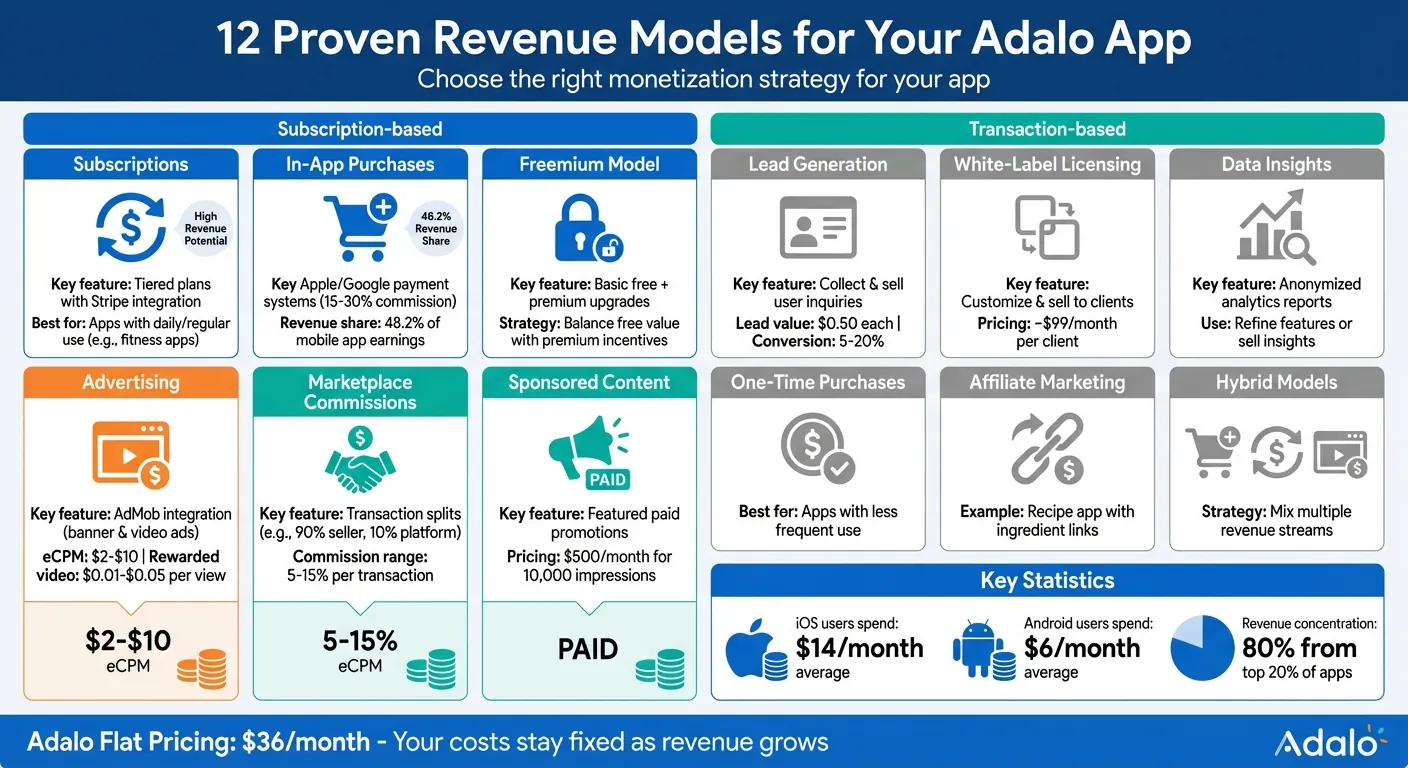
12 Revenue Models for Adalo Apps: Monetization Strategies Comparison
Build an Ecommerce Mobile App using Adalo part 1
App Monetization Basics
Choosing the right revenue model starts with understanding your users—how often they engage with your app and the specific problem it solves. A fitness app that people use daily is ideal for a subscription model, offering consistent value over time. Apps with less frequent use might perform better with one-time purchases or ad-based revenue streams. These details shape the foundation of your monetization approach.
The type of device your audience uses also plays a significant role. On average, iOS users spend around $14 per month, while Android users spend about $6. If your audience skews toward Android, you might lean into ad-supported models or lower-cost in-app purchases to align with spending habits.
Beyond user behavior, understanding market fit is key. If competing apps clearly price their premium features, your in-app purchases—responsible for roughly 48.2% of mobile app earnings—should deliver compelling value at competitive prices. Adalo, an AI-powered app builder, creates native iOS and Android apps from a single codebase, publishing directly to the Apple App Store and Google Play. Its built-in payment integrations and analytics help you fine-tune your pricing strategy to meet user expectations.
Striking the right balance between free and premium features is crucial. Your free version should offer enough value to engage users and build regular habits, while premium features provide enticing upgrades for those seeking more. For ad-based models, consider non-intrusive formats like rewarded video ads to maintain a positive user experience. Keep in mind that 80% of app revenue comes from just 20% of apps, so it's smart to focus on one standout feature before expanding your monetization efforts.
12 Revenue Models for Adalo Apps
Ada, Adalo's AI builder, lets you describe what you want and generates your app. Magic Start creates complete app foundations from a description, while Magic Add adds features through natural language.
Adalo's built-in tools—like its database, user authentication, and integrations—make it possible to implement a variety of revenue models without writing a single line of code. The platform's AI Builder with Magic Start can even generate your app's foundation from a simple description, so you can focus on monetization strategy rather than technical setup. Below, you'll find how to set up each approach step by step.
1. Subscription Plans
Start by adding a "Subscription Tier" property (e.g., Free, Basic at $9.99, Pro at $19.99) to your Users collection. Use Adalo's User Authentication to manage accounts and apply conditional logic to restrict premium features to Pro users. For billing, integrate the Stripe Subscription Component from the Adalo Marketplace. In your Stripe dashboard, set up subscription products matching your tiers, and link a "Subscribe" button to Stripe's checkout API. Use Stripe webhooks with Zapier to keep subscription statuses updated in real time.
For example, a fitness app could hide advanced workout plans from non-Pro users. The flow would look like this: Login → Dashboard with an upgrade button → Stripe checkout → Confirmation screen that updates the user's subscription tier.
With Adalo's unlimited database records on paid plans, you can track detailed subscription history, payment events, and user preferences without worrying about storage caps eating into your margins.
2. In-App Purchases
In-app purchases use Apple's and Google's payment systems, which take a 15–30% commission. To handle these transactions, integrate with IAPHUB, as Stripe doesn't cover them. Set up a Purchases collection linked to Users, tracking details like Item Type, Purchase Date, and Status. For permanent purchases, add an "Unlocked Items" property to the Users collection.
Use the Digital Purchase component to handle successful transactions, failed attempts, and retries. Assign unique product IDs for each store and test your builds thoroughly. For Android, upload a build to a testing track before creating products in the Play Store Console. For iOS, manage products in App Store Connect.
A language learning app could sell lesson packs as consumables, increasing a "Lessons Remaining" property after purchase. For non-consumables, you might set a permanent flag like "Ad Removal: True." Since Adalo compiles to native code for both platforms, your in-app purchase flows work seamlessly on iOS and Android from the same codebase.
3. Freemium Model
Add a "Role" property (Free or Paid) and a "Trial End Date" to your Users collection. Use conditional visibility to limit free users' access while offering full features to paid users. Create an upgrade path with teaser screens and "Go Pro" buttons linked to Stripe subscription actions.
You could also set up free trials by assigning Trial End Dates and scheduling actions to downgrade users afterward. For example, a note-taking app might limit free users to five notes, prompting them to upgrade for unlimited access. Track conversion rates in an Analytics collection to refine your messaging.
Magic Add makes implementing freemium features faster—describe what you want ("add a premium-only feature that shows detailed analytics to Pro users"), and the AI generates the screens and logic for you.
4. In-App Advertising
Embed Google AdMob banner ads using Adalo's Web View component with HTML or JavaScript. For rewarded videos, set up Custom Actions to trigger AdMob SDK calls when users tap buttons like "Watch for bonus points."
Strategically place ads to avoid disrupting the user experience. Banner ads work well on utility screens, while interstitial ads are better after key actions. To maintain user retention, limit ads to three per session. Mobile ad eCPMs typically range from $2 to $10, and rewarded videos can earn $0.01 to $0.05 per view.
A gaming app might reward users with bonus coins for watching video ads. Use an Analytics collection to track ad performance and test different placements with A/B screens. Since Adalo's pricing has no usage-based charges, high ad impression volumes don't increase your platform costs.
5. Marketplace Commissions
Set up three collections: Listings (Title, Price, Seller ID, Status), Orders (Buyer ID, Listing ID, Total, Commission), and Users (Balance field). Link these collections to connect buyers and sellers seamlessly.
Use the Stripe Connect Marketplace component to split payments automatically—sending 90% to the seller and retaining 10% as commission. When a buyer makes a purchase, the payment splits instantly with no manual intervention. For automated payouts, consider connecting Zapier to schedule transfers to sellers' accounts.
For instance, a freelance marketplace could charge a 5–15% commission per transaction, generating revenue as the platform scales. Adalo's flat $36/month pricing ensures your costs remain steady even as transaction volume grows—unlike platforms that charge based on workload units or database operations.
6. Sponsored Content
Create a Sponsored collection with fields like Sponsor Name, Content URL, Expiry Date, Impressions, and Clicks. Link this collection to your main feed, pinning sponsored items at the top when marked as sponsored.
Track performance by counting views and clicks, and build a dashboard for sponsors to monitor metrics like click-through rates. For example, a recipe app could feature sponsored ingredients with affiliate links, creating dual revenue streams. Sponsored slots might be priced at $500 per month for 10,000 impressions.
With no caps on database records or actions, you can track granular impression and click data without worrying about hitting limits that would affect your reporting accuracy.
7. Lead Generation
Use Adalo's Input components to build lead capture forms, collecting details like Name, Email, and Phone. Save submissions in a Leads collection and integrate with CRMs like HubSpot or Salesforce via Zapier.
To comply with regulations like the CCPA, include opt-in checkboxes with clear consent language. For example, a real estate app could collect property inquiries and sell leads at $0.50 each. Use double opt-in emails to confirm consent and track conversion rates, which often range from 5% to 20%.
Lead generation apps often scale quickly once they gain traction. Adalo's modular infrastructure supports apps with millions of monthly active users, so your lead capture system won't slow down as volume increases.
8. White-Label Licensing
Duplicate your app in the Adalo dashboard for each client. Use Dynamic Data to pull client-specific branding like logos and color schemes. Add feature flags to customize screens for individual clients.
License access through Stripe subscriptions, charging around $99 per month per client. For example, a gym chain could rebrand your workout app for multiple locations. Provide clients with a dashboard for minor edits while you manage core updates.
This model works particularly well with Adalo because you can publish each white-label version to the App Store and Play Store independently. One client's fitness app and another client's wellness app can both be live in app stores, each with their own branding and App Store listing.
9. Data Insights and Analytics
Track usage metrics in an Analytics collection, such as session times and user demographics. Use formulas to generate insights like "Top 10% of users spend 20 minutes per day." These insights can help you refine app features or even sell anonymized data reports for additional income.
Build dashboards that visualize trends over time—daily active users, feature adoption rates, and engagement patterns. With unlimited data storage on paid plans, you can retain historical analytics indefinitely, creating more valuable longitudinal insights for potential buyers.
10. Affiliate Marketing
Create an Affiliates collection tracking Partner Name, Referral Code, Commission Rate, and Earnings. When users sign up through an affiliate link, store the referral code in their profile and attribute future purchases to that affiliate.
Set up automated commission calculations using Adalo's formula fields. For example, if an affiliate earns 10% of referred users' first-year subscription value, a $99 annual subscription generates $9.90 per referral. Use Zapier to trigger payout notifications when affiliates reach minimum thresholds.
A productivity app might partner with business coaches who recommend the app to their clients, earning commissions on each conversion. This creates a scalable acquisition channel that costs nothing until it generates revenue.
11. Premium Support Tiers
Add a "Support Tier" property to your Users collection with levels like Standard, Priority, and VIP. Create a Support Tickets collection linked to users, with fields for Priority Level, Response Time SLA, and Resolution Status.
Charge premium users for faster response times or dedicated support channels. For example, VIP users at $49/month might get 4-hour response guarantees and direct chat access, while Standard users receive 48-hour email support. Build a support dashboard that automatically prioritizes tickets based on user tier.
This model works well for B2B apps where businesses value reliability and quick issue resolution. The recurring revenue from support tiers adds predictable income alongside your primary monetization strategy.
12. Event and Booking Fees
Create Events and Bookings collections with fields for Date, Time, Capacity, Price, and Booking Fee. When users book an event, add a service fee (typically 5–15%) on top of the ticket price.
Use Stripe to process payments with the fee automatically included. For example, a $50 yoga class with a 10% booking fee charges the user $55, with $5 going to your platform. Build confirmation screens that clearly show the fee breakdown for transparency.
Event apps benefit from Adalo's native push notifications to remind users of upcoming bookings, reducing no-shows and improving the experience for event organizers—which makes them more likely to continue using your platform.
How Adalo's Flat Pricing Increases Your Profit
Adalo takes a different approach to pricing. For just $36 per month on the Starter plan, you get unlimited usage, no caps on database records, and native iOS/Android publishing. No hidden fees, no surprise charges—just fixed costs, no matter how much your app grows.
This pricing structure means every extra dollar your app earns goes straight to your bottom line. Imagine growing from 500 users generating $5,000 per month to 5,000 users bringing in $50,000 per month—your Adalo bill stays the same at $36. This predictability allows you to focus your budget on scaling and promoting your app with confidence.
"By eliminating extra usage fees, we're betting on your success. Build the features you need. Scale without incurring additional fees. Your monthly cost stays predictable."
- David Adkin, Co-Founder, Adalo
Compare this to competitors where costs scale unpredictably:
| Platform | Starting Price | Native App Store Publishing | Pricing Model |
|---|---|---|---|
| Adalo | $36/mo | Yes (iOS + Android) | Flat, unlimited usage |
| Bubble | $69/mo | No (web only) | Workload Units (usage-based) |
| Glide | $25/mo | No (PWA only) | Limited customization |
| Thunkable | $189/mo | Yes | Token limits |
| FlutterFlow | $80/mo/seat | Yes | No database included |
The savings are substantial compared to traditional app development. Building an app the old-fashioned way can cost anywhere from $40,000 to $400,000 upfront, with ongoing maintenance fees of 15–20% annually. In contrast, Adalo offers similar capabilities for just $300–$1,000 per year, cutting your costs by 30–80%. That frees up funds you can reinvest into marketing, user acquisition, or adding new features instead of sinking it into escalating platform expenses.
For apps with revenue models based on high transaction volumes—like marketplaces or lead generation tools—flat pricing eliminates the stress of rising costs as you grow. You can channel profits into advertising and customer acquisition without worrying about infrastructure fees eating into your margins. With Adalo, your financial forecasts remain steady, and every revenue stream—from subscriptions to transactions—directly boosts your profit margins.
Publishing Your App to Web and App Stores
Getting your app out there is straightforward. With a single build, you can launch on the web, the Apple App Store, and the Google Play Store. Here's what you need to know to get started.
First, you'll need a paid Adalo plan, starting at $36/month (the Starter plan includes one published app). You'll also need developer accounts for the app stores. Once you're set up, follow the steps for each platform.
For the Apple App Store, you'll need to join the Apple Developer Program, which costs $99/year. This membership gives you access to App Store Connect, where you'll submit your app. In Adalo, go to Publish → iOS, connect your developer account, and generate the build files. Adalo takes care of the native compilation for you—just upload the generated IPA file to App Store Connect. Apple usually reviews apps within 24–48 hours, but more complex apps can take up to 1–2 weeks.
For the Google Play Store, create a Google Play Console account for a one-time $25 fee. Then, in Adalo, navigate to Publish → Android, connect your developer account, and generate your native build (AAB/APK). Upload your build, add the necessary metadata, and submit it for review. Google's approval process typically takes 1–7 days, though new developers may experience occasional delays.
If you're publishing a Progressive Web App (PWA), the process is even easier—no app store approval needed. Just go to Publish → Web App, connect a custom domain (included with your Starter plan), and your app goes live. Adalo also provides automatic SSL certification, ensuring your web app is secure and accessible immediately across all devices.
Once your app is live, Adalo's one-click update feature lets you make changes and push updates across all platforms effortlessly. Keep in mind, you'll need to renew your Apple Developer account annually, but your Adalo plan remains fixed at $36/month. This streamlined publishing process means you can focus on growing your app's reach and revenue.
Start Building Your Money-Making App
Now that you've seen the different ways to generate revenue using Adalo, it's time to take action. You've learned about strategies like Stripe integration for payments, customizable user flows, and the ability to manage unlimited data—all designed to help your app scale seamlessly.
Adalo keeps things simple with a flat $36/month pricing for the Starter plan (billed annually). This predictable cost structure means you can focus on reinvesting your app's earnings into growing your business instead of worrying about fluctuating expenses.
"Adalo has helped me to speed up this project at such a low cost that it's crazy. I am able to fulfill my dreams in half the time & that is the largest cost-benefit."
– Alexandrina Mabonga, Maker of Sunscreen
Real creators have seen the benefits firsthand. Getting started is quick and easy. Sign up for free at Adalo.com—no credit card required. Use Magic Start to let AI build the foundation of your app from a simple description of what you want to create. Then add your preferred monetization features using Magic Add—just describe what you need, and the AI generates the screens and logic.
You can publish your app as a Progressive Web App (PWA) for free or upgrade to the Starter plan at $36/month to launch on the Apple App Store and Google Play. Adalo takes care of the native compilation, so you don't need to juggle separate codebases for iOS and Android.
With over 1 million apps already built and infrastructure handling more than 20 million daily requests at over 99% uptime, Adalo is a proven platform for creating revenue-generating apps at scale. Start building your app today and turn your idea into a thriving business.
Related Blog Posts
- 5 Steps to Monetize Your No-Code Mobile Application
- How to Launch Your First Mobile App Without Coding
- What To Do With Your Vibe-Coded Prototype? Build, Launch, Monetize
- The Best No-Code AI Tools for Non-Technical Founders
FAQ
Why choose Adalo over other app building solutions?
Adalo is an AI-powered app builder that creates true native iOS and Android apps from a single codebase. Unlike web wrappers or PWA-only platforms, it compiles to native code and publishes directly to both the Apple App Store and Google Play Store. At $36/month with unlimited usage and no hidden fees, it offers the lowest price for native app store publishing with predictable costs as you scale.
What's the fastest way to build and publish an app to the App Store?
Adalo's AI Builder with Magic Start generates complete app foundations from a simple description. Describe your app idea, and it creates your database structure, screens, and user flows automatically. Then use the drag-and-drop interface to customize, and Adalo handles the complex App Store submission process—so you can go from idea to published app in days rather than months.
How do I set up subscription payments in my Adalo app?
Integrate Stripe through the Adalo Marketplace's Stripe Subscription Component. Add subscription tier properties to your Users collection, configure your products in Stripe's dashboard, and use Stripe webhooks with Zapier to keep subscription statuses updated automatically. The entire setup requires no coding.
What is the freemium model and how do I implement it in Adalo?
The freemium model offers basic features for free while charging for premium upgrades. In Adalo, add a 'Role' property to your Users collection, use conditional visibility to restrict features for free users, and create upgrade paths with buttons linked to Stripe subscription actions. You can also set up free trials using scheduled actions to downgrade users after the trial period ends.
Can I build a marketplace app with automatic payment splitting?
Yes, Adalo supports marketplace apps with automatic commission splitting using Stripe Connect. Set up collections for Listings, Orders, and Users, then configure payment splits—for example, 90% to sellers and 10% to your platform. Payments split instantly with no manual intervention, and Adalo's flat pricing means your costs stay the same even as transaction volume grows.
How much does traditional app development cost compared to using Adalo?
Traditional app development typically costs between $40,000 and $400,000 upfront, plus 15-20% annually for maintenance. With Adalo at $36/month ($432/year), you can build and publish native apps for a fraction of the cost—cutting expenses by 30-80% while maintaining the ability to publish to both app stores.
Which is more affordable, Adalo or Bubble?
Adalo starts at $36/month with unlimited usage and native app store publishing. Bubble starts at $69/month but only creates web apps (no native mobile apps) and charges additional Workload Units based on usage. For mobile apps with predictable costs, Adalo offers better value.
Can I publish to both the Apple App Store and Google Play Store?
Yes, Adalo creates native iOS and Android apps from a single codebase. The Starter plan at $36/month includes publishing to both the Apple App Store and Google Play Store. Adalo handles the native compilation—you just need Apple Developer ($99/year) and Google Play Console ($25 one-time) accounts.
How long does it take to build a monetized app with Adalo?
With Magic Start generating your app foundation and Magic Add creating features from descriptions, you can build a functional monetized app in days rather than months. Simple apps with basic monetization can be ready in a weekend; more complex marketplace or subscription apps typically take 2-4 weeks.
Do I need coding experience to monetize my Adalo app?
No coding required. Adalo's drag-and-drop interface and AI-assisted building handle the technical complexity. Payment integrations with Stripe, subscription management, and in-app purchases all work through visual configuration and pre-built components from the Adalo Marketplace.