How to Prepare Your App's Store Listing for Launch
Why Adalo Is Ideal for App Store Publishing
Adalo is a no-code app builder for database-driven web apps and native iOS and Android apps—one version across all three platforms, published to the Apple App Store and Google Play. This seamless publishing capability means you'll need a polished store listing ready for both platforms, making your app store optimization strategy essential from the start.
A well-prepared store listing can make or break your app's discoverability. With millions of apps competing for attention, your keywords, screenshots, and descriptions need to work hard to attract the right users. Whether you're launching a productivity tool, marketplace, or community app built with Adalo, the steps below will help you create a compelling presence that drives downloads.
Adalo is an AI-powered app builder for database-driven web apps and native iOS and Android apps—one version across all three platforms, published to the Apple App Store and Google Play. This seamless publishing capability means you'll need a polished store listing ready for both platforms, making your app store optimization strategy essential from the start.
A well-prepared store listing can make or break your app's discoverability. With millions of apps competing for attention, your keywords, screenshots, and descriptions need to work hard to attract the right users. Whether you're launching a productivity tool, marketplace, or community app built with Adalo, the steps below will help you create a compelling presence that drives downloads.
Why Adalo Is Perfect for Publishing Your App to the Stores
Adalo's single-codebase approach means you build once and publish everywhere—web, iOS App Store, and Google Play Store. Unlike platforms that require separate builds for each platform or rely on web wrappers for mobile, Adalo compiles true native apps. This matters for app store optimization because native apps typically perform better in store rankings and user reviews.
Ada, Adalo's AI builder, lets you describe what you want and generates your app. Magic Start creates complete app foundations from a description, while Magic Add adds features through natural language.
With over 3 million apps created on the platform, Adalo has proven its publishing pipeline at scale. The visual builder is described as "easy as PowerPoint," letting you focus on crafting compelling store listings rather than wrestling with technical deployment issues. Magic Start can generate your complete app foundation from a description, giving you more time to perfect your keyword strategy and screenshots.
Step 1: How to Research Keywords
Keywords are an incredible free tool for marketing as they help you rank for user search queries. With over 70% of App Store users utilizing search to find apps, it's important that you implement a keyword strategy that helps you show up for these queries.
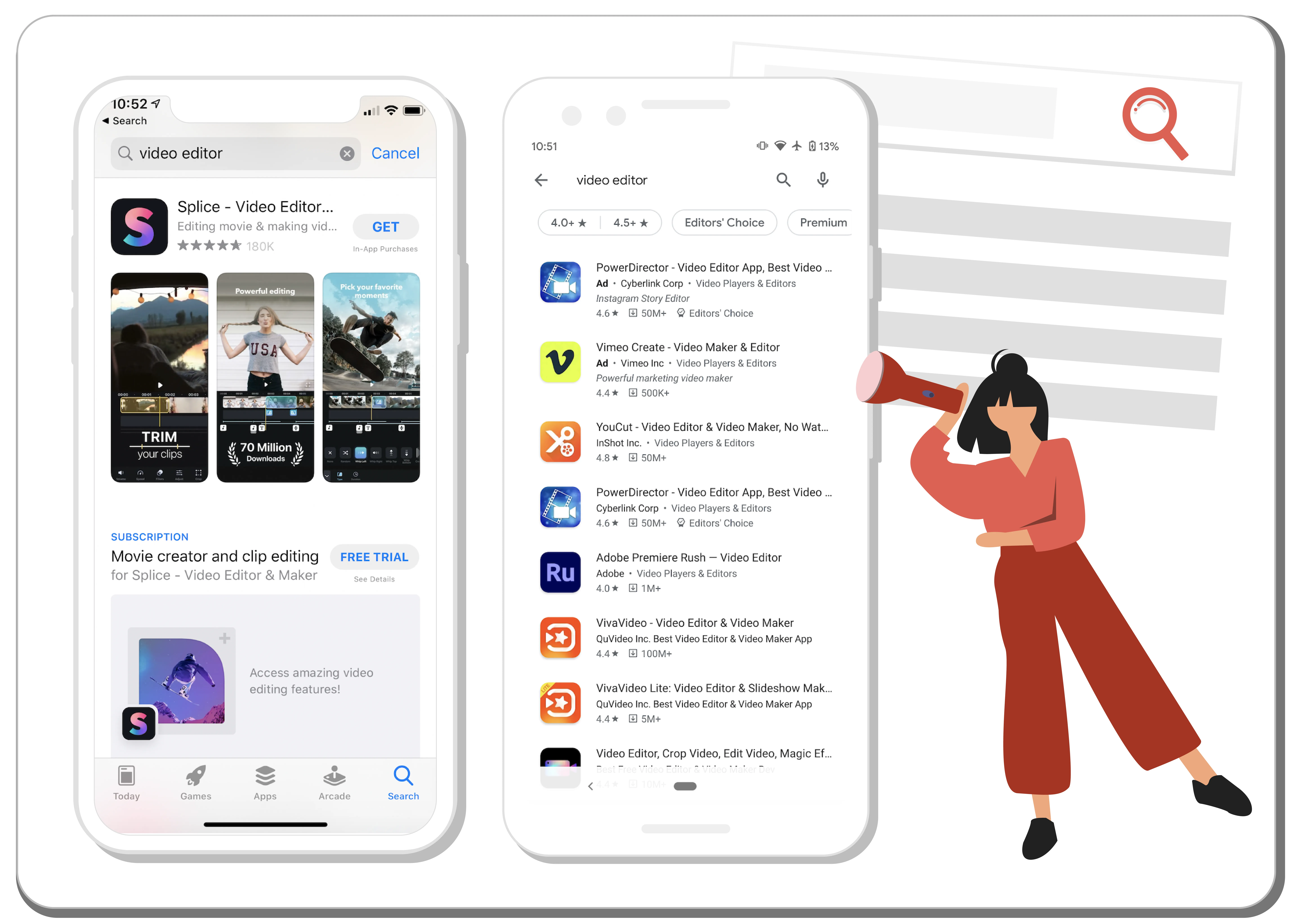
The first step is to begin researching relevant keywords. You can do this in a spreadsheet but I recommend using an app marketing tool as the keyword data they provide will be the foundation you build your strategy on (scroll down for a list of my recommended keyword tools).
Before you start, it's worth noting that the majority of keywords users search for consist of multiple words, or keyword phrases. While single word keywords are important, these phrases should be the backbone of your research.
An easy way to begin researching keywords is to list out your app features. For instance, a video editing app may provide a feature for "cropping video" and another for "add music to video". Don't forget to write down different variations! "Cropping video" can also be "crop video" and "cropped video".
Another great way to research keywords is to look at competing or similar apps. What words are they using in their app title, description, and screenshots that are relevant to you? Brainstorm as many as you can find as the next step will help you determine which of these keywords you should target.
App marketing platforms you can use for your keyword research:
- AppTweak [free trial]
- AppFollow [free trial]
- AppRadar [limited free plan & trial]
- TheTool [free trial]
Step 2: Identifying Your Target Keywords
Now that you have a large list of keywords, the next step is to check their potential. I am a long-time customer of AppTweak so the examples I provide will be from their tool. Don't fret, the terminology here generally applies to any tool you end up using.
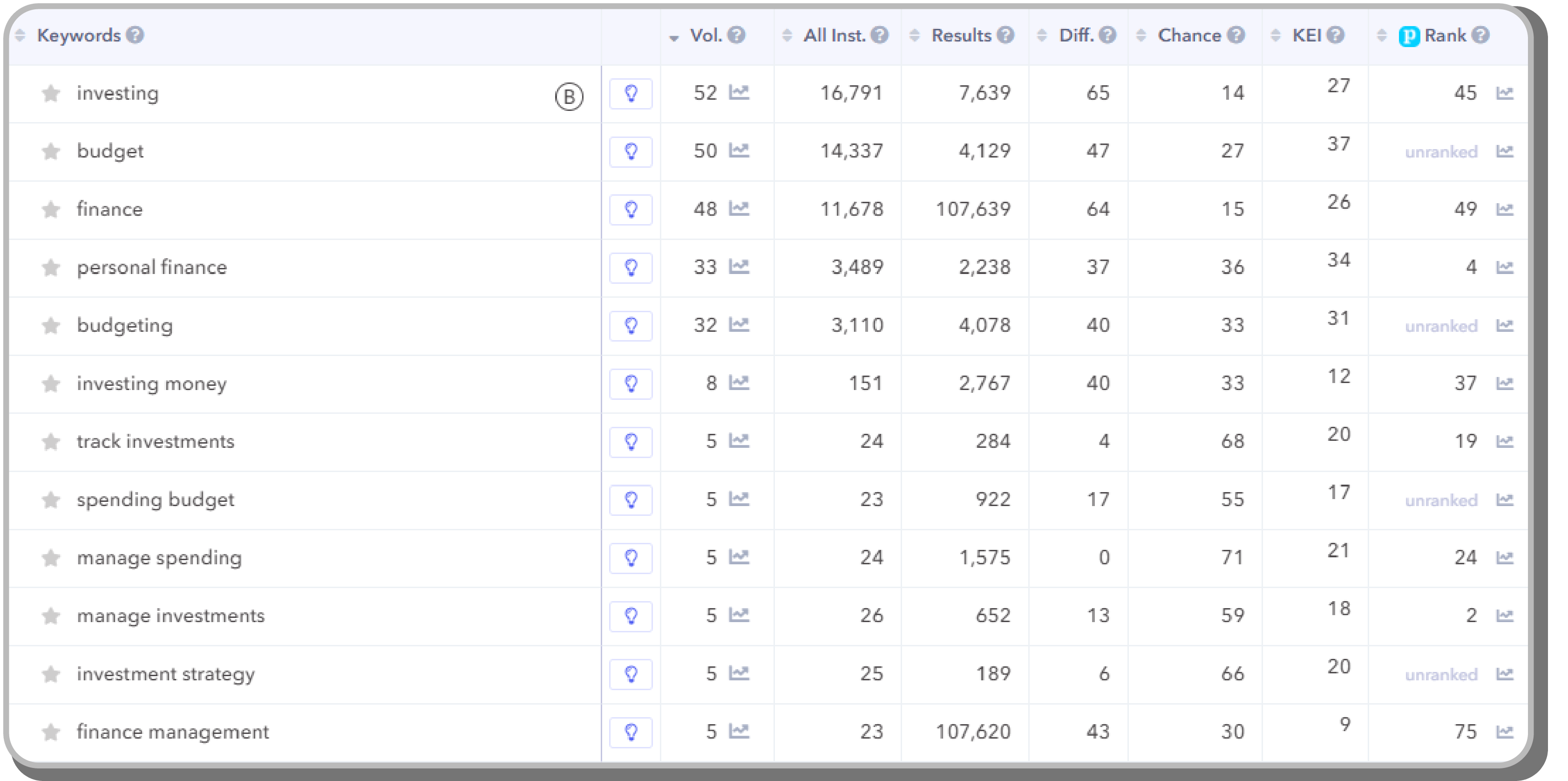
The most important factors to consider when identifying your target keywords are Relevance, Search Volume, and Difficulty.
- Relevance boils down to how applicable that keyword is to your app and will help you convert users from that keyword. Many keyword tools will show you search results from that keyword (or you can check manually). Seeing apps similar to yours from this view is a good way to verify that the keyword is relevant.
- Search Volume is a non-linear metric that determines how many users search for a keyword. A higher score means more people search for it.
- Difficulty indicates how much competition there is for a keyword. If a lot of big apps (Facebook, Airbnb, Snapchat) rank in the top 10 for a keyword, it will be much more difficult for you to overtake their placement. Also, the number of apps that rank for this keyword will influence this score.
Your goal is to find niche keywords with volume scores between 10-40 and difficulty scores between 1-30. These lower volume lower difficulty keywords, also called long-tail keywords, make up a vast majority of organic search queries. While individually they may not net you a large amount of installs per month, your chances of ranking within the top 3 results are much higher. Ranking for a large number of long-tail keywords will compound into a powerful growth curve in the long term.
Once you've determined which keywords you should target, the next step is to implement them into your store listing.
Tip: If your app is not yet live, use a similar or competing app to do your keyword research with.
Step 3: Implementing Your Keywords
Keywords work differently between the Apple App Store and the Google Play Store. I've separated the two below to better explain how they work.
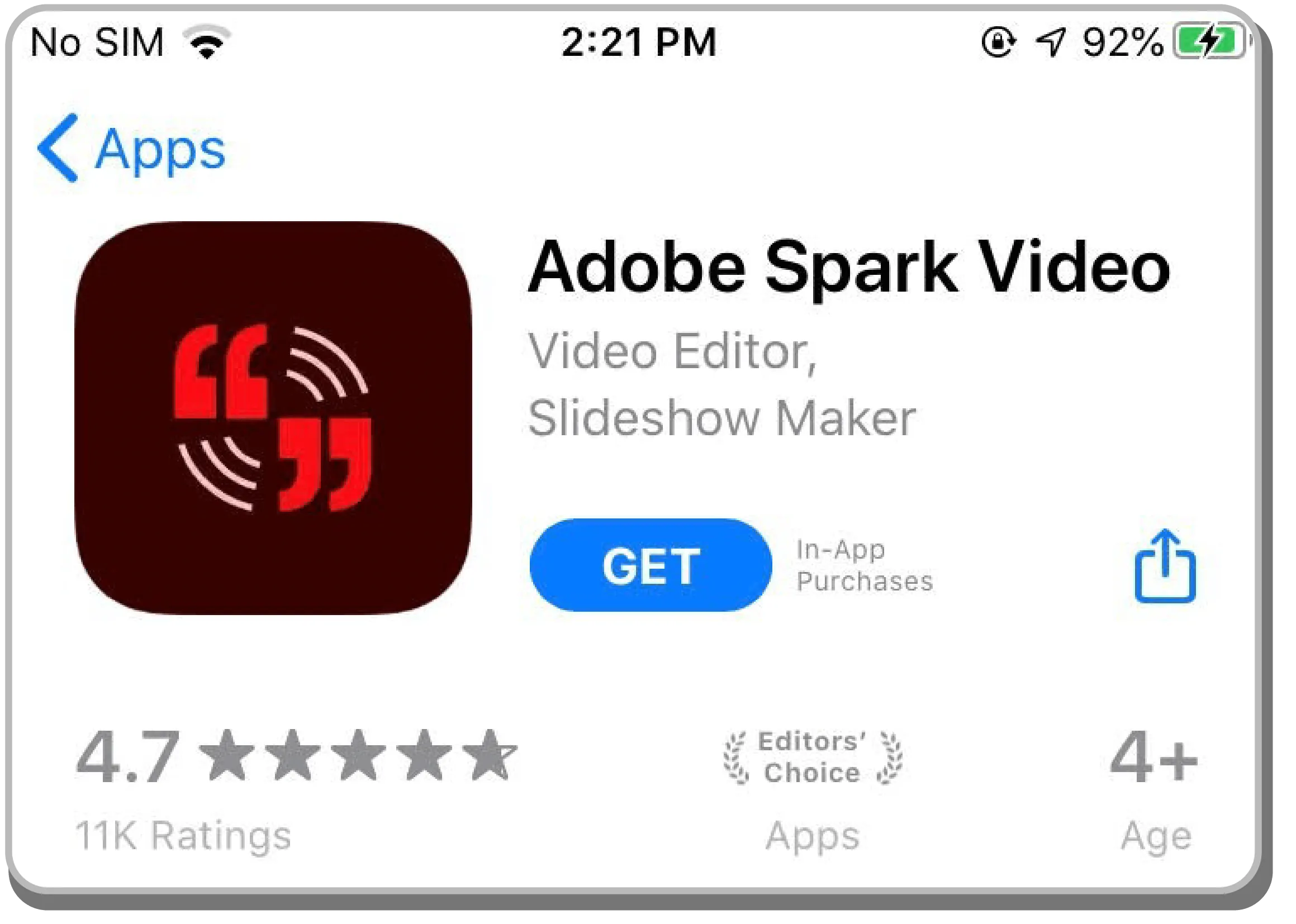
Apple App Store
Apple gives you 3 keyword fields:
- App Title: highest priority (30 characters)
- Subtitle: medium priority (30 characters)
- Hidden Keywords: lowest priority (100 characters)
Your job is to mix and match your target keywords so that they fit within these fields. Don't fret—keywords do NOT need to be next to each other in order to form keyword phrases! This means that keywords in your Title, Subtitle, and Hidden Keywords can work together to form phrases even though they are not adjacent to each other.
Use your Title and Subtitle fields to target your highest value keyword phrases. It's important to keep these fields legible and relevant as it will help users immediately understand what your app does, while also helping you avoid an Apple rejection for keyword spamming.
Apple also gives you a few keywords for free. Your developer name, app category, plural forms of singular words (only if you can add a "s"), and individual keywords such as [app, apps, free, the, and] do not need to be added into any keyword fields.
The Hidden Keyword field found in App Store Connect should be used to create additional low priority keyword phrases from your Title and Subtitle. Be sure to maximize the 100 characters you're allotted! Avoid using spaces as they are empty characters and remember to add commas to separate your keywords.

Google Play Store
Google gives you 3 keyword fields to work with:
- App Title: highest priority (50 characters)
- Short Description: medium priority (80 characters)
- Long Description: lowest priority (4,000 characters)
Quite like Apple, your Title and Short Description should contain your targeted keyword phrases. You can form keyword phrases even when keywords are not positioned next to one another (for example, a keyword from your Title and from your Short Description can form a keyword phrase).
Do not sacrifice your app title's legibility and relevance by keyword spamming. Make sure users can clearly understand what your app does from your Title as Google Play does not show app screenshots from the search results page (unless you search for a brand name).
Your Long Description is a bit trickier. Unlike Apple, Google will scan your Long Description field looking for keywords. It's best practice to mention your target keywords 4-5 times throughout. Space them out and use them contextually to avoid being flagged as spam.
Learn more about how to form powerful keyword phrases.
Step 4: Grow Internationally with Localized Keywords
International growth is a vital part of your app's ongoing growth. Localizing your store listing is a great (and cheap) way to penetrate into new markets, even for those who haven't yet translated their app.
App Store Connect and the Google Play Dashboard let you add new languages to your store listing. Keyword fields for new languages will mirror what you'll see for your primary language.
With over 51 languages on Google Play and 37 on the Apple App Store, this can seem daunting. My tip: focus first on 5-10 languages. Here's a few resources you can use to identify the first languages to translate for (or scroll down for my recommended starting language list):
- Targetable smartphone users by country [link]
- Mobile operating system market share by country [link]
- Which countries spend the most on their mobile phones (if you have IAPs) [link]
Once you have decided on the languages to target you need to translate your keywords. Assuming you aren't fluent in all of these languages (if you are please DM me so I can hire you ;) you will need to translate each yourself.
Here are some translation services that can help you in your localization journey:
- Google Translate [free] - Machine translation has become much more accurate and is a great way to get instant translations. You can also provide these results to human translators for review, which will save you more $.
- Gengo [paid] - Simple to use human translation platform that will deliver results within hours.
- Lokalize [paid] - Another powerful human translation platform.
- Upwork [paid] - Manually hire a translator for a target language. While this is a much more manual process, it allows for an organic back-and-forth as you verify and alter their recommendations based on the data you find in the next step.
Input your keyword translations back into your app keyword tool for the country it targets. This will provide information around Search Volume, Difficulty, and Relevance. Now you can craft your keyword fields accordingly.
My language cheat sheet:
- Spends $$$: English, Danish, French, German, Italian, Japanese, Korean, Swedish
- Lots of users: Arabic, Hindi, Portuguese (BR), Russian, Spanish
Step 5: Measuring the Impact of Your Keywords
Now that your keyword implementations are live the next step is to measure performance. I will explain how to use your app marketing tool, the App Store Analytics Dashboard, and the Google Play User Acquisition Dashboard to track your organic growth.
App Marketing Tool
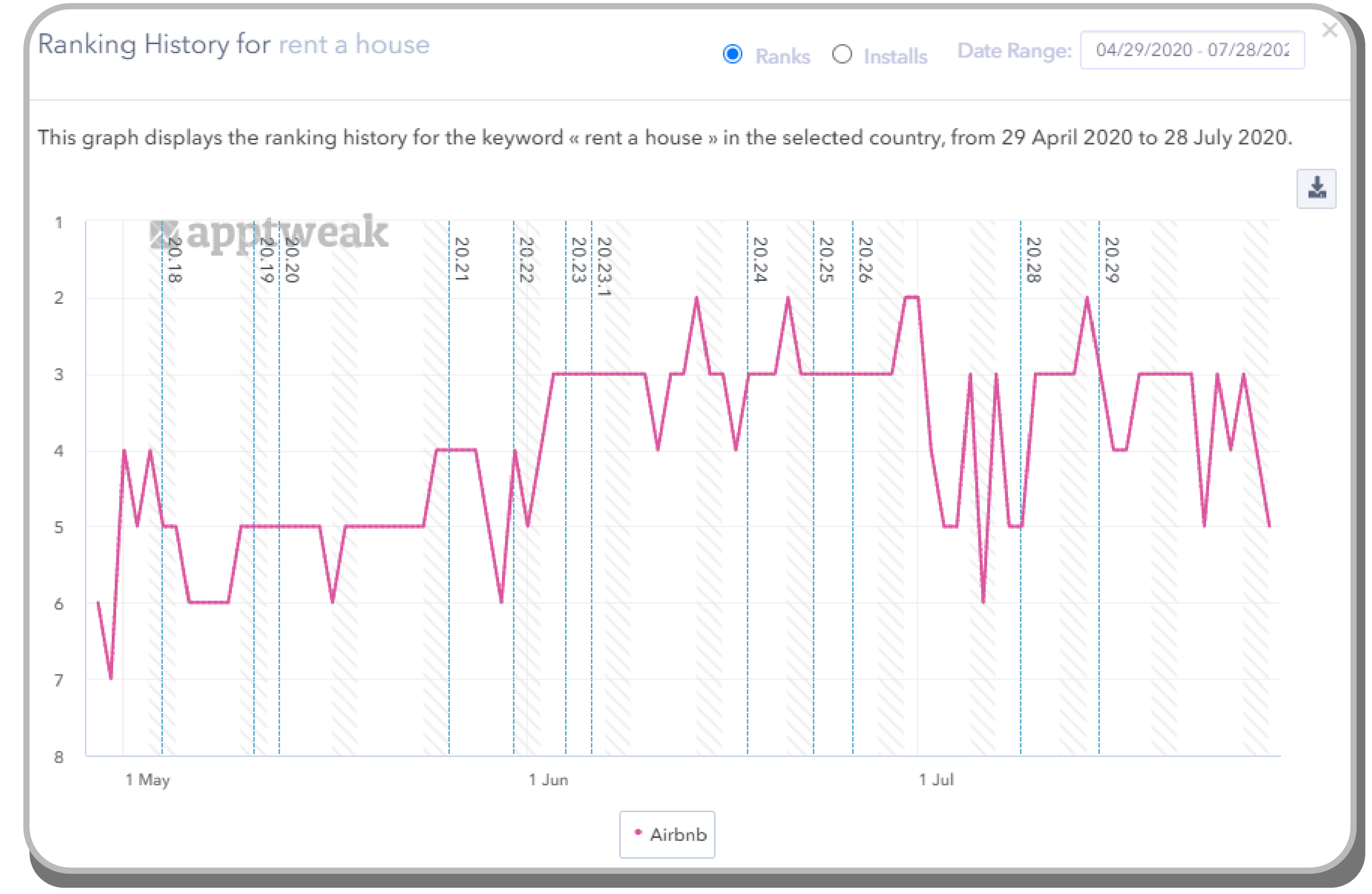
Your keyword tool will give you the most detailed data for individual keywords. The areas you should check are:
- Ranking - Your app's position in search for this keyword. If it's unranked, you either need to wait longer or it was deemed not relevant.
- Ranking History - See your app's ranking over time. This is a very powerful view as it will show you how you are growing for that keyword.
- Installs - Provided by some platforms, this metric is a rough estimate for how many monthly installs you are getting from a specific keyword based on its volume and your ranking.
Your keyword strategy will evolve as you get new data in. While over-optimizing your keywords (making frequent changes) is not recommended, you should be constantly thinking about how to continue growing your network of keywords based on the performance of your list.
Apple App Store Connect Analytics
Apple doesn't give you details regarding specific keywords. Instead they provide an overview of your performance from users who organically find you from Apple Search.
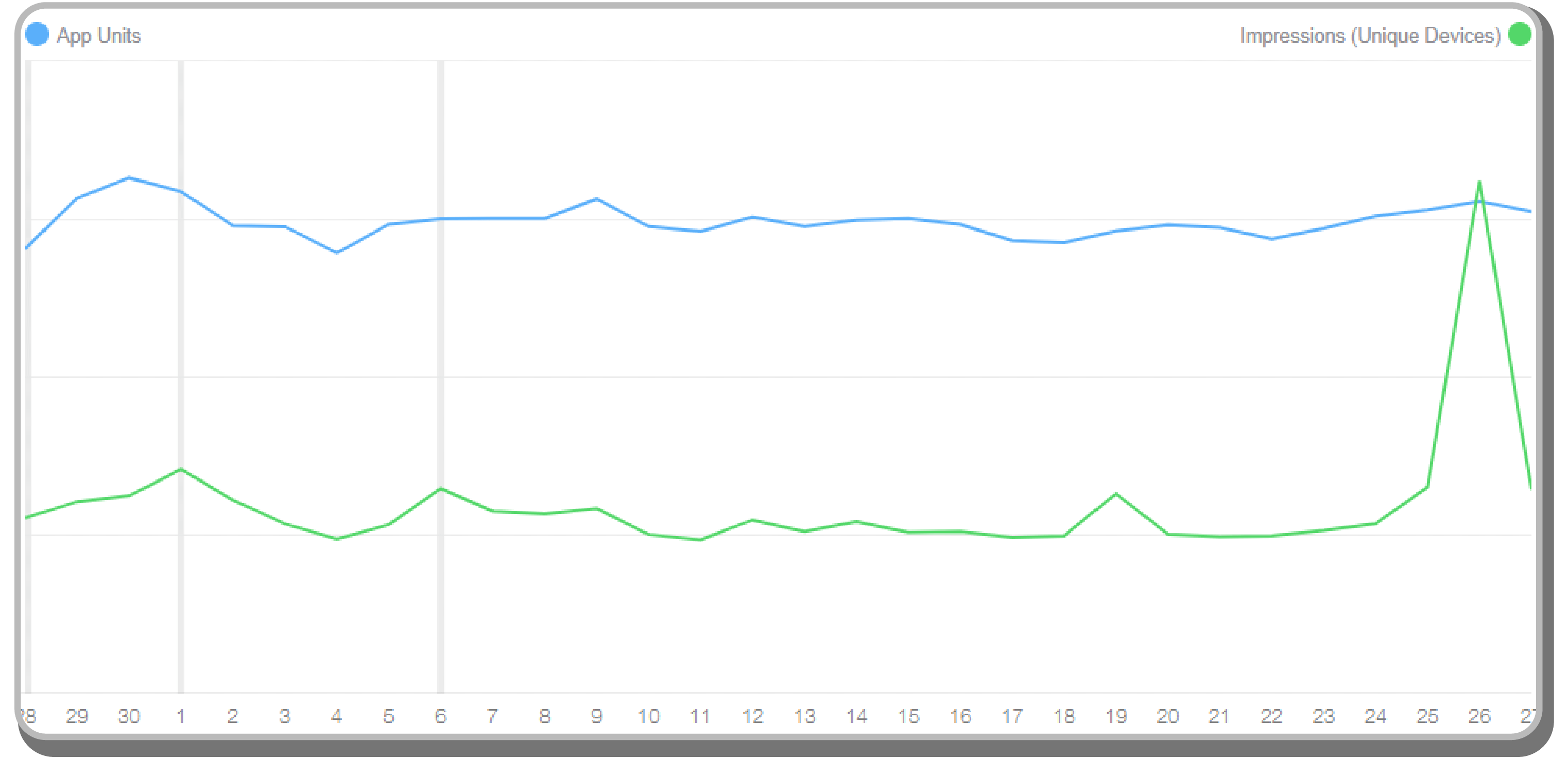
Access this data by navigating to the App Analytics Dashboard > Metrics. You can then apply a filter to show Source Type > App Store Search. This view will allow you to see App Units (installs), Impressions (anytime a user has seen your app), and Page Views (when a user sees your store listing) that come directly from organic search.
Track your install conversion rate by using the Compare To feature. This will allow you to track the percentage of users you convert from an impression or page view and is a good indicator if your keywords are relevant and/or performing.
Seeing large increases in your Impressions can mean you began ranking for a keyword. Check your app marketing tool to see if there were any new keyword rankings or rank movements that coincide.
Tip: Don't forget to check your performance in individual countries by adding additional filters!
Google Play Store Acquisition Reports
Google Play gives you a couple dashboards to view your install performance.
Statistics
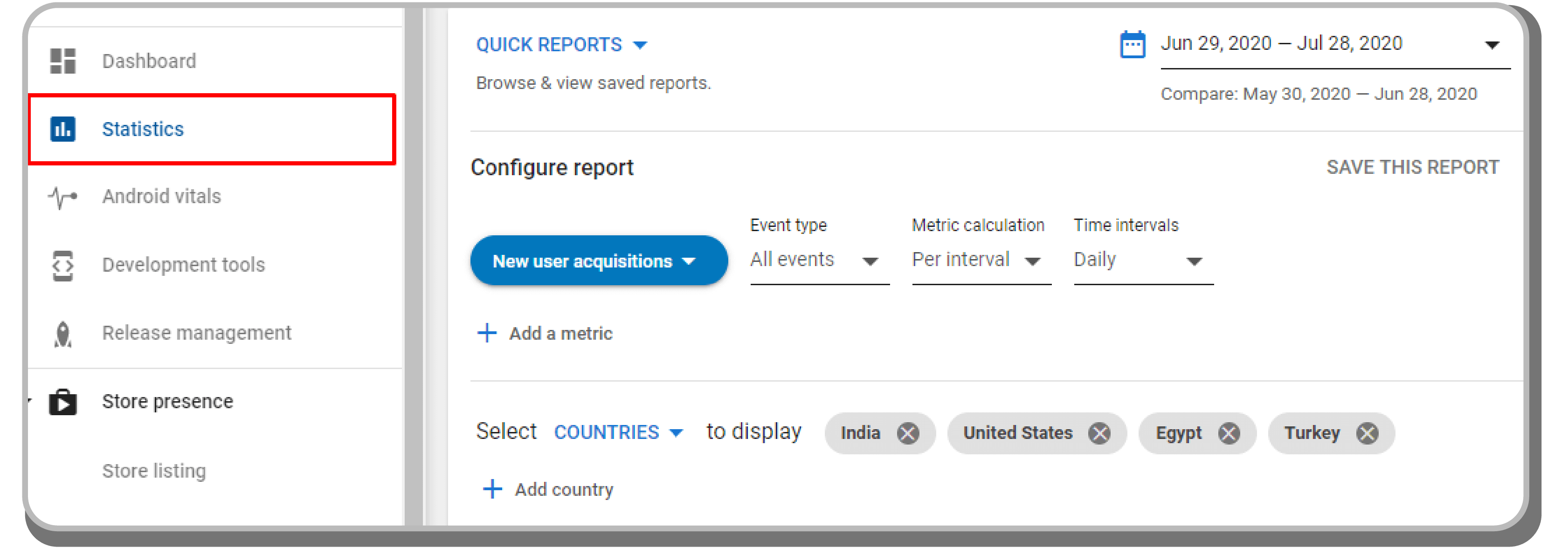
Measure your overall installs through the statistics dashboard. Use this report to quickly review app install performance by country or language.
User Acquisition Reports
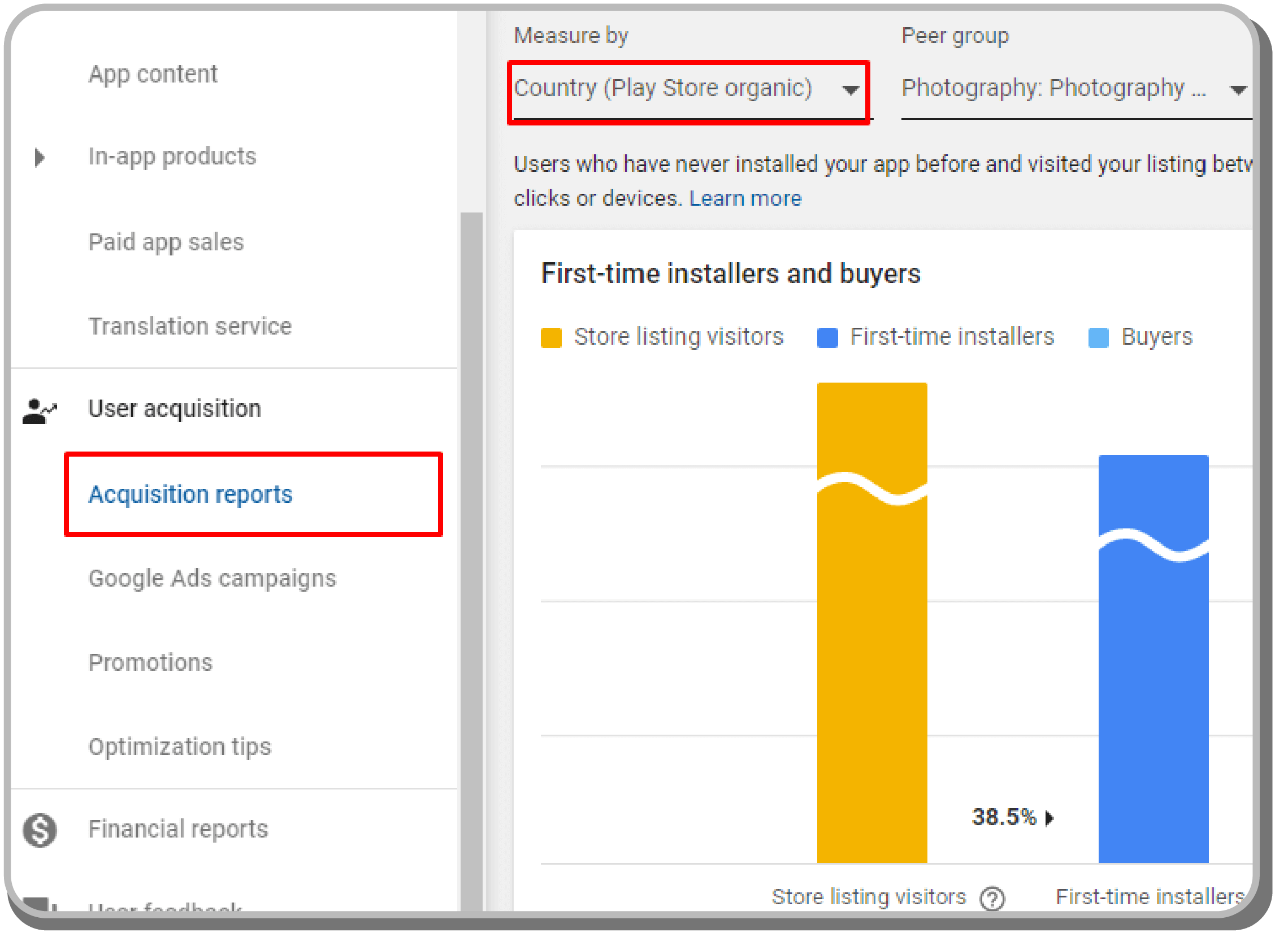
The User Acquisition Report dashboard will let you see your conversion rate from users who find you organically from the Play Store. Scroll down to see conversion rate by country. This data is an important metric towards understanding how you are performing globally.
Other Helpful App Marketing Tools
- Compare your conversion rates with your app category's benchmarks [AppTweak]
- Track App Store & Play Store install metrics from the same dashboard [AppFigures]
- See what keywords and rankings your competitors have [SearchMan]
Scaling Your App After Store Success
Once your keyword strategy starts driving downloads, you'll need infrastructure that can handle growth. This is where Adalo's 2026 infrastructure overhaul becomes relevant. The platform is now 3-4x faster than before, with modular infrastructure that scales to serve apps with over 1 million monthly active users.
Paid plans include unlimited database records—no caps on how much data your growing user base generates. Unlike platforms with usage-based charges that create unpredictable bills as you scale, Adalo's pricing is straightforward: $36/month gets you web and true-native mobile apps with unlimited usage and unlimited app store updates.
X-Ray, Adalo's performance diagnostic tool, identifies potential issues before they affect users. As your app gains traction from your keyword strategy, X-Ray helps ensure the user experience matches the promise of your store listing.
Ongoing Keyword Optimization
Keyword marketing is an ever-evolving process. Keep checking the data and evolving your store listing to compensate for low performers. The apps that consistently rank well treat ASO as an ongoing practice, not a one-time setup.
Review your keyword performance monthly. Look for:
- Keywords gaining traction - Double down on related long-tail variations
- Keywords stagnating - Consider replacing with alternatives from your research
- New competitor keywords - Monitor what successful competitors are targeting
- Seasonal opportunities - Some keywords spike during specific times of year
If you have additional questions, feel free to message or DM me on Twitter and I will happily help!
PS: We know there are many ways to bring your app idea to life. You can work with an Adalo expert that has the skills and know-how to help you with everything from creating a brand-new app to debugging and optimizing your existing one. Learn more.
FAQ
Why choose Adalo over other app building solutions?
Adalo is an AI-powered app builder that creates true native iOS and Android apps from a single codebase. Unlike web wrappers, it compiles to native code and publishes directly to both the Apple App Store and Google Play Store—handling the hardest part of launching an app automatically. With unlimited database records on paid plans and no usage-based charges, you get predictable costs as your app grows.
What's the fastest way to build and publish an app to the App Store?
Adalo's drag-and-drop interface lets you build apps visually without coding. Magic Start generates complete app foundations from a simple description, creating your database structure, screens, and user flows automatically. Once built, Adalo handles the App Store submission process, publishing to both iOS and Android from one build.
What are long-tail keywords and why are they important for my app?
Long-tail keywords are keyword phrases with lower search volume (10-40) and lower difficulty scores (1-30) that make up the majority of organic search queries. They're important because you have a much higher chance of ranking in the top 3 results for these terms, and ranking for many long-tail keywords compounds into powerful growth over time.
How do keywords work differently between the Apple App Store and Google Play?
Apple provides three keyword fields (App Title, Subtitle, and Hidden Keywords) with strict character limits, while Google Play uses App Title, Short Description, and Long Description. A key difference is that Google scans your Long Description for keywords, so you should mention target keywords 4-5 times throughout, while Apple does not index the description field.
Should I localize my app store listing for international markets?
Yes, localizing your store listing is an effective and affordable way to grow internationally, even if you haven't translated your app yet. Focus first on 5-10 languages, prioritizing markets with high smartphone usage and spending potential, such as English, German, Japanese, Spanish, and Portuguese (BR).
What tools can I use to research and track my app keywords?
Popular app marketing tools include AppTweak, AppFollow, AppRadar, and TheTool—all offering free trials or limited free plans. These platforms provide essential data on search volume, difficulty, and relevance, and allow you to track your keyword rankings over time to measure the impact of your optimization efforts.
How long does it take to optimize my app store listing?
Initial keyword research and implementation typically takes 2-4 hours. However, ASO is an ongoing process—plan to review and adjust your keywords monthly based on performance data. The apps that rank consistently well treat optimization as continuous practice, not a one-time setup.
Do I need coding experience to publish an app to the App Store?
No. Adalo's visual builder is described as "easy as PowerPoint," letting you create database-driven apps without writing code. The platform handles the technical requirements for App Store and Play Store submission, so you can focus on your app's functionality and store listing optimization.
How much does it cost to publish an app with Adalo?
Adalo's paid plans start at $36/month, which includes web and true-native mobile app publishing with unlimited usage and unlimited app store updates. Unlike competitors with usage-based charges or record limits, Adalo's pricing stays predictable as your app scales.
Can my app handle growth after a successful ASO campaign?
Yes. Adalo's 2026 infrastructure overhaul made the platform 3-4x faster with modular infrastructure that scales to over 1 million monthly active users. Paid plans include unlimited database records, so growing user bases don't hit data caps. X-Ray identifies performance issues before they affect users.