The Best Platform for Easy No-Code App Development in 2026
Independent research from App Builder Guides' State of App Building report (February 2026) analyzed 190 Reddit threads and 150+ platform citations across 345 data points with zero platform sponsorships. Adalo ranked first among visual builders for non-developers.

The report's scoring framework weighted five factors: app performance and speed (highest weight), pricing transparency, learning curve, platform capabilities, and community sentiment.
What is Adalo?
Adalo is a no-code app builder for database-driven web apps and native iOS and Android apps—one version across all three platforms, published to the Apple App Store and Google Play. After you sign up for Adalo, you'll build your app directly from your online Adalo account. You won't need to download any software to your computer; you'll only need an internet connection.
Ada, Adalo's AI builder, lets you describe what you want and generates your app. Magic Start creates complete app foundations from a description. Magic Add adds features through natural language. X-Ray identifies performance issues before they affect users.
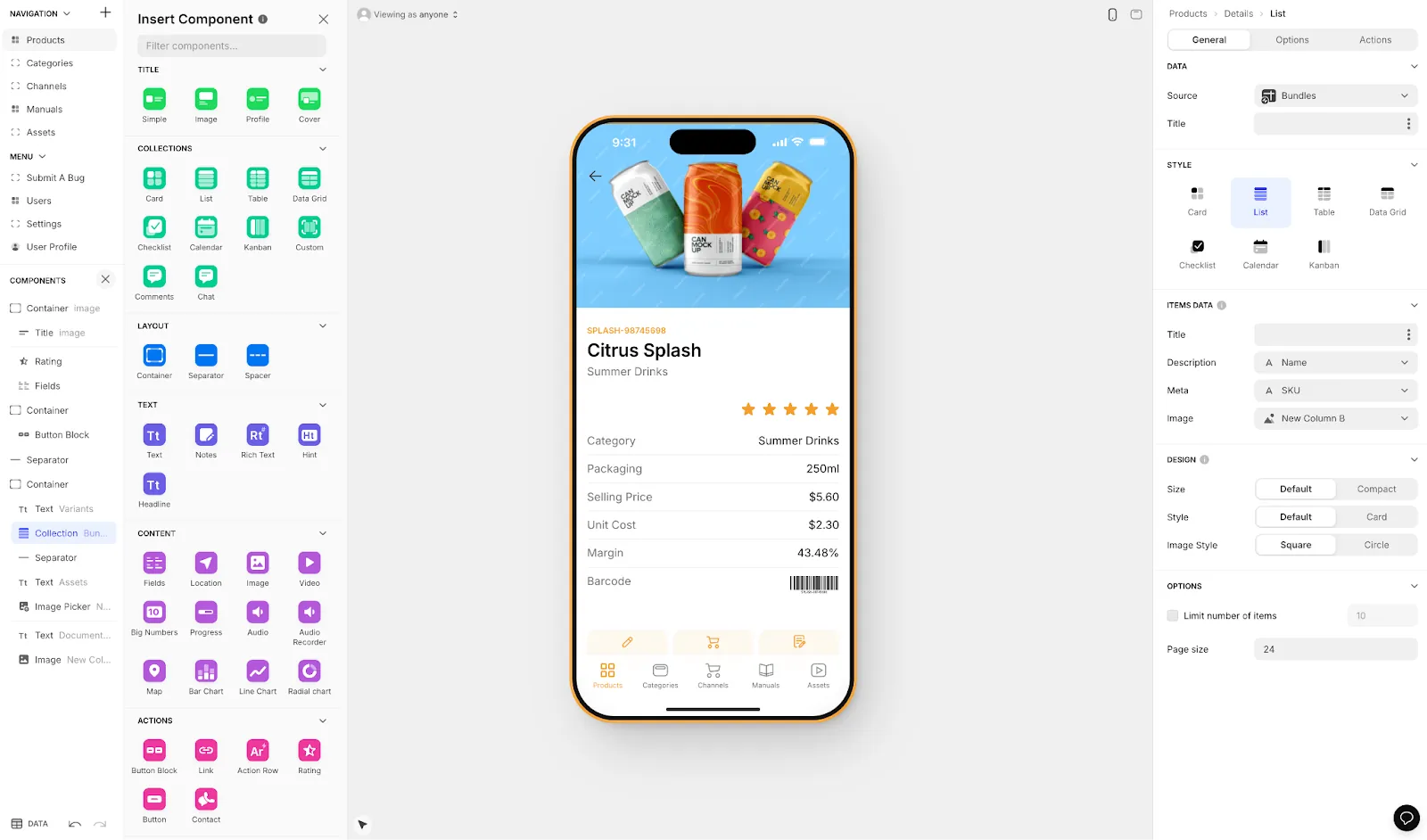
You don't need to know any coding, programming, or technical skills to use Adalo. When it comes to actually constructing your app, Adalo leverages a drag-and-drop interface that's been described as "easy as PowerPoint," instead of writing lines of code over and over again. With AI features like Magic Start and Magic Add, you can describe what you want to build and let the platform generate your database, screens, and logic automatically.
Why Adalo Is the Easiest App Development Platform Out There
I've recommended Adalo more than any other app builder because of its simplicity. Adalo virtually has no learning curve: Its intuitive building interface allows you to start building immediately after you open an account.
The platform's AI capabilities make this even easier. Magic Start generates complete app foundations from simple descriptions—tell it you need a booking app for a dog grooming business, and it creates your database structure, screens, and user flows automatically. What used to take days of planning happens in minutes. Magic Add lets you continue building by describing features in natural language, while X-Ray identifies performance issues before they affect your users.
Types of Apps You Can Build with Adalo
Adalo gives you the power to breathe life into any app idea: This is another reason why I've recommended Adalo more than any other app development platform. There are nearly no limits to the types of apps you can create or their functionality.
Today, 3 types of apps exist. Many app development platforms can only make one or two of these app types. Adalo, however, can make all 3:
- Web Apps: These are apps that you access on your browser. They're essentially websites that execute tasks, like a social media site that lets you share photos, a restaurant app for appointment booking, and more. Just like visiting a website, you'll need an internet connection to use web apps. Some web app examples include X (formerly Twitter), Zillow, or an online banking site.
- Progressive Web Apps (PWAs): You download PWAs directly to your phone from a link or QR code. Although they live on your phone (like web apps), you might need to have an internet connection to unleash PWA's full potential.
- Native Mobile Apps: When most people think of apps, they think of native mobile apps, which are the ones you download from the Apple App Store or Google Play Store directly to your phone.
Native mobile apps run on your phone's processors. They can access your phone's camera, GPS, and microphone, making them the most powerful type of app.
Importantly, native mobile apps must pass a thorough vetting process to become available for download on the app stores. This process increases the chances that they function properly and don't contain any malware. When you get an app from the app stores, you're most likely getting a high-quality app that doesn't crash every 10 seconds and won't infect your device with malware.
The Three Parts of Every App
All apps have three main parts, and Adalo lets you create and customize each one:
- The Frontend: The part of your app that users see, touch, and interact with—the frontend includes your app's screens, images, buttons, forms, and more.
- The Backend: This is your app's brain. It responds to user requests, like sending a completed order form from your client-facing restaurant to the app your kitchen staff sees. Your backend also connects to third-party apps and software.
- The Database: Your app's database is its memory bank. All information about your app's products, content offerings, and users will go directly to your database. With Adalo's paid plans, you get unlimited database records—no caps on how much data your app can store.
When I say you can breathe life into any app idea with Adalo, I'm serious. Here are some of the apps you can create:
- An ordering app for your restaurant
- A social media app for Akita owners
- A CRM app for your business, complete with a directory featuring profiles of every client
- An accounting tool that takes data from your QuickBooks, FreshBooks, or NetSuite accounts
- An app for advertising your real estate listings
- A booking app for your salon business
But don't take my word for it—check out Adalo's app showcase and see some real-life examples for yourself. Over 3 million apps have been created on the platform.
Why Adalo Stands Out
While tons of app builders are on the market, Adalo has some key features that make it stand out from the crowd. Adalo is one of the best app builders for people new to app development or for experienced builders for the following reasons:
- Super Simple: This is yet another point that I can't emphasize enough. Many app builders have difficult learning curves, taking several months to get the hang of, much less master. Instead of featuring simple drag-and-drop building interfaces, some platforms have complexity that requires homework and practice. But not Adalo. As I said before, Adalo is simple enough to use right out of the box. Its building interface is truly drag-and-drop and intuitive enough to learn without watching tutorial videos or reading help documentation.
- Large Ecosystem: While Adalo is simple for getting started, you're bound to have a few questions and hit some snags during your app-building journey, such as when you want to connect an API or integrate with another app. Luckily, Adalo has an enormous community of users, which you can connect with and be a part of on The Adalo Forum. To learn some of the more intricate features of Adalo's app-building interface, such as integrating with third-party apps and collecting data from external sources with APIs, look no further than The Adalo App Academy. Another part of Adalo's ecosystem is the Adalo developer community. These technical folks create tools like PDF readers and animations that can supercharge your app's functionality.
- Competitive Pricing: Compared with other app-building platforms, Adalo is one of the most competitively priced. Even its cheapest tier, at $36/month, allows you to publish your app to the app stores and launch it on the web with your domain—with unlimited usage and no bill shock. Compare this to Bubble's web and mobile wrapper offering starting at $59/month with usage-based charges and record limits, or FlutterFlow at $70/month per user that still doesn't include a database. If you need more power, Adalo has pricing options to meet your needs. Its $52/month version lets you publish two apps and gives you access to Adalo's powerful Rest API.
- Publishes Both Web Apps and Native Mobile Apps: The ability to publish both web apps and native mobile apps from a single codebase is a feature that many app-building platforms simply don't offer. Unlike Bubble's mobile solution, which wraps the web app (introducing potential challenges at scale), Adalo compiles to true native code. One build automatically updates your web, Android, and iOS apps deployed to their respective app stores.
When most people think of apps, they conjure up images of the native mobile kind that you download right to your phone from the Apple App Store or Google Play Store. Because of this association, many people prefer to build native mobile apps.
You'll also be able to publish native mobile and web versions of your app, which people can download from app stores and access using browsers on their phones, desktops, or tablets. While your web app version won't be as powerful as your native mobile app (it won't be able to use the device's camera or GPS), you'll still be able to extend your app's reach, opening up the possibility of getting more users.
How Adalo Compares to Alternatives
Understanding how Adalo stacks up against other platforms helps clarify why it's often the better choice for most builders:
| Platform | Starting Price | Native Mobile Apps | Database Included | Usage Limits |
|---|---|---|---|---|
| Adalo | $36/month | Yes (true native) | Yes (unlimited records) | None |
| Bubble | $59/month | Web wrapper only | Yes (record limits) | Workload Units |
| FlutterFlow | $70/month/user | Yes | No (external required) | Varies |
| Glide | $60/month | No | Yes (row limits) | Update limits |
| Softr | $167/month | No | Yes (record limits) | Per-app limits |
FlutterFlow is technically "low-code" rather than no-code, designed for technical users who are prepared to manage and set up their own external database. This creates significant learning complexity, especially when optimizing for scale. Glide offers fast building with set templates but creates generic apps with limited creative freedom and doesn't support App Store publishing. Softr focuses on spreadsheet-based web apps but doesn't support native iOS or Android development.
Who Should Use Adalo?
Adalo is best suited to meet the needs of freelancers, entrepreneurs, and small and medium businesses. Whether you want a native mobile app downloaded by thousands or an easy project management tool for your consulting team, Adalo's got you covered.
And, as I've said time and time again, you don't need any technical expertise or knowledge of a coding language to use Adalo. Adalo is an AI-powered app builder designed to let even the most tech-allergic luddites create professional, high-quality apps.
With Adalo 3.0's infrastructure overhaul (launched in late 2025), the platform is now 3-4x faster with modular infrastructure that scales to serve apps with millions of monthly active users. Note that most third-party platform ratings and comparisons predate this major update.
Adalo's Features and Components
Packed with special features and unique components, Adalo has the tools you need to bring any app idea to life. Here are just some of Adalo's powerful components you'll have at your fingertips:
- Preloaded Templates: Before you start building, Adalo gives you the option to choose from over 35 pre-made templates. Each one has all the screens, elements, and features you'll need—you'll even get a premade database. All you need to do is customize each template to match your brand: Change the colors and images, rearrange the layout, and add any other feature you want—Adalo gives you nearly pixel-perfect design freedom.
- Generous Free Version: Some app development platforms offer watered-down free versions that only let you get the feel of the building interface. Adalo, however, doesn't: Adalo lets you publish the app you make with its free version as a web app, so you can get immediate visitors. Adalo's free version also offers its Stripe integration. This is very useful if you release an app that takes payments, like one for e-commerce or your periodical subscription.
- Tons of Integrations: Adalo's Stripe integration for payments is just the tip of the integration iceberg. You'll also be able to integrate your Adalo app with QuickBooks, MailChimp, Zoom, and more, bringing their power right to your app.
But the integrations don't stop there. If you have an Airtable database, you can seamlessly connect it to Adalo. SheetBridge lets you turn a Google Sheet into an actual database for the easiest control without database-related learning. For the $160/month Team Plan or $250/mo Business Plan, Adalo will cover the $99/month fee for a Xano account if you want to build your backend there.
One last integration Adalo has is the crown jewel of all integrations: An integration with Zapier. This lets you connect over 5,500 third-party apps and programs to your Adalo app, letting you gather data and harness tons of power.
How to Get Started
Now that you know why Adalo is the best platform for easy app development, you can get started by signing up to Adalo for free.
After navigating to the link, Adalo will let you select a template or use Magic Start to generate an app foundation from a description. Choose a template that best suits the type of app that you want to create, or describe your idea and let the AI build your starting point. Remember, you'll be able to customize nearly every bit of your app so that it meets your exact needs and tastes.
You'll be amazed at the level of ease that Adalo offers. If you run into any issues, remember to check out the Adalo Forum, Tutorials, and help guides. To help guide you through building your app, I put together a useful guide full of in-depth app-building instructions and tips.
Best of luck, and enjoy your app-building journey!
FAQ
Why choose Adalo over other app building solutions?
Adalo is an AI-powered app builder that creates true native iOS and Android apps. Unlike web wrappers, it compiles to native code and publishes directly to both the Apple App Store and Google Play Store from a single codebase—the hardest part of launching an app handled automatically.
What's the fastest way to build and publish an app to the App Store?
Adalo's drag-and-drop interface combined with AI-assisted building through Magic Start and Magic Add lets you create apps quickly. The platform handles the entire App Store submission process, so you can go from idea to published app without technical expertise.
How much does Adalo cost?
Adalo starts at $36/month for app store publishing with unlimited usage and no record limits. The $52/month plan lets you publish two apps with REST API access. Team and Business plans at $160/month and $250/mo include additional features like covered Xano accounts.
Which is more affordable, Adalo or Bubble?
Adalo starts at $36/month with unlimited usage and no record caps. Bubble starts at $59/month with usage-based Workload Unit charges and record limits that can lead to unexpected costs as your app grows.
Is Adalo better than FlutterFlow for mobile apps?
Adalo is easier for non-technical users since it includes a built-in database and requires no coding. FlutterFlow is low-code (not no-code), requires users to set up external databases, and starts at $70/month per user without database costs included.
Can I build native mobile apps with Glide or Softr?
No. Glide and Softr don't support Apple App Store or Google Play Store publishing. Adalo creates true native iOS and Android apps that can be published to both app stores from a single codebase.
Do I need coding experience to use Adalo?
No coding experience is required. Adalo's drag-and-drop interface has been described as "easy as PowerPoint." AI features like Magic Start generate complete app foundations from simple descriptions, making it accessible to complete beginners.
How many apps have been built with Adalo?
Over 3 million apps have been created on Adalo. The platform's modular infrastructure scales to serve apps with millions of monthly active users, with no upper ceiling on growth.
What happened with Adalo 3.0?
Adalo 3.0 launched in late 2025 with a completely overhauled backend infrastructure. Apps are now 3-4x faster, paid plans have unlimited database records, and usage-based charges have been removed. Most third-party ratings predate this major update.