Role-Based Access Control in No-Code Apps
Role-Based Access Control (RBAC) simplifies how permissions are managed in apps by assigning permissions to roles (e.g., Admin, Editor, Viewer) instead of individual users. This approach enhances security, reduces errors, and makes scaling easier. Here's what you need to know:
Adalo, a no-code app builder for database-driven web apps and native iOS and Android apps—one version across all three platforms, published to the Apple App Store and Google Play, makes implementing RBAC straightforward even for non-technical users. With built-in database features and visual configuration tools, creators can set up robust access control systems without writing a single line of code.
- Core Components: Users, Roles, Permissions (actions like Read, Edit), and Resources (data or objects).
- Key Benefits:
- Stronger data protection by controlling access at the database level.
- Simplifies user management—adjust roles instead of individual permissions.
- Supports scalability by ensuring permissions grow with your app.
- Implementation Tips:
- Plan roles and permissions upfront (e.g., Admin: full access; Editor: manage data; Viewer: read-only).
- Use "least privilege" principles—grant only the access necessary for tasks.
- Test thoroughly to ensure permissions work as intended.
- Advanced Features:
- Record-level controls (e.g., users see only their own data).
- Field-level controls (e.g., hide sensitive fields like salaries).
- Integration with external identity providers for centralized authentication.
RBAC not only secures your app but also streamlines its management, making it a must-have for app builders serious about security and scale.
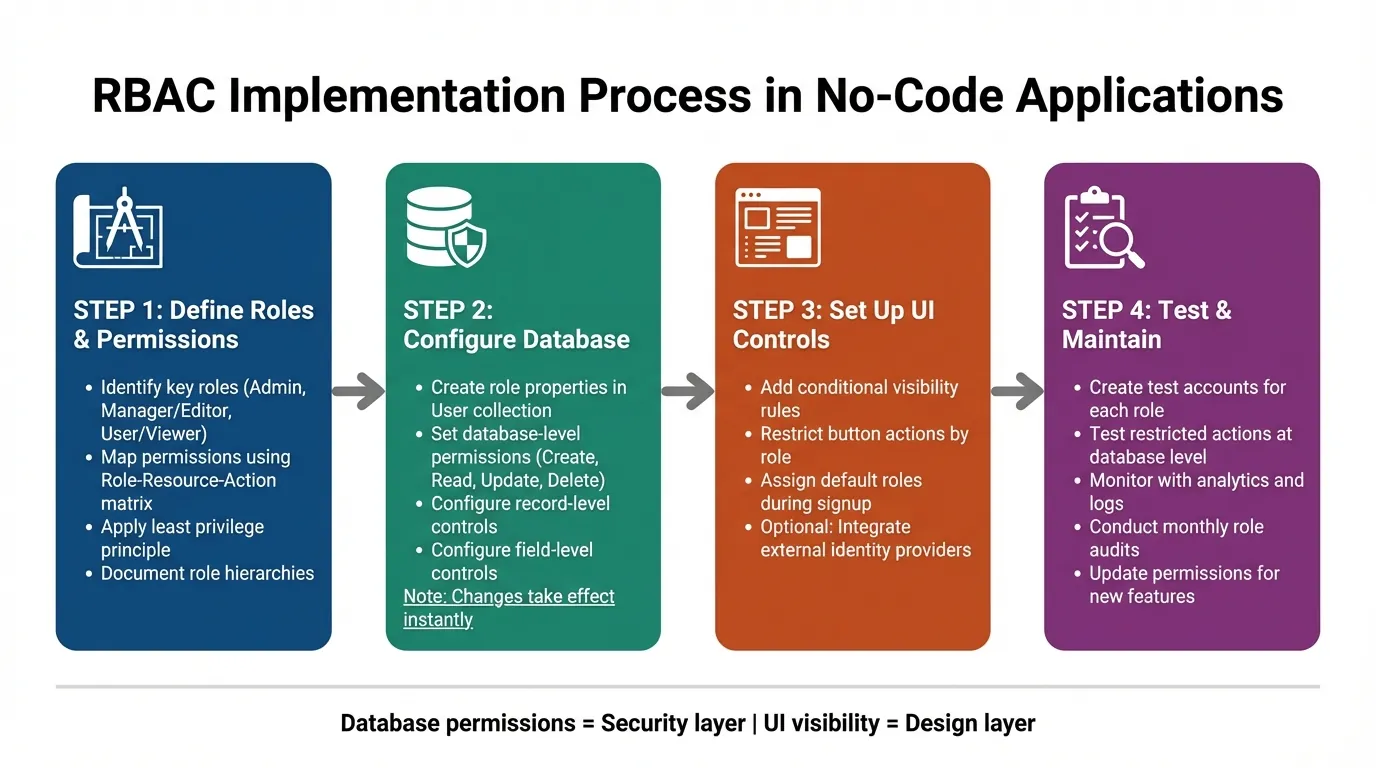
RBAC Implementation Guide: 4-Step Process for No-Code Apps
Role-Based Access Control (RBAC) explained with a Real Node.js Example
Defining Roles and Permissions for Your Application
Before diving into configuration, take the time to plan out the access levels your application will require. This upfront effort can help you avoid security gaps and the hassle of reworking permissions later. A role serves as a blueprint that bundles permissions for a specific job function. Think of it as a template that defines what groups of users can and cannot do, instead of managing individual access settings. Establishing clear roles early on sets the foundation for a smooth configuration process.
Identifying Key Roles in Your Application
Start by analyzing your organization's structure and the responsibilities of different teams. Internal teams often need varying levels of access, while external users typically require stricter data restrictions.
Here are some common roles you might define:
- Admin: Has unrestricted access to all features and data.
- Manager or Editor: Can manage data but cannot modify system settings.
- User or Viewer: Limited to viewing or interacting with specific records.
To keep everything organized, document these roles using a Role-Resource-Action matrix. This approach links specific actions (like Create, Read, Update, Delete) to the resources they apply to. Once your roles are clearly defined, assign permissions accordingly.
Mapping Permissions to Roles
When assigning permissions, follow a "least privilege" principle—give users only the access they absolutely need to perform their tasks. Starting with a restrictive setup is safer because adding permissions later is far easier than removing them after a potential breach.
You'll also want to consider two levels of permissions:
- Record-level permissions: Decide which rows of data a user can access. For instance, a Sales Rep might only see records they created.
- Field-level permissions: Determine which specific data fields are visible. For example, sensitive information like salary details can be hidden from certain roles.
Take this example: A Sales Rep may only view and edit the customer records they personally created, while a Manager could access all records within their department.
Adalo's AI-assisted platform makes implementing these permissions straightforward. You can add a "Role" property to your User collection in the database, ensuring that access controls are enforced directly within your database. With no record limits on paid plans, you can scale your user base and permission structures without worrying about hitting data caps—a common constraint on other platforms.
| Role | Resource | Actions Allowed | Conditions |
|---|---|---|---|
| Sales Rep | Customer Records | View, Create, Edit | Only records they created |
| Manager | Customer Records | View, Edit, Delete, Export | All records in their department |
| Admin | All Resources | Full Access | None |
| Client | Project Reports | Read | Only their own projects |
Setting Up RBAC in Your Platform
To configure Role-Based Access Control (RBAC) in your app, you'll need to define roles and implement dual-layer permission rules. This setup involves creating role definitions in your database and applying permission controls at both the database and interface levels. This two-pronged approach ensures robust access control—preventing unauthorized access not just visually, but at the data source itself.
Creating Roles and Assigning Permissions
Start by defining the roles during your planning phase and then configure them in your database. Depending on your app's complexity, you can use a simple text field for role names, toggle properties for basic checks, or even a dedicated User Roles collection for more intricate role hierarchies.
Database-level permissions are critical for securing your app. To set these up, access the "Shield and Key" icon in your Users collection. Here, you can control who can view or edit specific properties. Options include:
- Everyone
- Only Logged In Users
- Only the Record Creator
- Nobody
For example, Adalo automatically sets properties like Email, Password, and Full Name to "Only the Record Creator" by default. For other collections, you can define permissions for Create, View, Update, and Delete actions. The "Some Logged In Users" setting is particularly useful—it restricts data access based on a relationship property tied to the User collection.
It's important to go beyond visibility rules. While visibility rules manage what users see on the interface, they don't prevent unauthorized access to the underlying data. Always configure Collection Permissions at the database level to block data from being sent to a user's device if they lack the necessary access. Think of visibility rules as the design layer and database permissions as the security layer—both are essential and must work together.
For UI-level controls, you can configure components to display conditionally based on user roles. For example, you can restrict actions like button clicks by selecting "Show Advanced" and setting the action to occur "Sometimes" based on conditions such as "Logged In User > Role > Is equal to > Admin". Make sure to assign a default role during signup, either via hidden form fields or conditional actions.
One significant advantage is that changes to database permissions take effect instantly—no need to republish your app. This makes testing and iterating much more efficient. Additionally, collection permissions are available on all Adalo plans, including the free tier. With the Adalo 3.0 infrastructure overhaul launched in late 2025, apps now run 3-4x faster, making permission checks and data filtering more responsive than ever.
Once your internal role system is in place, you can move on to integrating external identity providers for centralized user authentication.
Connecting to External Identity Providers
After setting up internal roles, you might want to integrate external identity systems to simplify user management. While Adalo's internal role system is sufficient for most needs, external identity providers can centralize authentication and streamline operations.
Integration typically involves using Adalo's API to sync user data and role assignments from your external identity provider during login. When a user logs in through an external system, their role information is synced to the Role property in your Adalo Users collection. This ensures a single source of truth for permissions while leveraging your existing identity infrastructure.
For enterprise-level apps, Adalo Blue offers advanced features like Single Sign-On (SSO) and enterprise-grade permissions. These tools are particularly useful for internal operations apps that need to integrate with legacy systems or enforce strict access controls across multiple platforms.
If you're building multi-experience apps, consider using separate Adalo apps that share the same database. This allows for unified role management while supporting diverse user experiences. With Adalo's modular infrastructure capable of scaling to 1M+ monthly active users, your RBAC system can grow alongside your user base without architectural constraints.
Testing and Validating Your RBAC Configuration
Once you've set up your Role-Based Access Control (RBAC), testing becomes essential to ensure it works as intended. Rigorous testing helps confirm that your configuration effectively blocks unauthorized access while allowing legitimate actions. This includes verifying both what users can see and what data they can interact with.
Manual Testing of Permissions
Start by creating test accounts for every role in your system—for example, Admin, Editor, and Guest. Log in as each role and explore your app thoroughly. Try accessing restricted pages, clicking on protected buttons, and submitting forms that should be blocked. This hands-on testing ensures that both your app's interface and the underlying database permissions are functioning correctly.
It's important to test restricted actions directly, not just rely on hidden UI elements. For instance, if Editors aren't allowed to delete records, try performing a delete operation—even if the button is hidden. The system should block the action at the database level, not just at the interface level. Additionally, test role changes during an active session to confirm permissions update immediately.
Don't overlook new user signups. Verify that new accounts are automatically assigned the correct default role with limited permissions. This step prevents potential security gaps where new users might temporarily gain unintended access.
Once manual testing is complete, move on to monitoring your app's behavior using analytics.
Using Analytics and Logs for Validation
Leverage Adalo's Analytics tab to track user activity. For example, if non-admin users are accessing sensitive admin screens, it could indicate a misconfiguration. Analytics can highlight issues that manual testing might miss, especially as your app grows and usage patterns become more complex.
Regularly review access logs to detect unusual activity. Since Adalo's database permissions take effect immediately—without requiring a republish—you can quickly make adjustments and verify the changes in real time. For apps using external identity providers, decode Access Tokens (JWT) to confirm that attributes like user_role are correctly assigned during authentication. This mix of active testing and passive monitoring helps ensure your RBAC system stays secure as your app evolves.
The platform's X-Ray feature can also help identify performance issues in your permission logic before they affect users. If complex role-based filtering is slowing down certain screens, X-Ray highlights these bottlenecks so you can optimize your data relationships and queries.
Maintaining and Updating RBAC Over Time
Setting up and testing RBAC is only half the battle—keeping it updated is just as important. As your app evolves and your organization grows, permissions need to keep pace. According to Gartner, by 2026, 70% of new enterprise applications will be developed using low-code or no-code platforms. This shift means more teams will face the challenge of managing RBAC at scale.
Conducting Regular Role Audits
Make it a habit to review access logs monthly to monitor data changes. This practice not only supports compliance by creating an audit trail but also helps identify outdated permissions. To ensure your roles are functioning as intended, create test users for each role and periodically verify that restrictions are properly enforced.
If your organization uses an Identity Provider (IdP) like Okta or Azure AD, centralizing role management can simplify audits. IT administrators can then review permissions in one place instead of juggling multiple tools. Regular audits prepare you to adjust permissions seamlessly as new features are introduced.
Updating Permissions for New Features
When rolling out new features, it's essential to update permissions immediately. Changes to database-level permissions take effect instantly in Adalo, making it easier to tweak access controls and confirm their accuracy in real time. Consider building a mapping layer to connect external IdP groups with internal roles.
Ada, Adalo's AI builder, lets you describe what you want and generates your app. Magic Start creates complete app foundations from a description, while Magic Add adds features through natural language.
Before launching new features, always test them using accounts tied to specific roles. This ensures that access restrictions work as intended and prevents potential security gaps. With Magic Add, you can describe new features in natural language and have them generated automatically—but remember to immediately configure the appropriate RBAC settings for any new collections or screens created.
Managing Role Changes and Transitions
Automating role updates is key when team members join, leave, or change responsibilities. The System for Cross-Domain Identity Management (SCIM) can streamline this process by pushing updates from your IdP directly to your app. For example, when a user is deactivated in your central system, SCIM ensures their access is revoked immediately.
However, some IdPs may delay group-change notifications for deactivated users, so it's wise to manually verify permissions during account reactivations. When making role updates, stick to the principle of least privilege—grant users only the access they need to perform their tasks.
Organizations using AI-powered app builders have reported cutting application development costs significantly, but keeping RBAC controls tight ensures these savings don't come at the cost of security. Managing role transitions effectively strengthens both the security and scalability of your RBAC system.
Comparing RBAC Implementation Across Platforms
When choosing a platform for building apps with robust access control, understanding how different tools handle RBAC is crucial. Each platform has distinct approaches to permissions, scalability, and ease of implementation.
Adalo vs Bubble for RBAC
Bubble offers extensive customization for permission logic, but this flexibility often comes with complexity. Building sophisticated RBAC in Bubble frequently requires hiring experts to optimize database queries and prevent performance degradation under load. Bubble's Workload Units create unpredictable usage-based charges, and their mobile solution wraps the web app rather than compiling to native code—introducing potential challenges at scale.
Adalo's approach prioritizes simplicity without sacrificing power. Database-level permissions are configured visually, and with unlimited database records on paid plans, you won't hit data caps as your user base grows. The platform starts at $36/month with unlimited usage and no bill shock from unexpected charges.
Adalo vs Other Builders
Glide excels at spreadsheet-based apps but restricts creative freedom with template-focused formats. It doesn't support App Store or Play Store publishing, and pricing starts at $60/month with data record limits that attract additional charges.
FlutterFlow targets technical users with low-code capabilities, but requires setting up and managing a separate database—significant learning complexity that often leads to scalability issues without expert help. Pricing starts at $70/month per user for app store publishing, and that still doesn't include database costs.
Softr focuses on spreadsheet app building but starts at $167/month for Progressive Web App publishing, with restrictions on records per app. It doesn't support native iOS or Android app creation.
| Platform | Starting Price | Database Records | Native Mobile Apps | RBAC Complexity |
|---|---|---|---|---|
| Adalo | $36/month | Unlimited (paid plans) | Yes (iOS & Android) | Visual, no-code |
| Bubble | $59/month | Limited by Workload Units | Web wrapper only | Complex, often needs experts |
| FlutterFlow | $70/month + DB costs | Depends on external DB | Yes | Low-code, technical |
| Glide | $60/month | Limited with charges | No | Template-restricted |
Note that most third-party platform comparisons and ratings predate Adalo 3.0's infrastructure overhaul in late 2025, which delivered 3-4x performance improvements and removed previous scaling constraints.
Conclusion
To implement RBAC effectively, start by defining clear roles, aligning permissions with those roles, and ensuring security measures are enforced at both the user interface and database levels. While visibility rules control what users can see on the front end, database permissions serve as the ultimate safeguard, protecting your data at its core. As Auth0 notes, "RBAC refers to assigning permissions based on roles, offering a manageable approach less prone to error."
Regular audits and automated updates are crucial to keeping your app secure as it grows. When team members join, leave, or change roles, automated role assignments ensure access rights are updated instantly. Testing with dedicated role accounts helps identify any gaps in permissions early, creating a smoother and more secure user experience.
RBAC does more than protect your data—it simplifies scalability. By updating a role, every user assigned to it automatically inherits the changes, saving time and reducing errors. With over 3 million apps created on Adalo and infrastructure capable of handling 1M+ monthly active users, the platform provides a solid foundation for apps that need to grow securely.
Always follow the principle of least privilege when assigning permissions. By granting users only the access they need, you minimize risks and maintain a strong security posture as your app evolves. With robust database-level permissions in place, even if someone bypasses UI restrictions, your backend remains secure.
Related Blog Posts
- How To Enable Employees To Build The Apps They Need
- How to Create a Carwash Management Web and Mobile App
- Top 7 Security Best Practices For No-Code Apps
- GDPR and Data Sync in No-Code Apps
FAQ
Why choose Adalo over other app building solutions?
Adalo is an AI-powered app builder that creates true native iOS and Android apps from a single codebase. Unlike web wrappers, it compiles to native code and publishes directly to both the Apple App Store and Google Play Store. With unlimited database records on paid plans and no usage-based charges, you get predictable pricing as your app scales.
What's the fastest way to build and publish an app to the App Store?
Adalo's drag-and-drop interface combined with AI-assisted building features like Magic Start lets you generate complete app foundations from simple descriptions. The platform handles the App Store submission process, enabling launch in days rather than months—often the hardest part of bringing an app to market.
Can I easily implement Role-Based Access Control in my no-code app?
Yes, with Adalo you can implement Role-Based Access Control by adding a Role property to your User collection and configuring permissions through visual tools. You can set up database-level and UI-level controls without writing any code, and changes take effect instantly without republishing your app.
What is the difference between visibility rules and database permissions in RBAC?
Visibility rules control what users see on the interface, while database permissions prevent unauthorized data from being sent to a user's device entirely. Both layers are essential—visibility rules handle the design aspect, but database permissions provide the actual security backbone that blocks access even if someone bypasses UI restrictions.
Which is more affordable, Adalo or Bubble?
Adalo starts at $36/month with unlimited usage and no record limits on paid plans. Bubble starts at $59/month but includes Workload Units that create usage-based charges, plus limits on app re-publishing and records. Adalo's predictable pricing eliminates bill shock as your app scales.
Which is easier for beginners, Adalo or FlutterFlow?
Adalo is designed for non-technical users with a visual builder described as "easy as PowerPoint." FlutterFlow is low-code rather than no-code, targeting technical users who must also set up and manage their own external database—significant learning complexity that often requires expert help for scalability.
Is Adalo better than Glide for mobile apps?
For native mobile apps, yes. Adalo creates true native iOS and Android apps that publish to the App Store and Play Store. Glide doesn't support app store publishing and restricts creative freedom with template-focused formats. Glide excels at simple spreadsheet-based apps, but Adalo's SheetBridge offers similar convenience with more flexibility.
How do I test my RBAC configuration to ensure it works correctly?
Create test accounts for every role in your system (Admin, Editor, Guest, etc.) and log in as each role to explore your app thoroughly. Try accessing restricted pages and performing blocked actions directly, not just relying on hidden UI elements. The system should block unauthorized actions at the database level.
What is the principle of least privilege and why is it important for RBAC?
The principle of least privilege means granting users only the minimum access they need to perform their tasks. This approach is safer because starting with restrictive permissions and adding more later is far easier than removing access after a potential security breach. It minimizes risks as your app evolves.
How often should I audit and update my RBAC permissions?
Review access logs monthly to monitor data changes and identify outdated permissions. Regular audits support compliance by creating an audit trail, and automated role updates through systems like SCIM ensure access rights are adjusted instantly when team members join, leave, or change responsibilities.