How to Use User Feedback in MVP Testing
Want to avoid wasting time and resources on features your users don't need? The secret lies in gathering and acting on user feedback during MVP testing. Here's the deal: listening to users helps you validate assumptions, prioritize improvements, and create a product that solves real problems. Without it, you're guessing—and that's risky.
Adalo, a no-code app builder for database-driven web apps and native iOS and Android apps—one version across all three platforms, published to the Apple App Store and Google Play, makes it easier than ever to build and iterate on MVPs quickly. This streamlined approach means you can gather user feedback faster and refine your product without extensive development cycles.
Key Takeaways:
- Why Feedback Matters: It bridges the gap between your assumptions and user needs, saving time and money while guiding you toward product-market fit.
- How to Gather Feedback: Use user interviews, beta testing, and in-app tools like surveys or feedback widgets to capture insights at the right moments.
- Prioritizing and Acting: Organize feedback into categories, use frameworks like RICE scoring or MoSCoW to decide what to address first, then close the loop by showing users their input made an impact.
Bottom line: User feedback isn't just helpful—it's essential to building a product users actually want. Start small, act on what matters, and keep users in the loop.
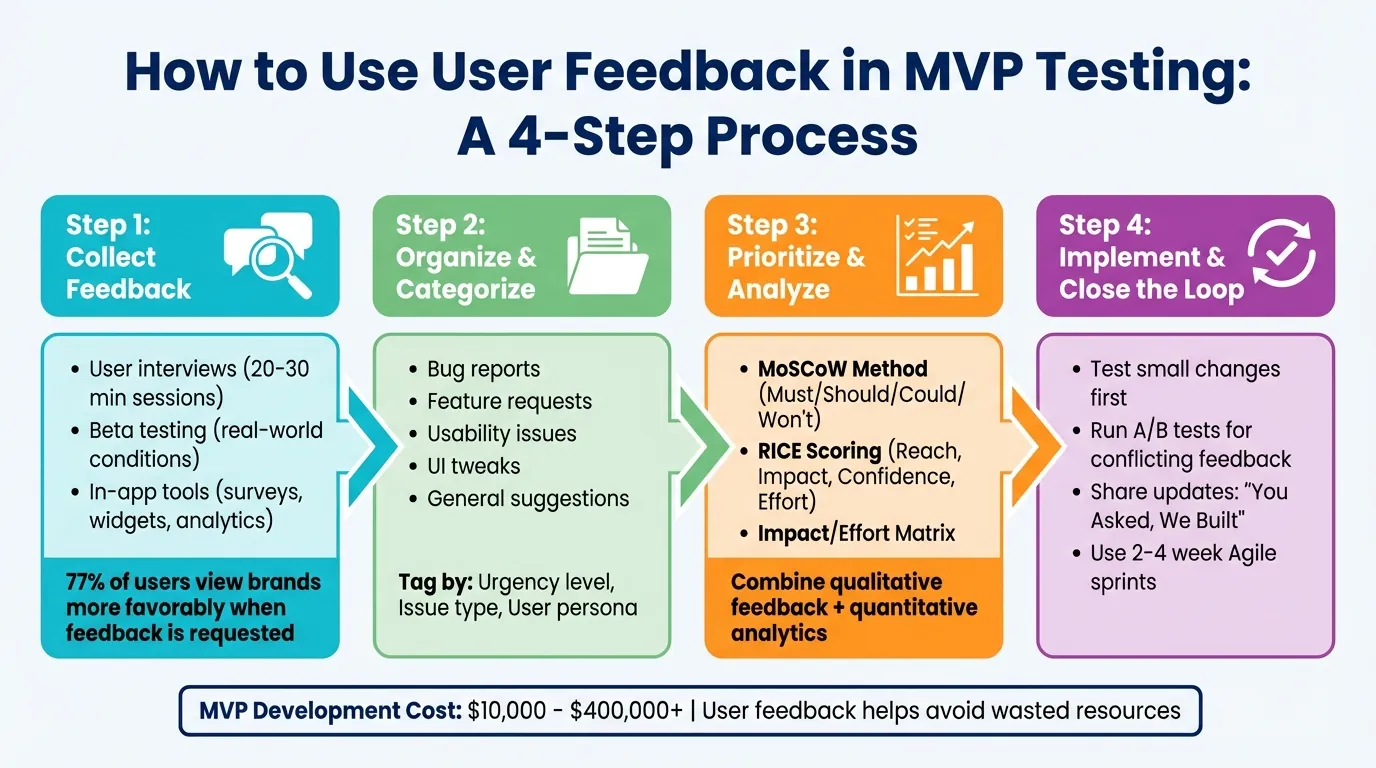
4-Step User Feedback Process for MVP Testing
How to Effectively Test Your MVP
Why User Feedback Matters for MVP Development
Feedback bridges the gap between what you assume users want and what they actually need. Without it, you're essentially guessing—and those guesses can often lead to costly mistakes. Many products fail simply because teams skip the critical step of validating their ideas with real users.
But feedback does more than just confirm or challenge your assumptions—it's a direct pathway to achieving product-market fit. Investor and startup coach Marc Andreessen emphasizes this perfectly:
"The only thing that matters is getting to product/market fit. Product/market fit means being in a good market with a product that can satisfy that market." - Marc Andreessen, Investor and Startup Coach
The difference between success and failure often boils down to how early and consistently teams involve users in the development process. Beyond the insights, engaging users early helps build relationships with those who could become your most loyal advocates.
Let's dive into how feedback helps you avoid wasted resources, make smarter decisions, and build strong early engagement.
Avoiding Wasted Resources
Feedback helps you focus on what really matters, saving both time and money. Developing an MVP can cost anywhere from $10,000 to over $400,000. Without user input, it's easy to spend resources on features that miss the mark entirely.
Take Instagram's early days as an example. It started as a multi-featured app called Burbn, which included social check-ins and other complex functionalities. Through user testing, the founders realized that people were primarily drawn to the photo-sharing feature. They stripped away the extras and focused solely on photos, which ultimately led to Instagram's massive success.
Catching issues early through feedback also prevents expensive rework. When you know what users genuinely care about, you can avoid wasting time building features that don't add value. This is where rapid iteration becomes crucial—platforms that let you deploy updates quickly across web and mobile simultaneously give you a significant advantage in responding to user needs.
Making Data-Driven Decisions
Gut feelings are risky. Data isn't. As economist W. Edwards Deming famously said:
"Without data, you're just another person with an opinion." - W. Edwards Deming, Economist
User feedback transforms subjective opinions into actionable insights. Instead of debating whether a feature is "good enough", you can rely on concrete data—user complaints, usage trends, and specific feature requests—to guide your decisions. Combining qualitative feedback from interviews with quantitative metrics from analytics takes the guesswork out of what to prioritize.
Frameworks like RICE scoring (Reach, Impact, Confidence, Effort) can help you objectively evaluate feedback and decide what to tackle first. This ensures you're investing in the features that will deliver the most value to your users.
Building Early User Engagement
Getting users involved in your MVP development isn't just about gathering data—it's about creating a connection. When users see their feedback shaping the product, they feel invested, turning them into advocates who are more likely to promote your product.
The numbers back this up: 77% of users have a more favorable view of brands that actively seek and act on their feedback. This goodwill often translates into higher retention rates and organic growth, which is especially valuable for startups working with tight budgets.
Closing the feedback loop is key. When users take the time to share their thoughts, they expect to see results. Whether it's through in-app updates, emails, or social media posts, keeping users informed about changes based on their input shows you're listening. This not only strengthens their loyalty but also encourages them to keep contributing.
Early adopters who feel heard can become your most valuable allies. They'll provide ongoing feedback, advocate for your product in their networks, and often become your first paying customers. This kind of engagement builds trust and lays a strong foundation for future growth, even beyond the MVP stage.
How to Collect User Feedback
Gathering user feedback is all about setting up the right opportunities to understand how people interact with your product. Choose methods that combine direct conversations with data-driven insights, tailoring your approach to the stage of your MVP and the depth of understanding you need. For example, user interviews can provide detailed context, beta testing reveals practical challenges, and in-app tools capture feedback right as users engage with your product.
Timing is key—collect feedback right after releasing new features and at regular intervals to keep track of changing user sentiment. These insights will guide the iterative process described in later sections.
Running User Interviews
One-on-one interviews are incredibly effective for uncovering emotions and pain points that analytics or surveys might miss. Focus on your MVP's core value and ask open-ended questions to encourage detailed responses. For instance, you could frame the conversation like this: "We think this tool helps teams save time on reporting. What do you think?" Then, dive deeper with questions like:
- "Can you walk me through your experience with our product so far?"
- "Which features do you find the most useful, and why?"
- "Have you faced any challenges or frustrations while using it?"
- "What initially drew you to try our product?"
Record key quotes to capture authentic insights and identify patterns. To avoid bias, focus on past user experiences rather than hypothetical scenarios. For example, ask, "Tell me about the last time you needed to complete this task," instead of, "Would you use this feature?"
Tools like Zoom or Loom can make remote interviews seamless, and keeping sessions to 20–30 minutes respects participants' time while still gathering valuable input. These qualitative insights pair well with the data collected through beta testing.
Setting Up Beta Testing
Beta testing puts your MVP in the hands of early adopters who use it in real-world conditions. This approach helps uncover bugs, usability hiccups, and performance issues that internal testing might miss. Select beta testers who closely match your target audience and be clear about what you're testing—whether it's a specific feature, overall performance, or navigation flow.
For mobile apps, platforms like TestFlight or Google Play's internal testing streamline distribution and feedback collection. Regular check-ins during the testing phase keep engagement high and allow you to address problems quickly.
The practical issues identified during beta testing lay the groundwork for the next step: using in-app feedback tools. When your app is built on a platform that publishes natively to both iOS and Android from a single codebase, you can run beta tests across both platforms simultaneously without maintaining separate builds—significantly accelerating your feedback cycles.
Adding In-App Feedback Tools
In-app feedback tools allow you to capture user reactions in real time, making the insights more specific and actionable. Add features like in-app surveys, feedback buttons, or live chat to gather input without disrupting the user experience. Keep surveys short—3–5 questions—and mix numerical ratings (like a 1–5 scale or emoji reactions) with one or two open-ended questions for context.
Trigger surveys strategically, such as after a user completes a task, interacts with a new feature, or exits the app, to ensure feedback is fresh and relevant.
Here's a quick breakdown of in-app feedback tools:
| Tool Category | Example Platforms | Key Functionality |
|---|---|---|
| In-App Surveys | Userpilot, Typeform, Lyssna | Triggered surveys based on user behavior |
| Feedback Widgets | Usersnap, Marker.io, Zeda.io | Real-time bug reporting and feature suggestions |
| Behavior Tracking | Hotjar, Mixpanel, Google Analytics | Heatmaps and session recordings for usage insights |
Adalo's AI-assisted platform makes it easy to integrate these tools and set up analytics dashboards, even if you're not a developer. With over 3 million apps created on the platform, there's a proven track record of builders successfully implementing feedback collection systems. The visual builder has been described as "easy as PowerPoint," making it accessible to add feedback widgets and survey triggers without writing code.
To encourage participation, offer small incentives like discounts, temporary access to premium features, or entry into a giveaway. Most importantly, close the loop by showing users how their feedback leads to improvements. For example, share updates with "You Asked, We Built" announcements. When users see their input making a difference, they're more likely to continue sharing insights and become loyal advocates for your product.
How to Analyze and Prioritize Feedback
When feedback starts pouring in, it can feel like an avalanche of information. The key is to organize it in a way that allows you to quickly identify what matters most. This step is crucial for making meaningful improvements to your MVP.
Organizing Feedback by Category
Start by sorting feedback into categories such as bug reports, feature requests, usability issues, UI tweaks, and general suggestions. This structure helps you cut through the noise and spot recurring themes more easily.
Take it a step further by tagging each piece of feedback with extra context: urgency level (is it a minor inconvenience or a dealbreaker?), issue type, and user persona (is this coming from a new user, a power user, or a high-value client?). For instance, if multiple power users report the same navigation issue but casual users don't mention it, you'll know which group is being impacted.
Keep all this information centralized—whether in a spreadsheet, a Trello board, or tools like ProductBoard or Canny—to ensure nothing gets lost in the shuffle of Slack messages, emails, or social media comments.
Deciding What to Fix First
Not all feedback is created equal, so prioritizing is essential to keep things moving forward. Frameworks like the MoSCoW method can help you categorize tasks into Must-haves, Should-haves, Could-haves, and Won't-haves, making it easier to focus on critical fixes while setting aside less urgent ones.
Another approach is RICE scoring, which evaluates tasks based on Reach (how many users are affected), Impact (how much it improves their experience), Confidence (your certainty about the outcome), and Effort (the time required to implement it).
For quick, high-impact wins, the Impact/Effort Matrix is a lifesaver. It highlights changes that deliver significant user benefits with minimal development effort—like fixing a confusing button label or resolving a slow-loading page. These smaller updates can immediately improve user satisfaction while you work on larger, more complex projects.
Always align your fixes with your core strategy and deprioritize feedback that doesn't fit your vision. Combining user feedback with analytics can further refine your priorities.
Combining User Interviews with Analytics
User feedback tells you why people feel the way they do, while analytics reveal what they're actually doing. Together, they provide a complete picture. For example, if users mention in interviews that a feature is confusing, check your analytics to see if engagement metrics or heatmaps back this up, such as low usage or high drop-off rates in that area.
Analytics can also help you form hypotheses to test with qualitative methods. If heatmaps show users frequently clicking on a non-clickable element, follow up with session recordings or interviews to understand their expectations. On the flip side, if interviews reveal frustration with a feature, use A/B testing to see if changes improve conversion rates or session lengths.
Segmenting your data by user groups—like power users versus newcomers—can uncover whether different audiences face unique challenges. And here's the kicker: about 77% of users view brands more favorably when their feedback leads to visible improvements. Showing customers that their input drives real change isn't just good practice—it builds loyalty that lasts.
How to Update Your MVP Based on Feedback
Once you've sorted through and prioritized the feedback you've received, the next step is putting it into action. The key here isn't to overhaul your entire product in one go. Instead, focus on making targeted, incremental improvements that address major user pain points. Using an Agile approach with 2–4-week sprints can help you tackle updates in manageable chunks, making it easier to test, learn, and refine as you go.
Testing Small Changes First
Start with the low-hanging fruit—those small fixes that pack a big punch. This might include squashing bugs, tweaking button labels for clarity, or improving loading times. These kinds of updates can immediately enhance the user experience without risking the stability of your core features.
To ensure these changes work as intended, use continuous integration and testing tools to catch any issues early. Validate updates by rolling them out to early adopters or in beta environments, ensuring they perform well across different devices.
Speed matters here. Adalo's infrastructure, rebuilt from the ground up with Adalo 3.0 in late 2025, now runs 3-4x faster than before. This means your small changes deploy quickly and users experience the improvements immediately—critical when you're iterating based on feedback. Once you've handled the quick wins, you can move on to experimenting with alternative solutions to address conflicting feedback.
Running A/B Tests
When user feedback points in different directions—or you're unsure which solution will work best—A/B testing can help you make informed decisions. For instance, if some users want a simplified checkout process while others prefer more detailed product information, you can create two versions and measure which one drives better results, like higher conversion rates.
A/B testing is most effective when you focus on one variable at a time. But if you need to evaluate how multiple elements—like a headline, image, and call-to-action button—work together, multivariate testing is a better option.
The ability to iterate quickly is essential for effective A/B testing. When your platform lets you push updates to web, iOS, and Android simultaneously from a single build, you can run tests across all user segments without managing separate codebases or waiting for app store approval cycles.
Sharing Updates with Users
After testing and confirming that your updates are effective, it's crucial to let users know that their feedback made a difference. Closing the feedback loop isn't just about implementing changes—it's about showing users that you listened. When you roll out a new feature or fix based on user input, communicate it clearly through in-app notifications, email updates, or social media posts. Highlight these updates with messaging like "You Asked, We Built" to emphasize that their input directly shaped your product.
For an even more personal touch, segment your communication. For example, send targeted emails to the specific users who requested a particular feature. This approach resonates—77% of users feel more positively about brands when they see their feedback result in tangible improvements. Transparency like this fosters loyalty and encourages users to keep sharing insights as your MVP continues to grow.
Adalo's platform lets you deploy updates simultaneously across web, iOS, and Android from a single build. This streamlined process allows you to iterate quickly and keep all your users on the same page without juggling separate codebases for each platform. With unlimited database records on paid plans and no usage-based charges, you can scale your feedback collection and user base without worrying about hitting data caps or unexpected bills.
Choosing the Right Platform for Rapid MVP Iteration
The platform you choose for building your MVP directly impacts how quickly you can respond to user feedback. When evaluating options, consider how each handles the full feedback-to-deployment cycle.
Key Factors for Feedback-Driven Development
Deployment speed determines how fast users see improvements based on their feedback. Platforms that publish to web, iOS App Store, and Google Play from a single codebase eliminate the delays of managing separate builds. This means when a user reports an issue on Android, you can fix it and deploy the update across all platforms simultaneously.
Database flexibility matters as your user base grows. Collecting feedback means storing more data—survey responses, user behavior logs, feature requests. Platforms with no record limits let you scale feedback collection without hitting walls. Adalo's paid plans offer unlimited database records, removing storage constraints that could otherwise force you to archive or delete valuable user insights.
Performance under load becomes critical during beta testing phases when you're actively soliciting feedback from larger user groups. Adalo's modular infrastructure scales to serve apps with millions of monthly active users, with no upper ceiling. Unlike web app wrappers that can slow down under increased load, purpose-built native architecture maintains performance even during high-traffic feedback collection periods.
Platform Comparison for MVP Builders
| Factor | Adalo | Bubble | Glide |
|---|---|---|---|
| Starting Price | $36/month | $59/month | $60/month |
| Native Mobile Apps | Yes (iOS & Android) | Web wrapper only | No app store publishing |
| Database Records | Unlimited on paid plans | Limited by Workload Units | Limited, additional charges |
| Usage-Based Charges | None | Yes (Workload Units) | Yes |
| Single Codebase Deploy | Web, iOS, Android | Web only (wrapper for mobile) | Web only |
Bubble offers more customization options, but that flexibility often results in slower applications that can struggle under increased load. Many Bubble users end up hiring experts to optimize performance—an additional cost that can add up quickly during the MVP phase when budgets are tight. Bubble's mobile solution is also a wrapper for the web app, which can introduce challenges at scale and means updates don't automatically sync across web and native mobile versions.
Glide excels at spreadsheet-based apps with its template-focused approach, making it fast to build and publish. However, this speed comes at the cost of creative freedom—apps tend to look generic and similar. Glide also doesn't support Apple App Store or Google Play Store publishing, limiting your ability to reach mobile users through native apps.
For MVP builders who need to iterate quickly based on user feedback, the combination of native app publishing, no data caps, and predictable pricing without usage charges provides a foundation for rapid experimentation without surprise costs.
Conclusion
Listening to user feedback is key to creating products that address real-world problems. By continuously gathering, analyzing, and acting on feedback, you can avoid wasting time and resources on features that don't matter and instead focus on what truly makes a difference.
To get the full picture, combine qualitative insights with hard data. Pair user interviews with metrics from analytics tools and A/B testing to understand not just what users are doing, but why they're doing it. Frameworks like RICE or MoSCoW can help you prioritize effectively, ensuring your efforts go toward the most impactful changes.
One of the most important steps? Close the feedback loop. Let users know how their input has influenced updates or improvements. When people see their suggestions implemented, they feel valued and become more invested in your product. This kind of transparency fosters loyalty, turning early adopters into long-term advocates. Plus, these targeted updates keep your MVP on track with user needs as you work toward achieving product-market fit.
The journey to product-market fit is all about staying connected to your users. Start small, validate changes, and let real user feedback—not assumptions—guide your decisions. With the right platform supporting rapid iteration, you can turn user insights into product improvements faster than ever.
Related Blog Posts
- Ultimate Guide to No-Code MVP Prototyping
- How To Create an AI Scanning and Checking App
- How To Create a Gift Remembering And Prompting App
- How To Create a Content Scheduling App
FAQ
Why choose Adalo over other app building solutions?
Adalo is an AI-powered app builder that creates true native iOS and Android apps. Unlike web wrappers, it compiles to native code and publishes directly to both the Apple App Store and Google Play Store from a single codebase—the hardest part of launching an app handled automatically. With unlimited database records on paid plans and no usage-based charges, you can scale without surprise costs.
What's the fastest way to build and publish an app to the App Store?
Adalo's drag-and-drop interface and AI-assisted building let you go from idea to published app in days rather than months. The platform handles the complex App Store submission process, so you can focus on your app's features and user experience instead of wrestling with certificates, provisioning profiles, and store guidelines.
How do I prioritize which user feedback to act on first?
Use prioritization frameworks like RICE scoring (Reach, Impact, Confidence, Effort) or the MoSCoW method (Must-haves, Should-haves, Could-haves, Won't-haves) to evaluate feedback objectively. Focus first on issues that affect the most users and align with your core value proposition, then tackle quick wins that deliver high impact with minimal effort.
What are the best methods for collecting user feedback during MVP testing?
The most effective methods include user interviews for deep qualitative insights, beta testing to uncover real-world usability issues, and in-app feedback tools like surveys and feedback widgets for real-time input. Combining these approaches gives you both the 'why' behind user behavior and actionable data to guide improvements.
How do I close the feedback loop with users after making changes?
Communicate updates clearly through in-app notifications, email updates, or social media posts using messaging like 'You Asked, We Built.' For a more personal touch, send targeted messages to users who specifically requested a feature. This transparency builds loyalty and encourages users to continue sharing valuable feedback.
Can I run A/B tests on my MVP without coding?
Yes, you can implement A/B testing in your MVP by creating different versions of features and measuring user engagement metrics. Adalo allows you to quickly iterate and deploy variations across web and mobile, then analyze which version performs better based on real user data—all without writing code.
Which is more affordable, Adalo or Bubble?
Adalo starts at $36/month with unlimited usage and no record limits on paid plans. Bubble starts at $59/month but includes usage-based Workload Unit charges and record limits that can lead to unexpected costs as your app scales. For predictable pricing during MVP iteration, Adalo offers better cost certainty.
Which is better for mobile apps, Adalo or Bubble?
Adalo creates true native iOS and Android apps that publish directly to app stores from a single codebase. Bubble's mobile solution is a web wrapper, which can introduce performance challenges at scale and means updates don't automatically sync across platforms. For native mobile app development, Adalo is the stronger choice.
How long does it take to build an MVP for user testing?
Ada, Adalo's AI builder, lets you describe what you want and generates your app. Magic Start creates complete app foundations from a description, while Magic Add adds features through natural language.
With Adalo's visual builder—described as 'easy as PowerPoint'—you can build a functional MVP in days rather than months. The platform's Magic Start feature generates complete app foundations from descriptions, and Magic Add lets you add features through natural language requests, accelerating the path from idea to testable product.
Do I need coding experience to collect user feedback in my app?
No coding experience is required. Adalo's visual interface lets you integrate in-app surveys, feedback widgets, and analytics tools without writing code. Over 3 million apps have been built on the platform by users of all technical backgrounds, proving that effective feedback collection is accessible to everyone.