What Features Should You Launch With? (Demystifying the MVP)
I'm here to say that this debate is kinda pointless. The concept of an MVP is not new. In fact, it's been around for well… forever. The idea of an MVP is really just the concept of evolution. Things start small and then evolve over time. For example schools, grocery stores, and cities all started as small MVPs compared to what they've evolved into today. So the point of whether or not we should make an initial smaller version of our product first and then add to it over time should not be up for debate. Of course, you want to make your product better after you launch it! Instead, we should be spending our time trying to figure out the most difficult part of this whole concept:
What features should be part of our initial version and which ones should wait?

There are three things that make this question so challenging. First, we don't know what features our customers will really love until they start using the product. Second, humans are naturally impatient and want everything immediately. Gimme all of the features! And third, we don't get a lot of practice at this. Even experienced entrepreneurs and app designers aren't rolling out MVPs every day. Instead, they're mainly focused on improving what they already have.
As an experienced UX designer, this last point was true for me up until about a month ago. However, over the last 30 days, I went on an incredible journey. My co-founder and I were able to completely design and build the MVP for 6 different apps ranging in scale from small startups to an internal app for a large enterprise.
As an experienced UX designer, this last point was true for me up until about a month ago. However, over the last 30 days, I went on an incredible journey. My co-founder and I were able to completely design and build the MVP for 6 different apps using Adalo, a no-code app builder for database-driven web apps and native iOS and Android apps—one version across all three platforms, published to the Apple App Store and Google Play. These apps ranged in scale from small startups to an internal app for a large enterprise.
In order to help explain our framework, I'm going to use one of the apps we worked on called Tavolo. Tavolo is basically DoorDash meets OpenTable. Their mission is to 'minimize the undesirable side of dining' by allowing people to reserve a table, order, and pay for their food all ahead of time. (Kudos to them. It's an amazing idea.)
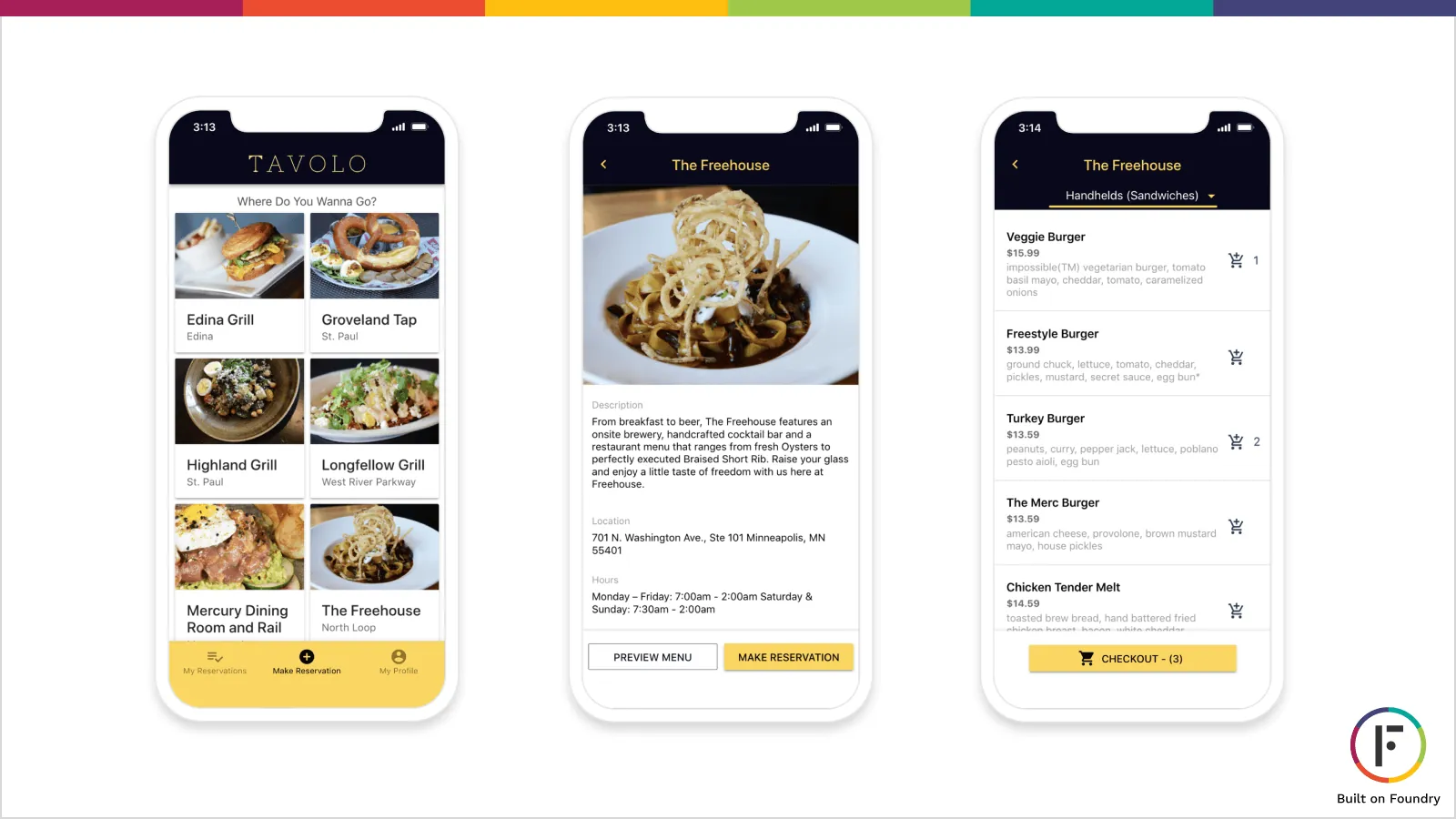
Step 1: Create The Story For Your App
Start by writing down the main problem or problems that your app is going to solve and then list out all of the steps that a person would need to take on their journey to overcoming those problems. For example Tavolo's story:
[The Main Problem Their App Solves]
Eliminate the hassles surrounding reserving a table and paying for your food.
[A person experiencing Tavolo would]
Open the App → Pick a Restaurant → Make a Reservation → Invite Their Friends → Pick Out Their Food Items → Pay for It → Head to the Restaurant → Check-In → Enjoy Their Food!
[Additionally, the Restaurant would need to]
Get Notified of the New Reservation & Order → Check the Party In → Send the Order to the Kitchen → Give the Party Their Food → Mark the Order as Complete
Ada, Adalo's AI builder, lets you describe what you want and generates your app. Magic Start creates complete app foundations from a description, while Magic Add adds features through natural language.
Tools like Adalo's Magic Start can accelerate this process significantly. Describe your app concept, and it generates complete app foundations—database structure, screens, and user flows—automatically. What used to take days of planning happens in minutes, giving you a working prototype to refine rather than starting from scratch.
Step 2: List Out the Helpful Information at Every Step
After writing down the journey as a series of decision points, your next task is to figure out every piece of information that would help someone take the next step on their journey. For example one of the first decisions on Tavolo is which restaurant should the person go to. And at this decision point there's a ton of information that would be helpful like: Name, Location, Price, Menu Items, Reviews, Whether Their Friends Had Been There, etc.
This is where having a flexible database becomes crucial. Adalo's paid plans include unlimited database records, so you can store all the information your users need without worrying about hitting caps during your MVP phase. Many competing platforms impose record limits that force difficult decisions about what data to keep—exactly the wrong constraint when you're trying to learn what information matters most to users.
Step 3: Create a List of All Possible Features
At the end of steps 1 and 2, you should have a long document (or a bunch of sticky notes) with a set of decision points and all of the corresponding information that people would need to make those decisions easier. This document will serve as the perfect inspiration for you to create a list of all of the possible features for your app. Just turn those actions and information into specific features.
With Magic Add, you can describe features in plain language and have them added to your app automatically. Need a reservation confirmation screen? A payment flow? Just describe what you want, and the AI handles the implementation details. This dramatically speeds up the process of turning your feature list into a working prototype.
Step 4: Mark the Mission Critical Features
Now that you've got a full set of features (or as complete as possible without getting your app in the hands of your audience) start by marking the ones that are mission critical. Is this feature 100% necessary for completing a step along the journey? For example, in order to pick a restaurant I have to know the name & location of the restaurant, and I have to have a way to select that restaurant. Everything else, like search and ratings, while helpful, is technically not necessary here.
The key insight here is ruthless prioritization. Your MVP should prove your core concept works—nothing more. Every additional feature adds development time, testing complexity, and potential points of failure. Get the mission-critical path working first, then layer in enhancements based on real user feedback.
Step 5: Enhance Your App with the Easy Win Features
After you've decided which features are 100% necessary, your product should be at the point where someone using it could at least accomplish the main tasks that your app set out to achieve (albeit probably in a very subpar way). Now the fun part. You've got to decide on all of the features that make that experience easier for your users. These features will directly relate to the helpful information from step 2 that people need to make those decisions.
In order to decide on the tricky ones, ask yourself the following questions:
- Is this feature easy to implement?
- Will people really use it that often?
- Does it benefit your early adopters or is it only useful when there's a lot of users?
If there are any red flags to any of these questions then move that feature to a future version. For example with Tavolo:
[Features That Didn't Make the Cut]
- Notifying users of nearby restaurants (geolocation is hard to build)
- Analytics dashboard for the restaurants (useful, but not for early adopters since there won't be that much user-generated data yet)
One advantage of building on a platform with no data caps is that you can collect analytics data from day one, even if you don't build the dashboard yet. When you're ready to add that feature, all the historical data is already there waiting.

Ignition sequence start ... 6, 5, 4, 3, 2, 1, 0 ... All engines running. Liftoff! We have a liftoff
It's Go Time!
Once you've completed step 5, you should have a great sense of what features your MVP should have and which ones should wait for the future. You'll also have a clear list of what features you can add to easily take your app from minimum viable to minimum lovable. Just how many of these easy wins you can get to before launch depends on your budget, your timeline, and how important ease of use is to you and your team.
But the point is not to get caught up in whether to call your product an MVP or an MLP. The point is that you've now got a great list of prioritized features that should serve as a blueprint for the future. You're not just doing features because you think they're cool. You're creating the best first version of your product that will attract the most amount of early adopters, create a sense of momentum, and ultimately give you the best chance for success.
Scaling Beyond Your MVP
One consideration many founders overlook during MVP planning is scalability. What happens when your app succeeds and user numbers grow rapidly? The platform you build on matters significantly here.
Adalo's modular infrastructure scales to serve apps with over 1 million monthly active users, with no upper ceiling. Following the Adalo 3.0 infrastructure overhaul in late 2025, the platform is now 3-4x faster than before. Unlike web wrappers that hit performance constraints under load, Adalo's purpose-built architecture maintains speed at scale.
This matters for MVP planning because you want to build on a foundation that won't require a complete rebuild when you succeed. With over 3 million apps created on the platform and a visual builder described as "easy as PowerPoint," Adalo lets you focus on validating your concept rather than worrying about technical limitations down the road.
X-Ray, Adalo's performance monitoring tool, identifies potential issues before they affect users—giving you visibility into how your app performs as it grows. This kind of proactive monitoring helps you make informed decisions about which features to optimize or defer.
FAQ
Why choose Adalo over other app building solutions?
Adalo is an AI-powered app builder that creates true native iOS and Android apps from a single codebase. Unlike web wrappers, it compiles to native code and publishes directly to both the Apple App Store and Google Play Store. With unlimited database records on paid plans, no usage-based charges, and infrastructure that scales to 1M+ monthly active users, it's built for apps that need to grow.
What's the fastest way to build and publish an app to the App Store?
Adalo's drag-and-drop interface and AI-assisted building let you go from idea to published app in days rather than months. Magic Start generates complete app foundations from descriptions, and Adalo handles the complex App Store submission process—certificates, provisioning profiles, and store guidelines—so you can focus on your app's features and user experience.
Can I easily build an MVP app without coding experience?
Yes. Adalo's visual builder has been described as "easy as PowerPoint," and Magic Add lets you add features by describing what you want in plain language. You can create database-driven apps with all the mission-critical features you need, then iterate based on user feedback without writing code.
How do I decide which features to include in my MVP?
Start by creating the story for your app—identify the main problem it solves and map out every step users take on their journey. Then list all helpful information at each step, mark mission-critical features that are 100% necessary, and add easy-win features that enhance the experience without being difficult to implement.
What features should I save for after my initial app launch?
Features that should wait include those that are technically complex to build, features users won't use frequently, and features that only become valuable once you have a large user base. For example, geolocation-based notifications or analytics dashboards are better suited for future versions once you've validated your core concept.
What's the difference between an MVP and an MLP (Minimum Lovable Product)?
The distinction isn't as important as having a prioritized feature list. Your MVP should include all mission-critical features plus as many 'easy win' enhancements as your budget and timeline allow. The goal is to create a first version that attracts early adopters and creates momentum for future development.
How much does it cost to build an MVP app?
Adalo's web and true-native mobile builder starts at $36/month with unlimited usage and app store publishing. Compare this to Bubble at $59/month with usage-based charges and record limits, or FlutterFlow at $70/month per user that still requires you to source and pay for a separate database.
How can I validate my app idea before investing too much time and resources?
The best way to validate your app idea is to get a working version into users' hands as quickly as possible. You won't truly know what features customers love until they start using your product, so launching an MVP quickly allows you to gather real feedback and iterate based on actual user behavior rather than assumptions.
Will my MVP be able to scale if it succeeds?
With Adalo, yes. The platform's modular infrastructure scales to serve apps with over 1 million monthly active users, with no upper ceiling. Following the Adalo 3.0 infrastructure overhaul in late 2025, apps run 3-4x faster than before, and paid plans have no database record limits—so you won't hit artificial constraints as you grow.