Adalo vs Bubble vs FlutterFlow: The Definitive 2026 No-Code Comparison
In 2026, no-code platforms dominate app development, powering 75% of new applications. Adalo, Bubble, and FlutterFlow are standout tools, each catering to different needs:
- Adalo: Best for building native mobile apps with AI tools like "Magic Start", offering unlimited usage and direct app store publishing starting at $36/month.
- Bubble: Ideal for complex web apps and SaaS platforms, but lacks native app support. Pricing starts at $32/month, with costs scaling based on usage.
- FlutterFlow: Focused on native mobile apps with full code export and robust backend integrations. Pricing starts at $30/month per user, with external database costs.
Quick Comparison
| Feature | Adalo | Bubble | FlutterFlow |
|---|---|---|---|
| Starting Price | $36/month | $32/month | $30/month (per user) |
| Native Mobile Apps | Yes | No | Yes |
| App Store Publishing | Direct | Requires wrapper | Direct |
| Database | Built-in, unlimited | Built-in, limited | External required |
| Usage Charges | None | Yes | External-dependent |
| Learning Curve | Low | High | Moderate to High |
| Code Export | No | No | Yes |
Adalo stands out for simplicity and flat-rate pricing, Bubble excels in web app complexity, and FlutterFlow offers unmatched flexibility for developers needing native code. Choose based on your app's goals, platform needs, and budget.
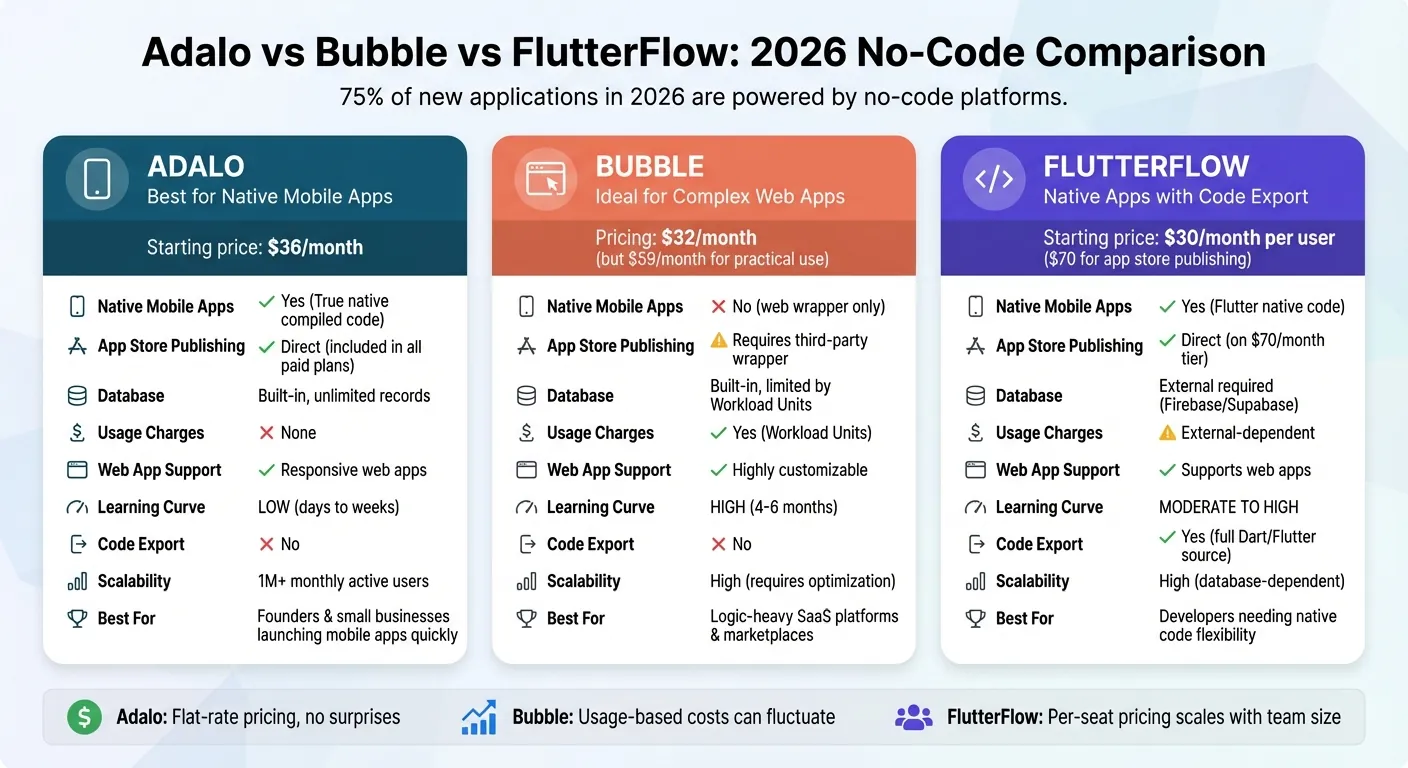
Adalo vs Bubble vs FlutterFlow: 2026 No-Code Platform Comparison
Before diving into the details, here's what independent research says. App Builder Guides' State of App Building report (February 2026) analyzed 190 Reddit threads and 150+ platform citations across 345 data points with zero platform sponsorships. The result: Adalo ranked first among visual builders for non-developers. Bubble ranked sixth.

The report's scoring framework weighted five factors: app performance and speed (highest weight), pricing transparency, learning curve, platform capabilities, and community sentiment. Key findings relevant to this comparison:
- Bubble's page loads averaged 5-10 seconds on desktop and 8-14 seconds on mobile beta, with users on $40K/year enterprise plans still reporting slow performance.
- Bubble's Workload Unit pricing drew the most negative community sentiment of any platform analyzed (net sentiment score: -60), with users reporting 400-500 WU consumed per user per day.
- Adalo users routinely build and publish complete apps to the App Store and Google Play without hiring expert assistance, while Bubble projects typically require consultants at $40-$125/hour.
Adalo: Full-Featured Platform for App Store Publishing
Adalo is the no-code app builder that pairs AI-powered generation with a visual multi-screen canvas, so entrepreneurs and business teams can design, build, and publish custom database-driven apps to the Apple App Store, Google Play Store, and web from a single project — no code, no developers required.Apple App Store and Google Play Store.
Ada, Adalo's AI builder, lets you describe what you want and generates your app. Magic Start creates complete app foundations from a description. Magic Add adds features through natural language. X-Ray identifies performance issues before they affect users.
AI-Powered App Building
Adalo's AI Builder simplifies app development by using natural language prompts. Its "Magic Start" feature can turn a simple description into a fully functional app foundation. For instance, describing a fitness tracking app results in a generated data schema, interface, and logic - all ready to use.
Need to tweak or expand your app? The "Magic Add" feature lets you describe additional functionalities, which are then seamlessly integrated into your app. This eliminates manual adjustments and drastically reduces development time.
Single Build for All Platforms
Adalo compiles your app into native iOS and Android code - not web wrappers - using a single codebase. This means you can build your app once and deploy it across the Apple App Store, Google Play Store, and even as a Progressive Web App for the web, all at the same time. Any updates you make in the builder are automatically applied across all platforms.
Additionally, Adalo's responsive design ensures your app adapts perfectly to different screen sizes, whether on mobile or desktop. Its pricing structure is designed to complement this scalability.
Unlimited Scalability and Pricing
Adalo has eliminated usage-based charges for App Actions across all plans, so you don't have to worry about unexpected costs from traffic spikes. Paid plans now include unlimited database records, users, and actions. This allows your app to grow without additional fees.
Since the release of Adalo 3.0 in late 2025, the platform can handle over 1,000,000 monthly active users without performance issues. With an average uptime exceeding 99% and the ability to process over 20,000,000 daily data requests, Adalo ensures reliability at scale. The built-in "X-Ray" tool also helps you identify and address potential development issues before they impact users.
"Adalo is the best no code tool for building mobile apps." - Endie Umunna
The Starter plan, priced at $36 per month, covers everything you need to launch - native app store publishing, unlimited usage, and integrated hosting and database. For $52 per month, the Professional plan adds push notifications, geolocation features, and the ability to publish up to two apps.
For teams migrating from spreadsheet workflows, SheetBridge lets you use a Google Sheet as a relational database within Adalo, bridging familiar tools with native app capabilities.
Flutterflow vs Adalo vs Bubble (2026) - Which One Is BEST?
Bubble: Web-Focused Development Platform
Bubble is designed to handle complex web applications with advanced workflows and logic. With plans starting at $69 per month for the Starter plan, it caters to developers who need complete control over frontend design, backend databases, and business logic.
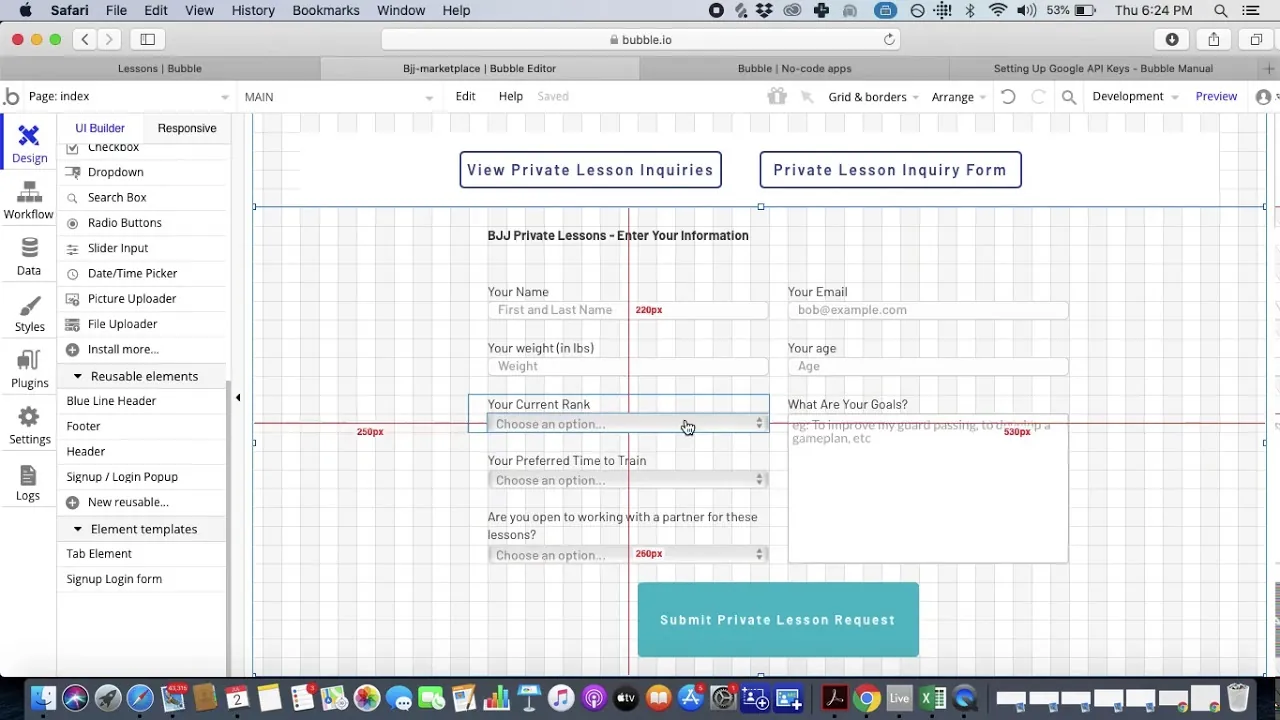
Web-Only Focus
Bubble focuses exclusively on web app development and does not support direct publishing to the Apple App Store or Google Play Store. To make a Bubble app mobile-friendly, developers must use third-party wrappers like Nativator. However, this approach introduces drawbacks such as a 2–3 second increase in load time and the need for separate update management.
"Bubble's mobile solution is a wrapper for the web app, not true native code. This introduces potential performance challenges at scale." - The Adalo Team
Bubble shines when it comes to powering logic-heavy web applications, including SaaS platforms, marketplaces, internal tools, and AI-driven dashboards. Its extensive plugin ecosystem and flexible API connector allow for seamless integrations, while built-in SEO tools, sitemap management, and server-side rendering enhance search engine visibility.
That said, these strengths come with limitations that can impact costs and scalability.
Pricing and Scalability Concerns
Bubble uses a pricing model based on Workload Units (WU), which measure CPU and database usage. The Starter plan includes a set allocation of WU for $69 per month, while higher tiers provide more capacity at increased costs. However, predicting costs can be tricky since WU consumption depends on database operations, workflows, and API requests.
Exceeding the WU limit results in additional charges, which can lead to unexpected expenses. While users can cap overages to control spending, hitting the limit will cause the app to go offline until the next billing cycle or until more units are purchased. This variable pricing model contrasts sharply with flat-rate plans that offer unlimited usage, making budgeting less straightforward for growing applications.
Team Collaboration Features
Bubble also supports team collaboration with features like role-based permissions, version control, and multiple editor seats on higher-tier plans. The Team plan includes expanded WU allocations and support for separate client databases.
However, mastering Bubble's interface can take time. Many users report needing 4–6 months to fully understand its capabilities. As Jesus Vargas, Founder of LowCode Agency, puts it:
"Bubble is a full product platform. It is built for logic-heavy apps with complex workflows, databases, permissions, and business rules."
FlutterFlow: Mobile-First Development with Technical Flexibility
FlutterFlow stands out by prioritizing native vs web app integration and offering developers significant technical control. Built on Google's Flutter SDK, it compiles apps into native ARM code, ensuring smooth performance on both iOS and Android devices. Unlike platforms that rely on web wrappers, FlutterFlow's architecture directly integrates with device hardware like cameras and GPS for a more seamless experience.
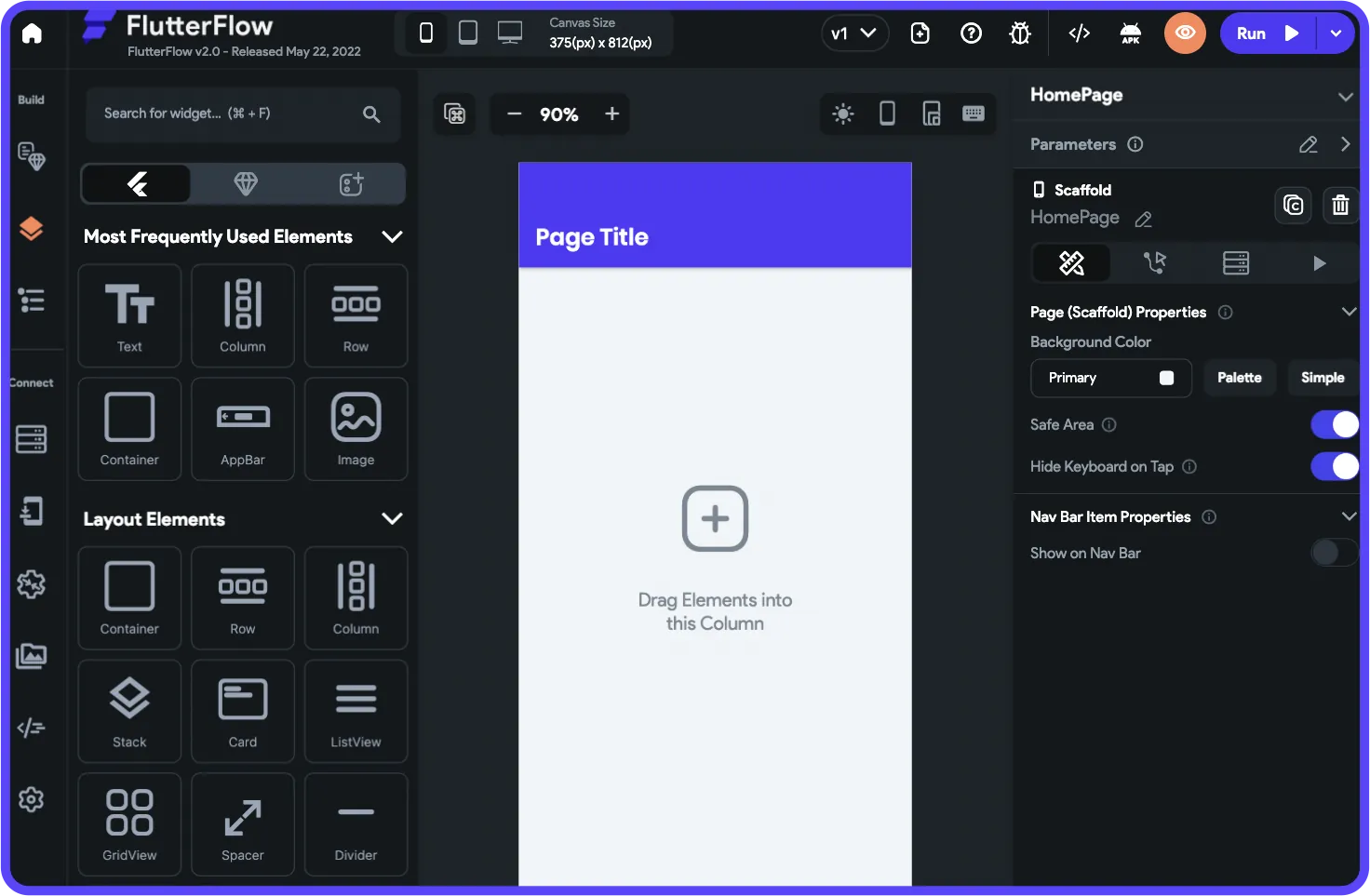
Native Mobile App Publishing
FlutterFlow produces Flutter/Dart code that compiles directly into native mobile apps, delivering smooth animations and efficient rendering across devices. The platform offers tiered pricing for app publishing:
- Standard Plan ($30/month per user): Includes source code downloads and APK publishing to Google Play.
- Pro Plan ($80/month per user): Adds one-click publishing to both the Apple App Store and Google Play Store.
While its mobile-first approach ensures optimized performance, the builder interface has limitations—it can only display up to two screens simultaneously, which might pose challenges for complex designs. Despite this, FlutterFlow's native capabilities and robust code export options give developers a solid foundation for building high-performance apps.
Technical Flexibility and Code Export
FlutterFlow goes beyond app publishing by offering full control over the app's code. Developers can export clean Dart source code, allowing for greater flexibility in hosting, selling, or transitioning to traditional development. As Jesus Vargas, Founder of LowCode Agency, explains:
"FlutterFlow also lets you export and import clean code without any bulk or obfuscation."
The platform supports integrations with Firebase, Supabase, MySQL, and REST APIs, empowering developers to manage the backend with precision. Additionally, GitHub integration streamlines version control and team collaboration. However, these advanced features require a deeper understanding of programming logic, API configurations, and database management. Bee Law from FlutterFlow highlights this advantage:
"If owning your code is important, FlutterFlow is the clear winner."
Per-Seat Pricing Model
FlutterFlow's Pro plan is priced at $80 per month per user, with additional features available in the Team tier. Costs scale with team size—for example, a team of 10 developers would pay $800 monthly. However, the pricing doesn't include database infrastructure, meaning teams must separately manage and pay for services like Firebase or Supabase. This adds both financial and technical complexity.
While the platform's pricing model offers flexibility, it also increases the total cost of ownership. Teams must weigh the benefits of advanced features against the additional costs and expertise required to manage external infrastructure effectively.
Side-by-Side Comparison Table
Here's a breakdown of how Adalo, Bubble, and FlutterFlow stack up in terms of pricing, features, and scalability.
| Feature | Adalo | Bubble | FlutterFlow |
|---|---|---|---|
| Starting Price | $36/month | $69/month | $30/month (per user) |
| Native Mobile Apps | True native (compiled code) | No (web wrapper only) | True native (Flutter code) |
| App Store Publishing | Direct – included in all paid plans | Requires third-party wrapper service | Available on the $80/month tier |
| Database | Built-in – unlimited records on paid plans | Built-in – limited by Workload Units | External (e.g., Firebase or Supabase required, at additional cost) |
| Usage Charges | None – unlimited actions, users, and records | Yes – based on Workload Units | Dependent on external database setup |
| Web App Support | Responsive web apps | Highly customizable web apps | Supports web apps |
| PWA Support | Yes | Yes | Yes |
| Learning Curve | Low (days to weeks) | Steep (4–6 months) | Moderate to high (requires some technical expertise) |
| Code Export | No | No | Yes (full Dart/Flutter source code) |
| Scalability | 1M+ monthly active users (Adalo 3.0) | High (often requires expert optimization) | High (dependent on external database setup) |
| Performance | Modular infrastructure with 99%+ uptime | Performance may lag under heavy load | High – leverages native Flutter performance |
| Team Collaboration | Editor seats differ by plan | 2 editor seats on the Growth plan | Per-seat pricing ($80/month per user) |
| Updates Across Platforms | Automatic (a single build updates all platforms) | Manual per platform (if using wrappers) | Integrated via Codemagic |
| AI-Assisted Building | Yes (Magic Start, Magic Add) | Limited | Limited |
Adalo keeps things straightforward with flat-rate pricing and zero usage-based fees, providing a predictable cost structure. Bubble, on the other hand, uses a Workload Unit system, which can lead to fluctuating expenses depending on your app's activity. FlutterFlow takes a per-seat pricing approach, which can quickly add up for larger teams. For instance, a team of 10 might spend around $800 monthly, and the need for an external database introduces additional costs and complexity.
"Adalo paid plans include unlimited database records with no usage-based charges - eliminating bill shock that plagues capacity-based competitors."
- Adalo Team
This table highlights the major differences, helping you weigh the options as you choose the platform that fits your needs. It sets the stage for deeper analysis in the next section.
Final Comparison and Conclusion
When it comes to picking an app building platform in 2026, your decision will hinge on your project's specific needs and budget. Adalo emerges as a well-rounded option for founders, small businesses, and enterprise teams aiming to launch native mobile apps quickly without breaking the bank. At $36/month for unlimited usage, Adalo simplifies the journey from idea to App Store launch. Its performance metrics and cost efficiency make it a standout choice.
Adalo's infrastructure has already demonstrated its ability to handle high performance and scalability. The platform processes over 20 million daily data requests with 99%+ uptime, supporting apps with over 1 million monthly active users. Compare this to traditional mobile development, which can range from $40,000 to $400,000 or more—Adalo achieves similar outcomes for a fraction of the cost, between $300 and $1,000 annually. These savings, paired with reliable performance, set Adalo apart from conventional development methods.
With projections suggesting that 70% of new applications will rely on visual development tools by 2026, Adalo's user-friendly interface and AI-driven tools like Magic Start enable creators to get their apps live in days instead of months. Describe what you want to build, and Magic Start generates your database structure, screens, and user flows automatically—what used to take days of planning happens in minutes. Plus, its pricing remains consistent as you grow, with no caps on actions, users, or storage.
"What I know is that when a client says 'No-code native mobile app' Adalo is the first + best choice." - Will Hawkins, No-Code Expert
For those seeking predictable costs, true native app functionality, and an easy learning curve, Adalo stands out as the top choice for 2026.
Independent Research
The State of App Building report (February 2026) by AppBuilderGuides.com evaluated 12 no-code platforms across 7 weighted dimensions using 345 citations from Reddit, X/Twitter, platform forums, and industry sources. The report is independently funded with no sponsored placements.
Adalo scored 5.76/10 (#1 Visual Builder). Bubble scored 4.18/10 (#6 Visual Builder). FlutterFlow scored 5.12/10 (#3 Developer Tool, different category). For detailed comparisons, see the Adalo vs Bubble and Adalo vs FlutterFlow landing pages.
Related Blog Posts
- Adalo vs Bubble for Web, iOS and Android apps: Which to Choose?
- Hidden Costs of No-Code Platforms
- Prototyping vs Production: How Adalo Handles Both
- Adalo for Software Development Teams: Rapid Internal Tool Building
FAQ
What is Adalo?
Adalo is the no-code app builder for creating database-driven native iOS and Android apps alongside web apps — all from one project on a multi-screen canvas. Preview on any device and publish directly to the Apple App Store and Google Play at a flat rate of $36/month with unlimited usage.
What is the difference between Adalo, Bubble, and FlutterFlow?
Adalo creates native iOS and Android apps alongside web apps from a single build at $36/mo with unlimited usage and a built-in database — the fastest path for non-technical creators who need app store presence. Bubble is a web-only platform that offers more customization options for browser-based applications, but independent research shows that building effective Bubble apps typically requires hiring consultants ($40–$125/hr) and months of learning, with apps still commonly loading in 5–10 seconds. Bubble uses usage-based pricing that can be unpredictable. FlutterFlow builds native mobile apps via Flutter with full code export at $30/mo per user but requires an external database (Firebase/Supabase) — ideal for developers who want native output with the option to transition to traditional code. Each platform serves a different creator profile.
Does FlutterFlow include a built-in database?
No, FlutterFlow requires external database services like Firebase or Supabase, which add additional costs and technical complexity. Adalo includes a built-in relational database with no record limits on paid plans, simplifying development and reducing total cost of ownership.
Can Bubble create native mobile apps for the App Store?
No, Bubble is web-focused only and does not support direct publishing to the Apple App Store or Google Play Store. To make a Bubble app mobile, you need third-party wrappers like Nativator, which introduces 2–3 second load time increases and requires separate update management for each platform. Both Adalo and FlutterFlow publish native apps directly.
What is the learning curve difference between these platforms?
Adalo has the lowest learning curve — most users achieve proficiency in days to weeks. FlutterFlow requires moderate to high technical expertise and familiarity with programming concepts. Bubble has the steepest curve, typically taking 4–6 months to master. Ada (Adalo’s AI Builder, now in beta) and the visual drag-and-drop interface make it the most accessible option for non-technical users.
Which platform is best if I need full code export?
FlutterFlow is the only platform of the three that offers full code export. It generates clean Flutter/Dart code that developers can download, modify, and deploy independently. Neither Adalo nor Bubble offers code export. If future code ownership and the ability to transition away from the no-code platform are priorities, FlutterFlow is the right choice.