How App Store APIs Enable Real-Time Insights
Want to make smarter decisions for your app? With App Store APIs, you can skip the manual work and get automated access to metrics like downloads, revenue, crash reports, and user retention. These tools provide real-time data to help you fix issues, track marketing performance, and improve user experiences - all without digging through dashboards.
Platforms like Adalo, a no-code app builder for database-driven web apps and native iOS and Android apps—one version across all three platforms, published to the Apple App Store and Google Play, make it easier to act on this data by letting you build custom dashboards and apps without coding expertise.
Key Benefits of App Store APIs:
- Automated Reports: Access sales, analytics, and subscription data daily.
- Real-Time Insights: Monitor app crashes, usage patterns, and user retention rates.
- Marketing Optimization: Analyze conversion rates and acquisition sources.
- Subscription Metrics: Track churn, renewals, and recurring revenue.
Whether you're a developer or part of a marketing team, these APIs simplify data collection and analysis, so you can focus on making your app better. Tools like Adalo even integrate this data into custom dashboards, automating the heavy lifting for you. Let’s break down how it works.
WWDC21: What's new in App Analytics | Apple
Types of Data Available Through App Store APIs
Three Main Categories of App Store API Data Types
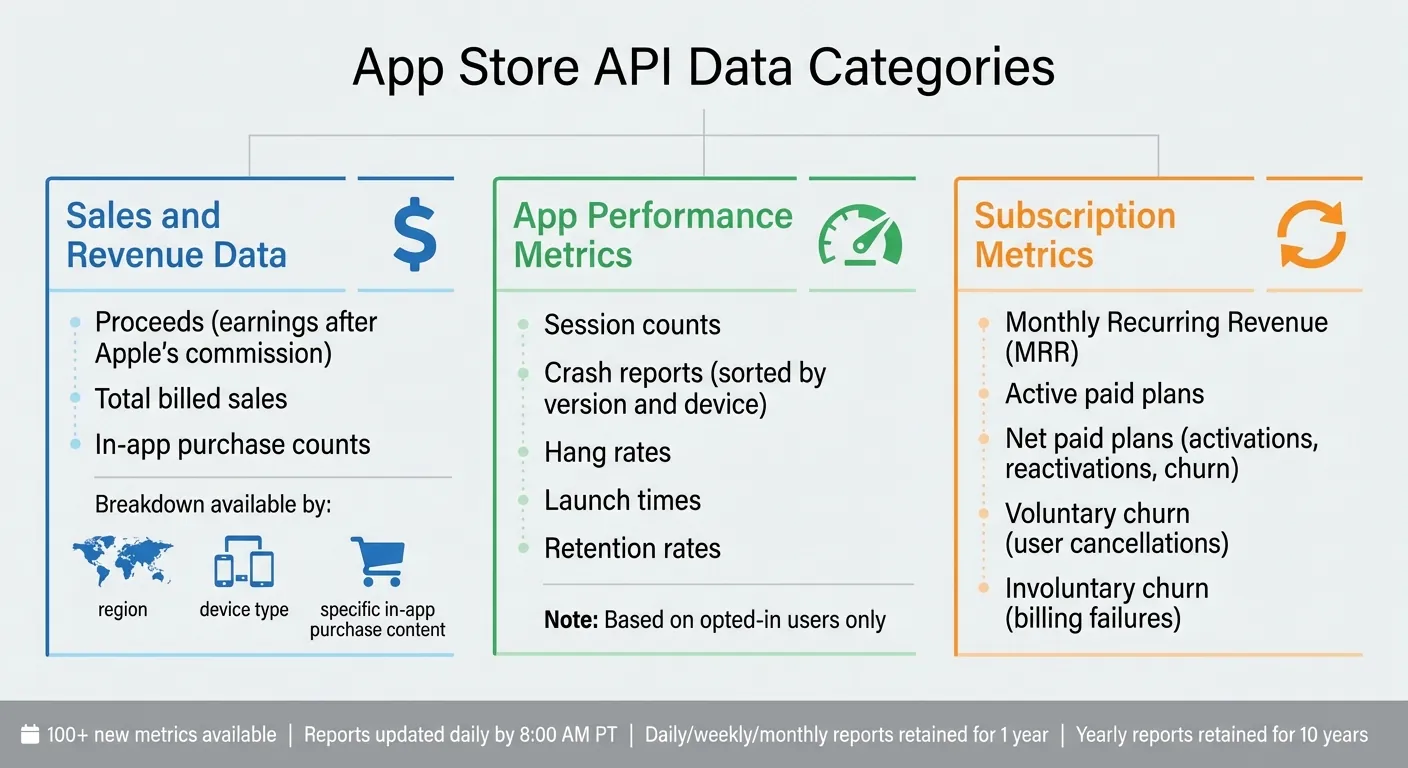
App Store APIs organize data into three main categories, giving you a comprehensive view of your app's performance from every angle. Understanding these categories is essential for building effective analytics dashboards and making data-driven decisions.
Sales and Revenue Data
This category covers proceeds (earnings after Apple's commission), total billed sales, and in-app purchase counts. You can break this data down by region, device type, or specific in-app purchase content. Revenue tracking at this granular level helps identify which markets and product offerings drive the most value for your business.
App Performance Metrics
Performance metrics focus on how your app operates in real-world conditions. They include session counts, crash reports (sorted by version and device), hang rates, launch times, and retention rates. Keep in mind, these metrics are based only on users who have opted in to share their data. Crash data filtered by app version is particularly valuable for identifying problematic releases before they affect your entire user base.
Subscription Metrics
For apps with subscription models, this data highlights recurring revenue patterns. Key metrics include Monthly Recurring Revenue (MRR), active paid plans, and net paid plans, which account for activations, reactivations, and churn. The API also differentiates between voluntary churn (user cancellations) and involuntary churn (billing failures)—a distinction that can dramatically change your retention strategy.
"The goal of App Analytics is to provide you with the data that you need to maximize your opportunity on the App Store."
– Max Martynov, Engineer, App Store and App Analytics teams
Apple has expanded its offerings with over 100 new metrics to track in-app purchases, subscriptions, and promotional campaigns. You can apply up to seven filters—such as region, device, or custom product page—to pinpoint the factors influencing your numbers. Reports are updated daily and typically available by 8:00 a.m. Pacific Time. Apple retains daily, weekly, and monthly reports for one year, while yearly reports are stored for ten years.
Familiarizing yourself with these data types is the first step toward leveraging API insights for smarter, real-time decisions.
How to Access and Use App Store APIs
This section dives into the steps for accessing and using App Store APIs, building on the data types discussed earlier. Before diving in, it's essential to set up authentication and permissions. The Account Holder must start by requesting access to the App Store Connect API. To do this, log in to App Store Connect, go to Users and Access, click the Integrations tab, and select Request Access. Once access is approved, you can generate API keys to automate access to your app's analytics.
Setting Up Authentication and Access
App Store Connect provides two types of API keys: Team Keys and Individual Keys.
- Team Keys: These apply to all apps in your account and can be assigned specific roles like Admin, Finance, or Sales and Reports. These roles are necessary for downloading analytics reports.
- Individual Keys: These are limited to one per user and are typically available for most roles unless restricted by an Admin.
To generate a Team Key:
- Go to Users and Access > Integrations.
- Select Team Keys.
- Click Generate API Key.
- Provide a reference name and role, then generate the key.
- Download the
.p8private key file immediately—it can only be downloaded once. If you lose or compromise it, you must revoke and regenerate the key.
| Role | Manage Report Requests | List and Download Reports |
|---|---|---|
| Admin | Request and Delete | Read reports for specific requests |
| Finance | No | Read reports for specific requests |
| Sales and Reports | No | Read reports for specific requests |
The Sales and Reports role also provides access to Sales and Trends Reports, in addition to Analytics.
Querying Data by Time Period
Once authenticated, you can pull data by creating an AnalyticsReportRequest. This request specifies the app and metrics you want to track. The API organizes data into "instances," which represent different timeframes—daily, weekly, or monthly. You can narrow your search using filters like date range, territory, device type, and app version, allowing you to focus on the data that matters most.
Here's how the workflow typically looks:
- Submit a POST request to create a report request.
- Use the returned ID to check the status of your report.
- Once the report is ready, fetch the available instances.
- Download the specific data segments you need.
Keep in mind, all reports are based on Pacific Time (PT), with each day running from 12:00 a.m. to 11:59 p.m. PT. Sales and Trends data is usually available the following day, providing a near real-time look at your app's performance.
Automating Data Collection
Manually exporting data can quickly become tedious. Instead, leverage the App Store Connect API to automate the process. You can schedule regular requests for Sales and Trends reports, ensuring a steady flow of daily performance insights. This automation not only saves time but also ensures you never miss critical metrics.
For teams using Adalo, the platform's External Collections feature connects directly to the App Store Connect REST API. This allows real-time metrics to display on a custom dashboard without manual data pulls or separate reporting tools. Whether you're tracking continuous integration builds with Xcode Cloud or monitoring performance metrics like app launch time and hang rate, automation keeps you informed and efficient.
Practical Applications of Real-Time App Data
When automated data collection is set up, real-time metrics can transform how teams improve performance, fine-tune campaigns, and keep users engaged. These metrics allow developers to spot issues instantly, respond to crashes, adjust spending based on live performance, and understand why users might lose interest. By leveraging automated retrieval tools, raw data becomes actionable insights in no time.
Monitoring Performance and Fixing Issues
The App Store Connect API delivers real-time diagnostics, helping developers identify and address problems quickly. Diagnostics logs can be downloaded to track launch times, memory usage, battery drain, and hang rates. Developers can also filter crash data by platform, app version, or operating system version to zero in on troublesome updates.
"View crash and deletion data by platform, app version, and operating system version to pinpoint potential causes and create a better user experience." – Apple Developer
Automation takes this process to the next level. Alerts can be configured using the Analytics Reports API to notify teams about spikes in hang rates or memory usage. When an issue arises, specific diagnostics logs can be downloaded to identify the exact code paths causing the problem. Integrating with Xcode Cloud also allows developers to keep tabs on build status in real time. To ensure reliable data, it's crucial to regularly verify opt-in rates for analytics.
Measuring Marketing Campaign Results
Real-time analytics make it possible to measure the success of marketing campaigns with precision. By creating unique campaign links for different channels—like social media, email, or paid ads—the API tracks which sources drive the most downloads and attract high-value users. Sales data can be filtered by source to determine average spending per user for specific campaigns. Comparing metrics like "Product Page Views" versus "Total Downloads" reveals how well App Store creatives convert visitors into users.
In-app event tracking can highlight which promotions are driving downloads. For those using App Clips, the API monitors which sources, such as NFC tags, Safari, or QR codes, generate the most "App Clip Card" views and full app installs. Automated reporting funnels acquisition and commerce data into custom dashboards, enabling teams to adjust spending on the fly based on real-time results. Features like "Compare" allow metrics to be displayed as ratios, such as "Proceeds per Paying User" filtered by campaign source, to identify the most lucrative acquisition channels.
While marketing optimization focuses on external data, internal metrics are essential for maintaining user engagement over time.
Increasing User Retention
Retention metrics show whether users stick with your app after downloading it. The API tracks retention rates on Day 1, Day 7, and Day 28 post-installation, while session data per active device provides insights into engagement levels.
Filtering retention data by app version or region can help pinpoint areas where users may be dropping off. Additionally, monitoring crash and deletion data can uncover technical issues that might lead to user frustration. For subscription-based apps, tracking renewal rates and understanding cancellation reasons—like billing problems or price changes—can shed light on financial churn. Quick actions, such as improving regional features in areas with low session rates, can help re-engage users and boost retention.
How Adalo Simplifies App Store Integration and Analytics
Integrating App Store APIs into your app workflow can feel like navigating a maze. Adalo, an AI-powered app builder, cuts through the complexity by letting you focus on building great apps instead of wrestling with intricate connections. This streamlined process enables automated publishing, real-time performance tracking, and instant updates across all platforms.
Publishing to App Stores with Adalo
The platform takes the headache out of app management by allowing direct publishing to both the Apple App Store and Google Play. Tasks like updating metadata, managing version control, and handling phased releases are automated. Permissions can be tailored to specific tasks, such as "Sales and Reports," ensuring secure access without revealing sensitive account details.
Even non-technical users can publish production-ready apps without understanding the complexities of Apple's JSON Web Tokens or Google's Play Console authentication. At $36/month, Adalo offers native iOS and Android app publishing with no caps on actions, users, records, or storage—a pricing model that remains predictable as your app scales. Competitors like Thunkable require $189/month for app store publishing with token limits, while FlutterFlow charges $80/month per seat without including a database.
Using X-Ray to Find Performance Problems
Adalo's X-Ray feature leverages real-time data from App Store APIs to catch performance issues early. It tracks key metrics like launch times, hang rates, memory usage, and battery life, automating what would otherwise require manual log reviews. By pinpointing bottlenecks and suggesting fixes, X-Ray helps ensure your app runs smoothly and scales effectively.
The platform's modular infrastructure supports apps with over 1 million monthly active users, processing 20 million+ data requests daily with 99%+ uptime. Unlike app wrappers that hit speed constraints under load, this purpose-built architecture maintains performance at scale.
Updating All Platforms at Once
Adalo's unified architecture makes app maintenance straightforward. With its single-codebase design, updates apply across web, iOS, and Android simultaneously. Apps can share the same database, keeping data consistent no matter the platform. Whether you're fixing a bug or adding a new feature, you do it once—no need to repeat the process for each platform.
Ada, Adalo's AI builder, lets you describe what you want and generates your app. Magic Start creates complete app foundations from a description, while Magic Add adds features through natural language.
The AI Builder accelerates this process further. Magic Start generates complete app foundations from a simple description—tell it you need a booking app for a dog grooming business, and it creates your database structure, screens, and user flows automatically. Magic Add lets you add features by describing what you want in natural language. What used to take days of planning happens in minutes.
Adalo also supports integration with tools like Mixpanel, automatically logging app usage across platforms. This provides a centralized view of performance, enriched by real-time insights from App Store APIs.
Conclusion
App Store APIs are a game-changer for developers and businesses, offering real-time insights into sales, performance, and subscription analytics. With instant access to this data, you can identify issues early, fine-tune your marketing strategies, and improve user retention before small problems grow into larger challenges. Features like Sales and Trends reports provide next-day data for better forecasting, while App Store Server Notifications V2 delivers immediate updates on subscription changes.
Streamlined integration is key to leveraging these tools effectively. Adalo simplifies the process by combining AI-driven app creation with automated App Store publishing—reducing development time and costs while its X-Ray feature identifies performance issues before they impact users. Whether you're a startup launching your first app or a large team managing internal tools with Adalo Blue, data-driven development is essential for building responsive, user-focused apps.
Related Blog Posts
- How Hard Is It To Publish To the App Stores? And Maintain The Apps?
- Web Traffic to App Downloads: SEO-ASO Link
- iOS vs. Play Store Algorithms
- Complete Guide to iOS App Store ASO in 2026
FAQ
Why choose Adalo over other app building solutions?
Adalo is an AI-powered app builder that creates true native iOS and Android apps from a single codebase. Unlike web wrappers, it compiles to native code and publishes directly to both the Apple App Store and Google Play Store—handling the hardest part of launching an app automatically. At $36/month with no caps on users, records, or storage, it offers predictable pricing that competitors can't match.
What's the fastest way to build and publish an app to the App Store?
Adalo's drag-and-drop interface combined with AI-assisted building lets you go from idea to published app in days rather than months. Magic Start generates complete app foundations from text descriptions, while Magic Add lets you add features by describing what you want. The platform handles the complex App Store submission process, so you can focus on your app's features instead of wrestling with certificates and provisioning profiles.
What types of data can I access through App Store APIs?
App Store APIs provide access to three main categories of data: sales and revenue data (proceeds, billed sales, in-app purchases), app performance metrics (session counts, crash reports, retention rates), and subscription metrics (MRR, active plans, churn rates). Apple offers over 100 metrics with up to seven filters for detailed analysis, and reports are updated daily by 8:00 a.m. Pacific Time.
How can real-time app data help improve user retention?
Real-time app data helps improve retention by tracking Day 1, Day 7, and Day 28 retention rates along with session data per active device. By filtering this data by app version or region, you can identify where users are dropping off and take quick action—such as fixing crashes or improving regional features that may be causing frustration.
What is Adalo's X-Ray feature and how does it help with app performance?
Adalo's X-Ray feature leverages real-time data from App Store APIs to automatically detect performance issues like slow launch times, hang rates, memory usage problems, and battery drain. It pinpoints bottlenecks and suggests fixes, eliminating the need for manual log reviews and helping ensure your app runs smoothly across all platforms.
How do I set up authentication to access App Store Connect APIs?
To access App Store Connect APIs, the Account Holder must first request access through App Store Connect under Users and Access > Integrations. You can then generate Team Keys or Individual Keys with specific roles like Admin, Finance, or Sales and Reports. Download the .p8 private key file immediately after generation, as it can only be downloaded once.
Can I easily integrate App Store APIs to track my app's performance data?
Yes, with Adalo's External Collections feature, you can connect directly to the App Store Connect REST API and display real-time metrics on custom dashboards without requiring coding expertise or manual data pulls. This eliminates the need for separate reporting tools and keeps your analytics centralized.
How much does it cost to build an analytics dashboard app with Adalo?
Adalo's paid plans start at $36/month with unlimited usage—no caps on actions, users, records, or storage. This predictable pricing model means your costs stay stable as your app scales. Competitors like Bubble charge $69/month with hard limits and unpredictable usage-based charges, while Thunkable requires $189/month for app store publishing.
What's the difference between Team Keys and Individual Keys in App Store Connect?
Team Keys apply to all apps in your account and can be assigned specific roles like Admin, Finance, or Sales and Reports—these are necessary for downloading analytics reports. Individual Keys are limited to one per user and are typically available for most roles unless restricted by an Admin. Both key types require downloading the .p8 private key file immediately, as it can only be downloaded once.
How often is App Store analytics data updated?
App Store analytics reports are updated daily and typically available by 8:00 a.m. Pacific Time. Sales and Trends data is usually available the following day, providing near real-time insights into your app's performance. Apple retains daily, weekly, and monthly reports for one year, while yearly reports are stored for ten years.